
今回は、AWS Systems Manager を使用した Amazon EC2 インスタンスの即時バックアップシステムを AWS CDK で実装する方法をまとめました。
同様にバックアップ機能を提供しているAWS Backupは優れたサービスですが、スケジュール出来る時間には幅があり、特定の時間にバックアップを開始するようスケジュールすることができません。
一方、今回のSSMバックアップシステムは以下の特徴があります。
- 柔軟なスケジュール設定 – 分単位での細かい実行スケジュール調整
- カスタム処理の組み込み – 独自の前後処理やチェック機能
- 詳細な制御 – 再起動有無の制御、AMI世代管理のカスタマイズ
はじめに
今回は、AWS Systems Manager を使用して、EC2インスタンスの即時バックアップをAWS CDKで実装していきます。AWS Systems Managerを利用したバックアップは、緊急時の即座な対応から定期的な運用まで、AWS Backupでは実現できない柔軟性と即時性を備えています。
また、Sytems Managerを利用するためSSM Agentの死活監視についても実装をしていきます。
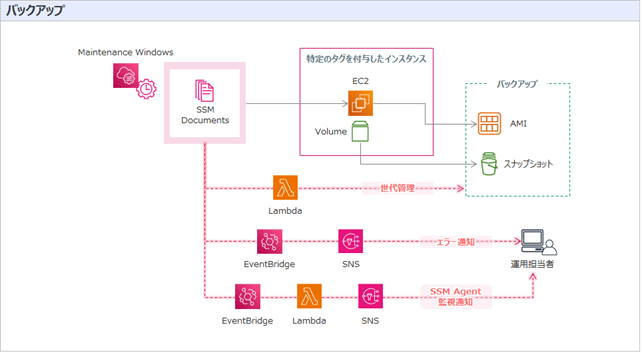
今回作成するリソース
- SNSトピック: バックアップ失敗通知とSSM Agent監視
- IAMロール: SSM Automation、Lambda実行権限
- Lambda関数: 世代管理とSSM Agent監視
- SSMドキュメント: カスタムバックアップドキュメント
- メンテナンスウィンドウ: スケジュール実行設定
- EventBridge: 失敗検知と事前監視
アーキテクチャ概要
AWS CDK ソースコード
SNS通知設定
    const emailAddresses = [                                                            // SNS通知先メーリングリスト
      'xxxxxxxx@example.com',
      'xxxxxxx@example.com',
    ];

    const backupTopic = new sns.Topic(this, 'BackupTopic', {               // バックアップ失敗通知用のトピック
      topicName: 'sns-backup-alertnotification',
      displayName: 'Backup Alert Notifications'
    });

    emailAddresses.forEach(email => {
      backupTopic.addSubscription(
        new subscriptions.EmailSubscription(email)
      );
    });

    backupTopic.addToResourcePolicy(                                                // トピックポリシー追加1
      new iam.PolicyStatement({
        effect: iam.Effect.ALLOW,
        actions: [
          'sns:GetTopicAttributes',
          'sns:SetTopicAttributes',
          'sns:AddPermission',
          'sns:RemovePermission',
          'sns:DeleteTopic',
          'sns:Subscribe',
          'sns:Publish',
        ],
        resources: [backupTopic.topicArn],
        principals: [new iam.AnyPrincipal()],
        conditions: {
          StringEquals: {
            'aws:SourceOwner': cdk.Stack.of(this).account
          }
        }
      })
    );

    backupTopic.addToResourcePolicy(                                                  // トピックポリシー追加2
      new iam.PolicyStatement({
        effect: iam.Effect.ALLOW,
        actions: [
          'sns:Publish',
        ],
        resources: [backupTopic.topicArn],
        principals: [new iam.ServicePrincipal('events.amazonaws.com')],
      })
    );
ポイント:
- 複数の管理者への通知配信
- アラーム発生時に通知するメールアドレスを指定
IAMロール設定
    //===========================================
    // Automationタスク用IAMロール作成
    //===========================================
    const ssmBackupRole = new iam.Role(this, 'SSMBackupRole', {
      roleName: 'SSMAutomationRole',
      assumedBy: new iam.CompositePrincipal(
        new iam.ServicePrincipal('ec2.amazonaws.com'),
        new iam.ServicePrincipal('ssm.amazonaws.com')
      ),
      managedPolicies: [
        iam.ManagedPolicy.fromAwsManagedPolicyName('service-role/AmazonSSMMaintenanceWindowRole'),   // AWS管理ポリシー追加
        iam.ManagedPolicy.fromAwsManagedPolicyName('AmazonSSMManagedInstanceCore')
      ]
    });

    ssmBackupRole.addManagedPolicy(                                                                              // IAMポリシー追加1
      iam.ManagedPolicy.fromAwsManagedPolicyName('service-role/AWSLambdaBasicExecutionRole')          // 基本的な権限(logs:CreateLogGroup、logs:CreateLogStream、logs:PutLogEvents)を含むポリシー「AWSLambdaBasicExecutionRole」をアタッチ
    );

    new iam.Policy(this, 'SSMBackupPolicy', {                                                                     // IAMポリシー追加2
      policyName: 'iam-policy-for-ssm-backup',
      roles: [ssmBackupRole],
      statements: [
        new iam.PolicyStatement({
          effect: iam.Effect.ALLOW,
          actions: [
            "ec2:CreateTags",
            "ec2:CreateImage",
            "ec2:DescribeImages",
            "ec2:DescribeTags",
            "ec2:DescribeInstances",
            "ec2:DescribeInstanceStatus",
            "ec2:DescribeSnapshots",
            "ec2:StopInstances",
            "ec2:StartInstances"
          ],
          resources: ['*']
        }),
        new iam.PolicyStatement({
          effect: iam.Effect.ALLOW,
          actions: [
            "lambda:InvokeFunction"
          ],
          resources: ["*"]
        })
      ]
    });


    //===========================================
    // Lambda実行用IAMロール作成
    //===========================================
    // AMI世代管理(Lambda実行用)IAMロール作成
    const lambdaBackupRole = new iam.Role(this, 'LambdaBackupRole', {
      roleName: 'LambdaBackupRole',
      assumedBy: new iam.CompositePrincipal(
        new iam.ServicePrincipal('lambda.amazonaws.com'),
        new iam.ServicePrincipal('ec2.amazonaws.com')
      )
    });

    lambdaBackupRole.addManagedPolicy(                                                                         // IAMポリシー追加1
      iam.ManagedPolicy.fromAwsManagedPolicyName('service-role/AWSLambdaBasicExecutionRole')        // 基本的な権限(logs:CreateLogGroup、logs:CreateLogStream、logs:PutLogEvents)を含むポリシー「AWSLambdaBasicExecutionRole」をアタッチ
    );

    new iam.Policy(this, 'LambdaBackupPolicy', {                                                              // IAMポリシー追加2
      policyName: 'iam-policy-for-lmd-ssm-backup',
      roles: [lambdaBackupRole],
      statements: [
        new iam.PolicyStatement({
          sid: 'LifeCycleOfAMIandSnapshot',                                                                       // AMIとスナップショットのライフサイクル管理用権限追加
          effect: iam.Effect.ALLOW,
          actions: [
            'ec2:DescribeImages',
            'ec2:DeregisterImage',
            'ec2:DeleteSnapshot',
            'ec2:DescribeSnapshots',
            'ec2:DescribeTags'
          ],
          resources: ['*']
        })
      ]
    });

    // SSMAgent監視(Lambda実行用)IAMロール作成
    const ssmAgentCheckRole = new iam.Role(this, 'SSMAgentCheckRole', {
      roleName: 'LambdaSSMAgentCheckRole',
      assumedBy: new iam.ServicePrincipal('lambda.amazonaws.com'),
    });

    ssmAgentCheckRole.addManagedPolicy(                                                                       // IAMポリシー追加1
      iam.ManagedPolicy.fromAwsManagedPolicyName('service-role/AWSLambdaBasicExecutionRole')        // 基本的な権限(logs:CreateLogGroup、logs:CreateLogStream、logs:PutLogEvents)を含むポリシー「AWSLambdaBasicExecutionRole」をアタッチ
    );

    new iam.Policy(this, 'SSMAgentCheckPolicy', {                                                               // IAMポリシー追加2
      policyName: 'iam-policy-for-lmd-ssmagent-check',
      roles: [ssmAgentCheckRole],
      statements: [
        new iam.PolicyStatement({
          effect: iam.Effect.ALLOW,
          actions: [
            'ssm:DescribeInstanceInformation',
            'sns:Publish'
          ],
          resources: ['*']
        })
      ]
    });
Lambda関数設定
    //===========================================
    // バックアップ(世代管理)用Lambda作成
    //===========================================
    const backupGenLambda = new lambda.Function(this, 'BackupGenLambda', {
      functionName: 'lmd-del-backup-gen',
      runtime: lambda.Runtime.PYTHON_3_13,
      handler: 'index.lambda_handler',
      code: lambda.Code.fromAsset(
        path.join(__dirname, 'Lambda/backup-gen')
      ),
      role: lambdaBackupRole,
      timeout: cdk.Duration.seconds(600),                                                       // 実行タイムアウト(秒):10分
      memorySize: 128,
      description: 'SSMドキュメントを使用してバックアップ実行時に流れる世代管理用の関数'
    });

    //===========================================
    // SSM Agent監視用Lambda作成
    //===========================================
    const ssmAgentCheckLambda = new lambda.Function(this, 'SSMAgentCheckLambda', {
      functionName: 'lmd-ssmagentcheck-send-sns',
      runtime: lambda.Runtime.PYTHON_3_13,
      handler: 'index.lambda_handler',
      code: lambda.Code.fromAsset(
        path.join(__dirname, 'Lambda/ssmagentcheck')
      ),
      role: ssmAgentCheckRole,
      environment: {
        SNS_TOPIC_ARN: backupTopic.topicArn,
      },
      timeout: cdk.Duration.seconds(600),                                                      // 実行タイムアウト(秒):10分
      memorySize: 128,
      description: 'SSMAgent疎通エラーのSNS通知'
    });
ポイント:
- 自動世代管理: 古いバックアップの自動削除
- 事前監視: バックアップ前のSSM Agent健全性チェック
- エラーハンドリング: 失敗時の適切な通知機能
ソースコードの配置パスは実際のパスにより変更してください。
SSMドキュメント設定
    const backupDocument = new ssm.CfnDocument(this, 'BackupDocument', {
      name: 'SSM-BackupEC2Instance',
      documentType: 'Automation',                                                                  // ドキュメント作成時に選択する:オートメーション
      documentFormat: 'YAML',                                                                      // ドキュメントフォーマット
      content: yaml.load(fs.readFileSync(
        path.join(__dirname, 'Document', 'backup-document.yaml'),
        'utf8'
      ))
    });
バックアップドキュメントの主な機能:
- 柔軟な実行: 即時実行とスケジュール実行の両対応
- 再起動制御: タグによる再起動有無の選択
- エラー処理: 失敗時の自動復旧機能
- 世代管理: Lambda連携による古いバックアップの自動削除
メンテナンスウィンドウ設定
    // メンテナンスウィンドウの作成
    const backupMaintenanceWindow = new ssm.CfnMaintenanceWindow(this, 'BackupMaintenanceWindow', {
      name: 'mw-ssm-backup',
      schedule: 'cron(30 03 ? * * *)',                                                              // 実行スケジュール(JST: 毎日3:30)
      duration: 1,                                                                                    // 実行可能時間:1時間
      cutoff: 0,                                                                                        // 終了1時間前までに新規タスク開始
      allowUnassociatedTargets: false,                                                              // 関連付けられたターゲットのみ実行
      scheduleTimezone: 'Asia/Tokyo'                                                             // スケジュールのタイムゾーン
    });

    // ターゲットの作成
    const backupMaintenanceWindowTarget = new ssm.CfnMaintenanceWindowTarget(this, 'BackupMaintenanceWindowTarget', {
      windowId: backupMaintenanceWindow.ref,
      name: 'tg-ssm-backup',
      targets: [{                                                                                     // ターゲットの指定方法(タグで指定)
        key: 'tag:BackupGroup',
        values: ['ssm-backup-group']
      }],
      resourceType: 'INSTANCE',                                                                    // 対象リソース種別:EC2インスタンス
      ownerInformation: 'バックアップ対象インスタンス'
    });

    // タスクの作成
    const backupMaintenanceWindowTask = new ssm.CfnMaintenanceWindowTask(this, 'BackupMaintenanceWindowTask', {
      windowId: backupMaintenanceWindow.ref,
      taskArn: backupDocument.ref,                                                               // ドキュメントARN
      taskType: 'AUTOMATION',                                                                      // タスクタイプ
      priority: 1,                                                                                     // タスク優先度
      maxConcurrency: '100',                                                                        // 同時制御実行数:100ターゲット
      maxErrors: '100',                                                                             // エラーのしきい値:100エラー
      name: 'EC2Backup',
      targets: [{
        key: 'WindowTargetIds',
        values: [backupMaintenanceWindowTarget.ref]
      }],
      serviceRoleArn: ssmBackupRole.roleArn,
      taskInvocationParameters: {
        maintenanceWindowAutomationParameters: {

          documentVersion: '$DEFAULT',                                                            // ドキュメントのバージョン:ランタイムのデフォルトバージョン
          parameters: {                                                                              // 入力パラメータ
            InstanceId: ['{{TARGET_ID}}'],                                                        // ターゲットインスタンスID
          }
        }
      }
    });
ポイント:
- 柔軟スケジュール: 分単位での細かい実行時間設定
- タグベース制御: 対象インスタンスの動的管理
EventBridge設定
    const backupRule = new events.Rule(this, 'BackupEventRule', {               // バックアップ失敗時のルール
      ruleName: 'evtbg-rule-backup',
      eventPattern: {
        source: ['aws.ssm'],
        detailType: ['EC2 Automation Execution Status-change Notification'],     // Automationタスクの実行結果に発行されるイベント
        detail: {
          Status: ['Failed', 'TimedOut', 'Cancelled']                                // AutiomationのステータスFailed,TimedOut,Cancelledを検知
        }
      },
      targets: [
        new targets.SnsTopic(backupTopic)
      ]
    });
    //===========================================
    // SSM Agent監視用ルール
    //===========================================
    const ssmMonitoringRule = new events.Rule(this, 'SSMMonitoringRule', {     // SSM Agent監視用のEventBridge
      ruleName: 'evtbg-rule-ssmagentcheck',
      schedule: events.Schedule.expression('cron(20 18 * * ? *)'),                // 3:20 JST バックアップ開始前に疎通確認
      description: 'Triggers Lambda every day at 3:20 JST',
      targets: [
        new targets.LambdaFunction(ssmAgentCheckLambda)
      ]
    });
  }
}
ポイント:
- プロアクティブ監視: バックアップ前のSSM Agent接続確認
- 予防的対応: 事前のトラブル検知と通知
- SSMAgent監視用Ruleの実行時間はバックアップ開始時間に合わせて変更が必要です
Lambda関数の詳細
世代管理Lambda(即時・スケジュール両対応)
import json
import boto3

def lambda_handler(event, context):
    gen = int(event['gen'])

    client = boto3.client('ec2')
    images = client.describe_images(
        Filters=[
            {
                'Name': 'tag:Name',
                'Values': [
                    event['ServerName'] + '*'
                ]
            },
            {
                'Name': 'tag:AutoBackup',
                'Values': [
                    'true'
                ]
            }
        ]
    )['Images']
    #スナップショット一覧をソート
    images.sort(key=lambda x: x['CreationDate'], reverse=True)

    for i in range(gen, len(images), 1):
        print(images[i]['ImageId'])
        response = client.deregister_image(
            ImageId=images[i]['ImageId']
        )
        for device in images[i]['BlockDeviceMappings']:
            if device.get('Ebs') is not None:
                print(device['Ebs']['SnapshotId'])
                response = client.delete_snapshot(
                    SnapshotId=device['Ebs']['SnapshotId']
                )

    return 'OK'
SSM Agent監視Lambda
import boto3
import os

def lambda_handler(event, context):
    sns_topic_arn = os.environ.get('SNS_TOPIC_ARN', None)

    if not sns_topic_arn:
        print("SNS_TOPIC_ARN is not set.")
        return

    def get_managed_instances():
        ssm_client = boto3.client('ssm')
        try:
            # ConnectionLostなインスタンスのみを取得
            response = ssm_client.describe_instance_information(
                Filters=[
                    {
                        'Key': 'PingStatus',
                        'Values': ['ConnectionLost']
                    }
                ],
                MaxResults=50  # 必要に応じて調整
            )
            # インスタンス情報を取得した数をログに出力
            instance_count = len(response['InstanceInformationList'])
            print(f"Number of instances with ConnectionLost: {instance_count}")

            # InstanceInformationListの内容を表示
            instance_information_list = response['InstanceInformationList']
            print("Instance Information List with ConnectionLost status:")
            for instance_info in instance_information_list:
                print(instance_info)  # 各インスタンス情報を表示

            # ConnectionLostのインスタンスIDを取得
            managed_instances = [info['InstanceId'] for info in instance_information_list]

        except boto3.exceptions.Boto3Error as e:
            print(f"An error occurred while describing instances: {e}")
            managed_instances = []

        return managed_instances

    def notify_connection_lost(instance_ids, sns_topic_arn):
        sns_client = boto3.client('sns')

        if not instance_ids:
            print("No instances with ConnectionLost status.")
            return

        for instance_id in instance_ids:
            message = f"Instance ID: {instance_id} has ConnectionLost status."
            print(message)
            try:
                sns_client.publish(
                    TopicArn=sns_topic_arn,
                    Message=message,
                    Subject='SSM Managed Instance Connection Alert'
                )
            except boto3.exceptions.Boto3Error as e:
                print(f"An error occurred while sending SNS notification for {instance_id}: {e}")

    # マネージドインスタンスの一覧を取得
    connection_lost_instances = get_managed_instances()

    # 接続が失われたインスタンスについて通知
    notify_connection_lost(connection_lost_instances, sns_topic_arn)
SSM ドキュメントの詳細
schemaVersion: '0.3'
description: SSM Standard EC2Backup
parameters:
  InstanceId:
    description: (Required) InstanceIds to run command
    type: String
mainSteps:

###################################################################################
# 事前処理
###################################################################################

  #InstanceのNameタグを取得
  - name: Get_InstanceTag_EC2SV1Name
    action: aws:executeAwsApi
    nextStep: Get_InstanceTag_EC2BackupGen
    isEnd: false
    inputs:
      Filters:
        - Values:
            - '{{ InstanceId }}'
          Name: resource-id
        - Values:
            - Name
          Name: key
      Service: ec2
      Api: DescribeTags
    outputs:
      - Type: String
        Name: value
        Selector: $.Tags[0].Value

  # EC2バックアップ世代数
  - name: Get_InstanceTag_EC2BackupGen
    action: aws:executeAwsApi
    nextStep: Get_EC2StopStartTag
    isEnd: false
    inputs:
      Filters:
        - Values:
            - '{{ InstanceId }}'
          Name: resource-id
        - Values:
            - EC2BackupGen
          Name: key
      Service: ec2
      Api: DescribeTags
    outputs:
      - Type: String
        Name: value
        Selector: $.Tags[0].Value

  # バックアップ再起動有無
  - name: Get_EC2StopStartTag
    action: aws:executeAwsApi
    nextStep: CheckStopStartTag1
    isEnd: false
    inputs:
      Filters:
        - Values:
            - '{{ InstanceId }}'
          Name: resource-id
        - Values:
            - BackupEC2StopStart
          Name: key
      Service: ec2
      Api: DescribeTags
    outputs:
      - Type: String
        Name: value
        Selector: $.Tags[0].Value

###################################################################################
# EC2停止
###################################################################################
  - name: CheckStopStartTag1
    action: aws:branch
    inputs:
      Choices:
        - NextStep: Run_EC2StopSV1
          Variable: '{{ Get_EC2StopStartTag.value }}'
          StringEquals: 'true'
      Default: Get_BackupEC2SV1_AMI

  - name: Run_EC2StopSV1
    action: aws:executeAutomation
    timeoutSeconds: '600'
    nextStep: Get_BackupEC2SV1_AMI
    isEnd: false
    onFailure: step:Run_EC2RestartSV1
    inputs:
      RuntimeParameters:
        InstanceId:
          - '{{ InstanceId }}'
      DocumentName: AWS-StopEC2Instance

###################################################################################
# バックアップ
###################################################################################
  # AMI作成
  - name: Get_BackupEC2SV1_AMI
    action: aws:executeAwsApi
    nextStep: Get_BackupEC2SV1_AMI_SnapshotId
    isEnd: false
    onFailure: step:Run_EC2RestartSV1
    inputs:
      Service: ec2
      Api: CreateImage
      InstanceId: '{{ InstanceId }}'
      Name: '{{Get_InstanceTag_EC2SV1Name.value}}-{{global:DATE_TIME}}'
      NoReboot: true
    outputs:
      - Type: String
        Name: ImageId
        Selector: $.ImageId

  # スナップショット作成
  - name: Get_BackupEC2SV1_AMI_SnapshotId
    action: aws:executeAwsApi
    nextStep: Get_BackupEC2SV1_AMITag
    isEnd: false
    onFailure: step:Run_Quit
    inputs:
      Filters:
        - Values:
            - '*{{ Get_BackupEC2SV1_AMI.ImageId }}*'
          Name: description
      Service: ec2
      Api: DescribeSnapshots
    outputs:
      - Type: StringList
        Name: value
        Selector: $.Snapshots..SnapshotId

  # AMIにタグを付与
  - name: Get_BackupEC2SV1_AMITag
    action: aws:createTags
    nextStep: Del_OldBackupEC2SV1_AMI
    isEnd: false
    onFailure: step:Run_Quit
    inputs:
      ResourceIds:
        - '{{ Get_BackupEC2SV1_AMI.ImageId }}'
        - '{{ Get_BackupEC2SV1_AMI_SnapshotId.value }}'
      ResourceType: EC2
      Tags:
        - Value: '{{Get_InstanceTag_EC2SV1Name.value}}'
          Key: Name
        - Value: 'true'
          Key: AutoBackup

###################################################################################
# 世代管理
###################################################################################
  - name: Del_OldBackupEC2SV1_AMI
    action: aws:invokeLambdaFunction
    maxAttempts: 3
    timeoutSeconds: '600'
    nextStep: CheckStopStartTag2
    isEnd: false
    onFailure: step:Run_Quit
    inputs:
      FunctionName: lmd-del-backup-gen
      Payload: '{ "ServerName":"{{Get_InstanceTag_EC2SV1Name.value}}","gen":"{{Get_InstanceTag_EC2BackupGen.value}}"}'

###################################################################################
# EC2起動
###################################################################################
  - name: CheckStopStartTag2
    action: aws:branch
    inputs:
      Choices:
        - NextStep: Run_EC2StartSV1_1
          Variable: '{{ Get_EC2StopStartTag.value }}'
          StringEquals: 'true'
      Default: WaitForImageAvailable

  - name: Run_EC2StartSV1_1
    action: aws:executeAutomation
    timeoutSeconds: '600'
    nextStep: WaitForImageAvailable
    isEnd: false
    onFailure: step:Run_EC2RestartSV1
    inputs:
      RuntimeParameters:
        InstanceId:
          - '{{ InstanceId }}'
      DocumentName: AWS-StartEC2Instance

  - name: WaitForImageAvailable
    action: aws:waitForAwsResourceProperty
    timeoutSeconds: 10800
    nextStep: Run_Quit
    isEnd: false
    onFailure: step:Run_Quit
    inputs:
      Service: ec2
      Api: DescribeImages
      ImageIds:
        - '{{ Get_BackupEC2SV1_AMI.ImageId }}'
      PropertySelector: $.Images[0].State
      DesiredValues:
        - available

  - name: Run_Quit
    action: aws:executeAwsApi
    isEnd: true
    inputs:
      Service: sts
      Api: GetCallerIdentity

###################################################################################
# 異常時処理
###################################################################################
  - name: Run_EC2RestartSV1
    action: aws:executeAutomation
    nextStep: Run_Restart_Quit
    isEnd: false
    onFailure: step:Sleep_EC2Restart
    inputs:
      RuntimeParameters:
        InstanceId:
          - '{{ InstanceId }}'
      DocumentName: AWS-RestartEC2Instance

  - name: Run_Restart_Quit
    action: aws:executeAwsApi
    isEnd: true
    inputs:
      Service: sts
      Api: GetCallerIdentity

###################################################################################
# 異常処理に失敗した場合、1時間後に再起動
###################################################################################
  - name: Sleep_EC2Restart
    action: 'aws:sleep'
    inputs:
      Duration: PT60M

  - name: Run_Retry_EC2RestartSV1
    action: 'aws:executeAutomation'
    inputs:
      DocumentName: AWS-RestartEC2Instance
      RuntimeParameters:
        InstanceId:
          - '{{ InstanceId }}'

  - name: Run_Retry_Quit
    action: 'aws:executeAwsApi'
    isEnd: true
    inputs:
      Service: sts
      Api: GetCallerIdentity
SSMドキュメント処理フロー
1. 事前処理
- Nameタグ取得: EC2インスタンスのNameタグを取得
- バックアップ世代数取得:
EC2BackupGenタグから保持する世代数を取得 - 停止/開始設定取得:
BackupEC2StopStartタグでバックアップ時の停止/開始を確認
2. EC2停止(条件付き)
BackupEC2StopStartタグがtrueの場合のみEC2インスタンスを停止- 停止に失敗した場合は再起動処理へ
3. バックアップ実行
- AMI作成: インスタンスからAMI(Amazon Machine Image)を作成
- スナップショット取得: 作成したAMIに関連するスナップショットIDを取得
- タグ付与: AMIとスナップショットに
NameとAutoBackupタグを付与
4. 世代管理
- Lambda関数を呼び出して古いバックアップを削除
- 指定された世代数を超えるバックアップを自動削除
5. EC2起動(条件付き)
- 停止していた場合はEC2インスタンスを起動
- AMIの作成完了を待機(最大3時間)
6. 異常時処理
- バックアップ処理で異常が発生した場合、EC2インスタンスを再起動
- 再起動に失敗した場合は1時間後に再試行
前提条件・運用上の注意点
前提条件
- SSM Agent: EC2インスタンスにSSM Agentがインストール・実行中であること
- IAMロール: インスタンスにSSM管理権限を付与されていること
- 必要タグ: バックアップ制御用タグの設定されていること
- ネットワーク: SSMエンドポイントへの通信が可能であること
タグ設定例
BackupGroup: ssm-backup-groupEC2BackupGen: 世代管理数BackupEC2StopStart: true/false- true: 再起動ありでバックアップ取得
- false: 再起動なしでバックアップ取得
今回実装したコンストラクトファイルまとめ
import * as cdk from 'aws-cdk-lib';
import { Construct } from 'constructs';
import * as iam from 'aws-cdk-lib/aws-iam';
import * as lambda from 'aws-cdk-lib/aws-lambda';
import * as ssm from 'aws-cdk-lib/aws-ssm';
import * as fs from 'fs';
import * as path from 'path';
import * as yaml from 'js-yaml';
import * as sns from 'aws-cdk-lib/aws-sns';
import * as subscriptions from 'aws-cdk-lib/aws-sns-subscriptions';
import * as events from 'aws-cdk-lib/aws-events';
import * as targets from 'aws-cdk-lib/aws-events-targets';


export interface SsmBackupConstructProps {
}

export class SsmBackupConstruct extends Construct {
  constructor(scope: Construct, id: string, props?: SsmBackupConstructProps) {
    super(scope, id);


    //===========================================
    // バックアップ失敗通知用SNSトピック作成
    //===========================================
    const emailAddresses = [                                                            // SNS通知先メーリングリスト
      'xxxxxxxx@example.com',
      'xxxxxxx@example.com',
    ];

    const backupTopic = new sns.Topic(this, 'BackupTopic', {               // バックアップ失敗通知用のトピック
      topicName: 'sns-backup-alertnotification',
      displayName: 'Backup Alert Notifications'
    });

    emailAddresses.forEach(email => {
      backupTopic.addSubscription(
        new subscriptions.EmailSubscription(email)
      );
    });

    backupTopic.addToResourcePolicy(                                                // トピックポリシー追加1
      new iam.PolicyStatement({
        effect: iam.Effect.ALLOW,
        actions: [
          'sns:GetTopicAttributes',
          'sns:SetTopicAttributes',
          'sns:AddPermission',
          'sns:RemovePermission',
          'sns:DeleteTopic',
          'sns:Subscribe',
          'sns:Publish',
        ],
        resources: [backupTopic.topicArn],
        principals: [new iam.AnyPrincipal()],
        conditions: {
          StringEquals: {
            'aws:SourceOwner': cdk.Stack.of(this).account
          }
        }
      })
    );

    backupTopic.addToResourcePolicy(                                                  // トピックポリシー追加2
      new iam.PolicyStatement({
        effect: iam.Effect.ALLOW,
        actions: [
          'sns:Publish',
        ],
        resources: [backupTopic.topicArn],
        principals: [new iam.ServicePrincipal('events.amazonaws.com')],
      })
    );

    //===========================================
    // Automationタスク用IAMロール作成
    //===========================================
    const ssmBackupRole = new iam.Role(this, 'SSMBackupRole', {
      roleName: 'SSMAutomationRole',
      assumedBy: new iam.CompositePrincipal(
        new iam.ServicePrincipal('ec2.amazonaws.com'),
        new iam.ServicePrincipal('ssm.amazonaws.com')
      ),
      managedPolicies: [
        iam.ManagedPolicy.fromAwsManagedPolicyName('service-role/AmazonSSMMaintenanceWindowRole'),   // AWS管理ポリシー追加
        iam.ManagedPolicy.fromAwsManagedPolicyName('AmazonSSMManagedInstanceCore')
      ]
    });

    ssmBackupRole.addManagedPolicy(                                                                              // IAMポリシー追加1
      iam.ManagedPolicy.fromAwsManagedPolicyName('service-role/AWSLambdaBasicExecutionRole')          // 基本的な権限(logs:CreateLogGroup、logs:CreateLogStream、logs:PutLogEvents)を含むポリシー「AWSLambdaBasicExecutionRole」をアタッチ
    );

    new iam.Policy(this, 'SSMBackupPolicy', {                                                                     // IAMポリシー追加2
      policyName: 'iam-policy-for-ssm-backup',
      roles: [ssmBackupRole],
      statements: [
        new iam.PolicyStatement({
          effect: iam.Effect.ALLOW,
          actions: [
            "ec2:CreateTags",
            "ec2:CreateImage",
            "ec2:DescribeImages",
            "ec2:DescribeTags",
            "ec2:DescribeInstances",
            "ec2:DescribeInstanceStatus",
            "ec2:DescribeSnapshots",
            "ec2:StopInstances",
            "ec2:StartInstances"
          ],
          resources: ['*']
        }),
        new iam.PolicyStatement({
          effect: iam.Effect.ALLOW,
          actions: [
            "lambda:InvokeFunction"
          ],
          resources: ["*"]
        })
      ]
    });


    //===========================================
    // Lambda実行用IAMロール作成
    //===========================================
    // AMI世代管理(Lambda実行用)IAMロール作成
    const lambdaBackupRole = new iam.Role(this, 'LambdaBackupRole', {
      roleName: 'LambdaBackupRole',
      assumedBy: new iam.CompositePrincipal(
        new iam.ServicePrincipal('lambda.amazonaws.com'),
        new iam.ServicePrincipal('ec2.amazonaws.com')
      )
    });

    lambdaBackupRole.addManagedPolicy(                                                                         // IAMポリシー追加1
      iam.ManagedPolicy.fromAwsManagedPolicyName('service-role/AWSLambdaBasicExecutionRole')        // 基本的な権限(logs:CreateLogGroup、logs:CreateLogStream、logs:PutLogEvents)を含むポリシー「AWSLambdaBasicExecutionRole」をアタッチ
    );

    new iam.Policy(this, 'LambdaBackupPolicy', {                                                              // IAMポリシー追加2
      policyName: 'iam-policy-for-lmd-ssm-backup',
      roles: [lambdaBackupRole],
      statements: [
        new iam.PolicyStatement({
          sid: 'LifeCycleOfAMIandSnapshot',                                                                       // AMIとスナップショットのライフサイクル管理用権限追加
          effect: iam.Effect.ALLOW,
          actions: [
            'ec2:DescribeImages',
            'ec2:DeregisterImage',
            'ec2:DeleteSnapshot',
            'ec2:DescribeSnapshots',
            'ec2:DescribeTags'
          ],
          resources: ['*']
        })
      ]
    });

    // SSMAgent監視(Lambda実行用)IAMロール作成
    const ssmAgentCheckRole = new iam.Role(this, 'SSMAgentCheckRole', {
      roleName: 'LambdaSSMAgentCheckRole',
      assumedBy: new iam.ServicePrincipal('lambda.amazonaws.com'),
    });

    ssmAgentCheckRole.addManagedPolicy(                                                                       // IAMポリシー追加1
      iam.ManagedPolicy.fromAwsManagedPolicyName('service-role/AWSLambdaBasicExecutionRole')        // 基本的な権限(logs:CreateLogGroup、logs:CreateLogStream、logs:PutLogEvents)を含むポリシー「AWSLambdaBasicExecutionRole」をアタッチ
    );

    new iam.Policy(this, 'SSMAgentCheckPolicy', {                                                               // IAMポリシー追加2
      policyName: 'iam-policy-for-lmd-ssmagent-check',
      roles: [ssmAgentCheckRole],
      statements: [
        new iam.PolicyStatement({
          effect: iam.Effect.ALLOW,
          actions: [
            'ssm:DescribeInstanceInformation',
            'sns:Publish'
          ],
          resources: ['*']
        })
      ]
    });

    //===========================================
    // バックアップ(世代管理)用Lambda作成
    //===========================================
    const backupGenLambda = new lambda.Function(this, 'BackupGenLambda', {
      functionName: 'lmd-del-backup-gen',
      runtime: lambda.Runtime.PYTHON_3_13,
      handler: 'index.lambda_handler',
      code: lambda.Code.fromAsset(
        path.join(__dirname, 'Lambda/backup-gen')
      ),
      role: lambdaBackupRole,
      timeout: cdk.Duration.seconds(600),                                                       // 実行タイムアウト(秒):10分
      memorySize: 128,
      description: 'SSMドキュメントを使用してバックアップ実行時に流れる世代管理用の関数'
    });

    //===========================================
    // SSM Agent監視用Lambda作成
    //===========================================
    const ssmAgentCheckLambda = new lambda.Function(this, 'SSMAgentCheckLambda', {
      functionName: 'lmd-ssmagentcheck-send-sns',
      runtime: lambda.Runtime.PYTHON_3_13,
      handler: 'index.lambda_handler',
      code: lambda.Code.fromAsset(
        path.join(__dirname, 'Lambda/ssmagentcheck')
      ),
      role: ssmAgentCheckRole,
      environment: {
        SNS_TOPIC_ARN: backupTopic.topicArn,
      },
      timeout: cdk.Duration.seconds(600),                                                      // 実行タイムアウト(秒):10分
      memorySize: 128,
      description: 'SSMAgent疎通エラーのSNS通知'
    });

    //===========================================
    // バックアップ作成
    //===========================================
    // SSMドキュメントの作成
    const backupDocument = new ssm.CfnDocument(this, 'BackupDocument', {
      name: 'SSM-BackupEC2Instance',
      documentType: 'Automation',                                                                  // ドキュメント作成時に選択する:オートメーション
      documentFormat: 'YAML',                                                                      // ドキュメントフォーマット
      content: yaml.load(fs.readFileSync(
        path.join(__dirname, 'Document', 'backup-document.yaml'),
        'utf8'
      ))
    });

    // メンテナンスウィンドウの作成
    const backupMaintenanceWindow = new ssm.CfnMaintenanceWindow(this, 'BackupMaintenanceWindow', {
      name: 'mw-ssm-backup',
      schedule: 'cron(30 03 ? * * *)',                                                              // 実行スケジュール(JST: 毎日3:30)
      duration: 1,                                                                                    // 実行可能時間:1時間
      cutoff: 0,                                                                                        // 終了1時間前までに新規タスク開始
      allowUnassociatedTargets: false,                                                              // 関連付けられたターゲットのみ実行
      scheduleTimezone: 'Asia/Tokyo'                                                             // スケジュールのタイムゾーン
    });

    // ターゲットの作成
    const backupMaintenanceWindowTarget = new ssm.CfnMaintenanceWindowTarget(this, 'BackupMaintenanceWindowTarget', {
      windowId: backupMaintenanceWindow.ref,
      name: 'tg-ssm-backup',
      targets: [{                                                                                     // ターゲットの指定方法(タグで指定)
        key: 'tag:BackupGroup',
        values: ['ssm-backup-group']
      }],
      resourceType: 'INSTANCE',                                                                    // 対象リソース種別:EC2インスタンス
      ownerInformation: 'バックアップ対象インスタンス'
    });

    // タスクの作成
    const backupMaintenanceWindowTask = new ssm.CfnMaintenanceWindowTask(this, 'BackupMaintenanceWindowTask', {
      windowId: backupMaintenanceWindow.ref,
      taskArn: backupDocument.ref,                                                               // ドキュメントARN
      taskType: 'AUTOMATION',                                                                      // タスクタイプ
      priority: 1,                                                                                     // タスク優先度
      maxConcurrency: '100',                                                                        // 同時制御実行数:100ターゲット
      maxErrors: '100',                                                                             // エラーのしきい値:100エラー
      name: 'EC2Backup',
      targets: [{
        key: 'WindowTargetIds',
        values: [backupMaintenanceWindowTarget.ref]
      }],
      serviceRoleArn: ssmBackupRole.roleArn,
      taskInvocationParameters: {
        maintenanceWindowAutomationParameters: {

          documentVersion: '$DEFAULT',                                                            // ドキュメントのバージョン:ランタイムのデフォルトバージョン
          parameters: {                                                                              // 入力パラメータ
            InstanceId: ['{{TARGET_ID}}'],                                                        // ターゲットインスタンスID
          }
        }
      }
    });

    //===========================================
    // バックアップ失敗検知
    //===========================================
    const backupRule = new events.Rule(this, 'BackupEventRule', {               // バックアップ失敗時のルール
      ruleName: 'evtbg-rule-backup',
      eventPattern: {
        source: ['aws.ssm'],
        detailType: ['EC2 Automation Execution Status-change Notification'],     // Automationタスクの実行結果に発行されるイベント
        detail: {
          Status: ['Failed', 'TimedOut', 'Cancelled']                                // AutiomationのステータスFailed,TimedOut,Cancelledを検知
        }
      },
      targets: [
        new targets.SnsTopic(backupTopic)
      ]
    });
    //===========================================
    // SSM Agent監視用ルール
    //===========================================
    const ssmMonitoringRule = new events.Rule(this, 'SSMMonitoringRule', {     // SSM Agent監視用のEventBridge
      ruleName: 'evtbg-rule-ssmagentcheck',
      schedule: events.Schedule.expression('cron(20 18 * * ? *)'),                // 3:20 JST バックアップ開始前に疎通確認
      description: 'Triggers Lambda every day at 3:20 JST',
      targets: [
        new targets.LambdaFunction(ssmAgentCheckLambda)
      ]
    });
  }
}
まとめ
今回はSSMドキュメントでのEC2のバックアップをAWS CDKで実装してみました。
皆さんのお役に立てれば幸いです。