
こんにちは、広野です。
以下の記事の続編記事です。RAG で CSV データからの検索精度向上を目指してみました。本記事は UI 編で、主にフロントエンド (React) のコードや UI の動作について記載しています。全体的なアーキテクチャやバックエンドについては前回記事をご覧ください。
UI は以前書いた以下の記事の UI をカスタマイズしています。
この記事では雑多な非構造化データ (PDF等) の中から参考となる情報やファイル名を見つけ出すことを目的としていましたが、本記事では構造化データ (CSV) から参考となる情報やその情報のメタデータを見つけ出すことを目的としています。コードはほぼ同じです。メタデータフィルタリングの機能が追加されているぐらいだと思って下さい。
やりたいこと (再掲)
以下のような架空のヘルプデスク問い合わせ履歴データ (CSV) を用意しました。
ヘルプデスク担当者が新たな問い合わせを受けたときに、似たような過去の対応履歴を引き当てられるようにしたい、というのが目的です。

- LLM に、今届いた新しい問い合わせに対する回答案を提案させたい。
- 回答案を生成するために、自然言語で書かれた問い合わせ内容と回答内容から、意味的に近いデータを引き当てたい。
- カテゴリで検索対象をフィルタしたい。その方が精度が上がるケースがあると考えられる。
- LLM が回答案を提案するときには、参考にした過去対応履歴がどの問合せ番号のものか、提示させたい。その問合せ番号をキーに、生の対応履歴データを参照できるようにしたい。
以下の前提があります。
- データソースとなる CSV ファイルは 1つのみ。過去の対応履歴は 1 つの CSV ファイルに収まっているということ。
- つまり、データの1行が1件の問い合わせであり、その項目間には意味的なつながりがある。
まあ、ごくごく一般的なニーズではないかと思います。
前回記事のおさらい
メタデータフィルタリングについて
今回のブログ記事では、簡略化のため上記のように「販売形態」と「カテゴリ」の 2 つのメタデータのみフィルタリング可能なように設計します。特定の項目でフィルタリングすることで、検索精度を向上させます。
- フィルタ対象項目
販売形態(2種類: 直販, 代理店)
カテゴリ(10種類: 家庭用コタツ, 家庭用テーブル, 家庭用収納棚, 家庭用チェア, 家庭用デスク, 業務用ラック, 業務用キャビネット, 業務用会議テーブル, 業務用チェア, 業務用デスク)
- フィルタ条件選択時の動作
両方未選択 → フィルタリングなし(全件検索)
片方のみ選択 → equals (完全一致) で単一条件検索
両方選択 → andAll で AND 条件検索、それぞれは equals (完全一致) とする
つくったもの
UI
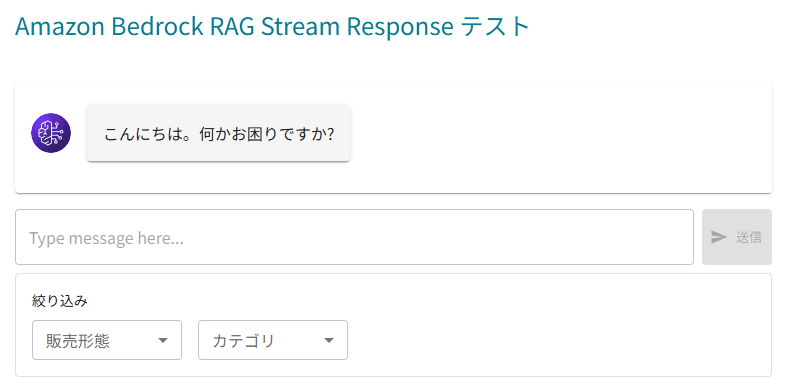
一般的なチャットボット UI ですが、ユーザーのメッセージ入力欄の下に「絞り込み」という欄を追加しています。ここにあるプルダウンメニューの項目であれば、フィルタリングできるようになっています。
全件検索した例
メタデータフィルタリングを使用せず(プルダウンを選択せず)、「海外発送ができるか」を問い合わせてみました。
過去の問い合わせ履歴データから、4件が見つかりました。
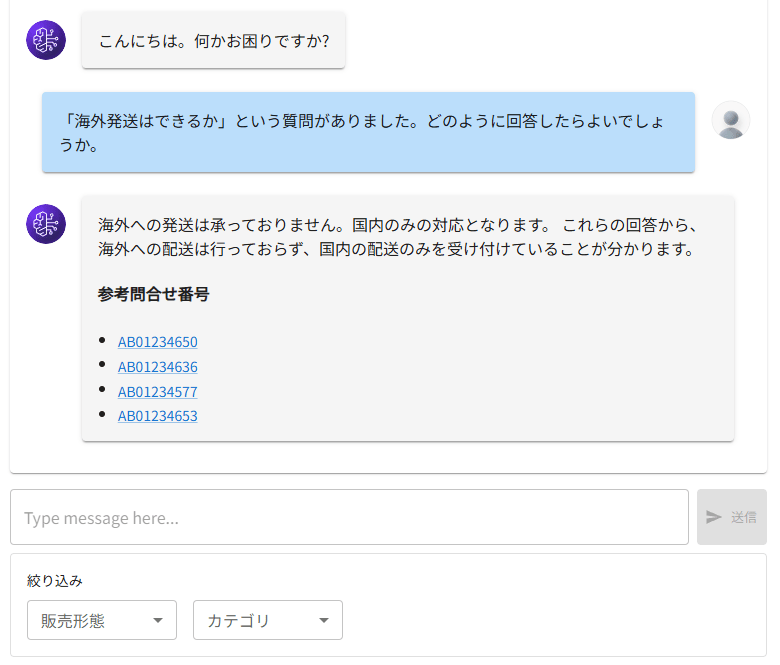
参考問合せ番号のリンクを押すと、それぞれの実データを参照できます。ここでは省略しますが、以下の販売形態、カテゴリで海外発送に言及している履歴があることがわかりました。
| 問合せ番号 | 販売形態 | カテゴリ |
|---|---|---|
| AB01234650 | 直販 | 家庭用デスク |
| AB01234636 | 代理店 | 業務用キャビネット |
| AB01234577 | 代理店 | 業務用チェア |
| AB01234653 | 直販 | 家庭用テーブル |
以降、メタデータフィルタリングでこの検索結果を絞り込みたいと思います。
メタデータ1件でフィルタリングした例
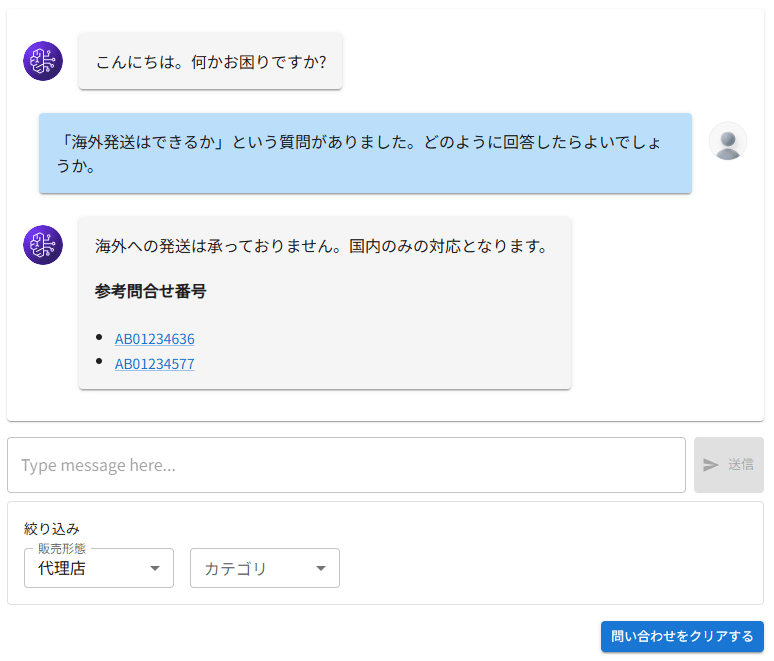
販売形態が「代理店」でフィルタリングして、同じく「海外発送ができるか」を問い合わせた例です。
想定通り、「販売形態が代理店」の問い合わせ履歴データが 2 件、検索されました。
メタデータ2件でフィルタリングした例
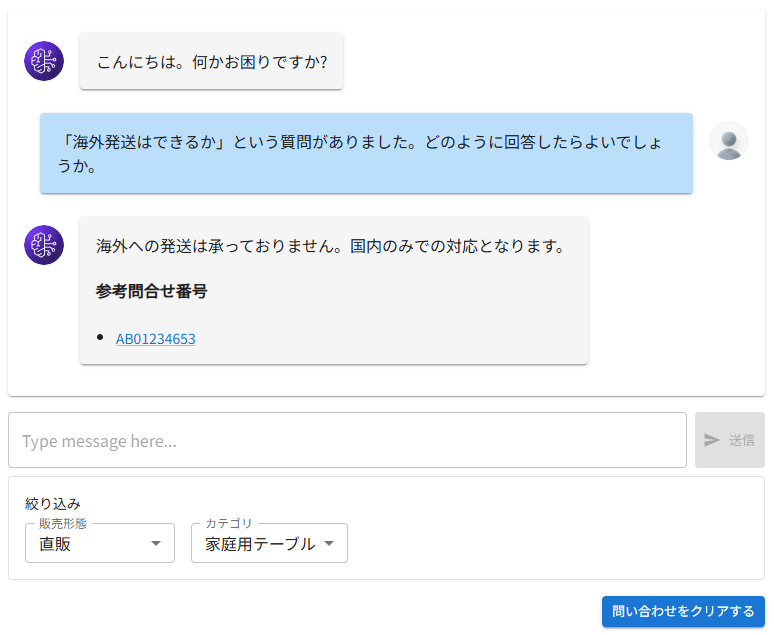
販売形態が「直販」、かつカテゴリが「家庭用テーブル」でフィルタリングして、同じく「海外発送できるか」を問い合わせた例です。
想定通り、該当する問い合わせ履歴データ 1 件だけが検索されました。
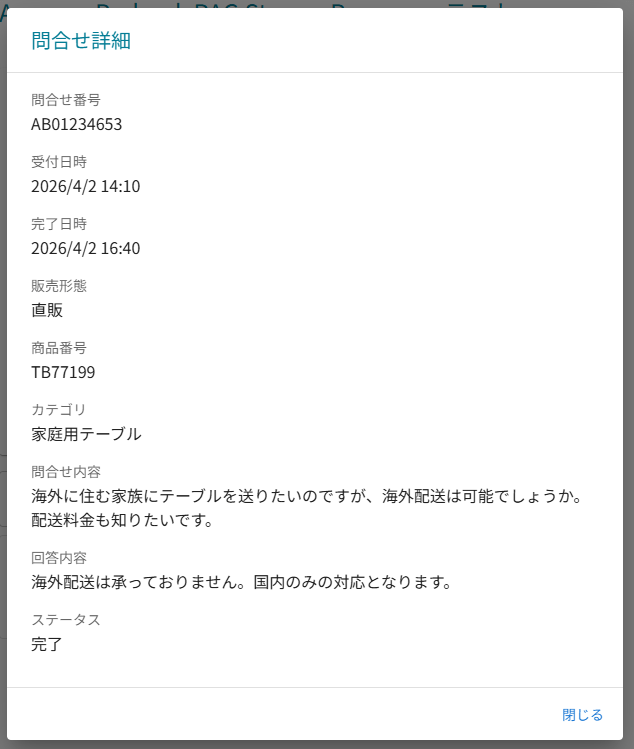
参考問合せ番号のリンクを押すと、該当問い合わせ履歴の実データが見られます。確かに海外発送についての問い合わせです。
React コード
この画面を提供している React のコードですが、詳細は実コードを見てください。
絞り込みのオプションはベタ書きの固定値にしており、選択したデータを Amazon API Gateway に渡しているだけです。当たり前ですが、フォーマットはバックエンドの AWS Lambda 関数で定義したものと合わせています。
AWS AppSync Events から送られてくるレスポンスの中に、citation と呼ばれる、回答の参考になったチャンクとそのメタデータが含まれます。それを元に参考問合せ番号のリンクを作成し、モーダルウィンドウで問い合わせ番号詳細を表示しています。
import { useState, useEffect, useRef } from "react";
import { Container, Grid, Box, Paper, Typography, TextField, Button, Avatar, Dialog, DialogTitle, DialogContent, DialogActions, Link, FormControl, InputLabel, Select, MenuItem } from "@mui/material";
import SendIcon from '@mui/icons-material/Send';
import { blue, grey } from '@mui/material/colors';
import { v4 as uuidv4 } from "uuid";
import { events } from "aws-amplify/data";
import ReactMarkdown from "react-markdown";
import remarkGfm from "remark-gfm";
import { inquireRagSr } from "./Functions.jsx";
import Header from "../Header.jsx";
import Menu from "./Menu.jsx";

const RagSr = (props) => {
  //定数定義
  const groups = props.groups;
  const sub = props.sub;
  const idtoken = props.idtoken;
  const imgUrl = import.meta.env.VITE_IMG_URL;
  const channelOptions = ["直販", "代理店"];
  const categoryOptions = ["家庭用コタツ", "家庭用テーブル", "家庭用収納棚", "家庭用チェア", "家庭用デスク", "業務用ラック", "業務用キャビネット", "業務用会議テーブル", "業務用チェア", "業務用デスク"];
  //変数定義
  const appsyncSessionIdRef = useRef();
  const bedrockSessionIdRef = useRef(null);
  const channelRef = useRef();
  const streamingRefMap = useRef(new Map());
  const citationDataMap = useRef(new Map());
  //state定義
  const [prompt, setPrompt] = useState("");
  const [conversation, setConversation] = useState([]);
  const [streaming, setStreaming] = useState({ text: "", refs: [] });
  const [dialogOpen, setDialogOpen] = useState(false);
  const [selectedCitation, setSelectedCitation] = useState(null);
  const [filterChannel, setFilterChannel] = useState("");
  const [filterCategory, setFilterCategory] = useState("");
  //RAGへの問い合わせ送信関数
  const putRagSr = () => {
    if (streaming.text) {
      setConversation(prev => [
        ...prev,
        { role:"ai", text: streaming.text, ref: streaming.refs },
        { role:"user", text: prompt, ref: [] }
      ]);
      streamingRefMap.current.clear();
      setStreaming({ text:"", refs:[] });
    } else {
      setConversation(prev => [...prev, { role:"user", text: prompt, ref: [] }]);
    }
    inquireRagSr(prompt, appsyncSessionIdRef.current, bedrockSessionIdRef.current, idtoken, (() => {
      const f = [];
      if (filterChannel) f.push({"販売形態": filterChannel});
      if (filterCategory) f.push({"カテゴリ": filterCategory});
      return f;
    })());
    //プロンプト欄をクリア
    setPrompt("");
  };
  //content.textから問合せ内容と回答内容を抽出
  const parseContent = (text) => {
    const inquiryMatch = text.match(/問合せ内容:\s*([\s\S]*?)(?=\n\n回答内容:|$)/);
    const answerMatch = text.match(/回答内容:\s*([\s\S]*?)$/);
    return {
      inquiry: inquiryMatch ? inquiryMatch[1].trim() : "",
      answer: answerMatch ? answerMatch[1].trim() : ""
    };
  };
  //問合せ番号クリック時の処理
  const handleCitationClick = (inquiryNumber) => {
    const data = citationDataMap.current.get(inquiryNumber);
    if (data) {
      setSelectedCitation(data);
      setDialogOpen(true);
    }
  };
  //Dialog閉じる処理
  const handleDialogClose = () => {
    setDialogOpen(false);
    setSelectedCitation(null);
  };

  //サブスクリプション開始関数
  const startSubscription = async () => {
    const appsyncSessionId = appsyncSessionIdRef.current;
    if (channelRef.current) await channelRef.current.close();
    const channel = await events.connect(`rag-stream-response/${sub}/${appsyncSessionId}`);
    channel.subscribe({
      next: (data) => {
        //Bedrock Knowledge base の session id 取得
        if (data.event.type === "bedrock_session") {
          console.log("=== Session received ===");
          console.log(data.event.bedrock_session_id);
          bedrockSessionIdRef.current = data.event.bedrock_session_id;
          return;
        }
        //問い合わせに対する回答メッセージ (chunkされている)
        if (data.event.type === "text") {
          console.log("=== Message received ===");
          setStreaming(s => ({
            ...s,
            text: s.text + data.event.message
          }));
          return;
        }
        //回答に関する関連ドキュメント (citation)
        if (data.event.type === "citation") {
          console.log("=== Citation received ===");
          console.log(data.event.citation);
          data.event.citation.forEach(ref => {
            const inquiryNumber = ref.metadata?.["問合せ番号"];
            if (!inquiryNumber) return;
            if (!streamingRefMap.current.has(inquiryNumber)) {
              streamingRefMap.current.set(inquiryNumber, {
                id: inquiryNumber,
                label: inquiryNumber
              });
              citationDataMap.current.set(inquiryNumber, {
                metadata: ref.metadata,
                content: ref.content
              });
              setStreaming(s => ({
                ...s,
                refs: Array.from(streamingRefMap.current.values())
              }));
            }
          });
        }
      },
      error: (err) => console.error("Subscription error:", err),
      complete: () => console.log("Subscription closed")
    });
    channelRef.current = channel;
  };
  //セッションIDのリセット、サブスクリプション再接続関数
  const resetSession = async () => {
    appsyncSessionIdRef.current = uuidv4();
    bedrockSessionIdRef.current = null;
    setPrompt("");
    streamingRefMap.current.clear();
    citationDataMap.current.clear();
    setStreaming({ text:"", refs:[] });
    setConversation([]);
    setFilterChannel("");
    setFilterCategory("");
    await startSubscription();
  };
  //画面表示時
  useEffect(() => {
    //画面表示時に最上部にスクロール
    window.scrollTo(0, 0);
    //Bedrockからのレスポンスサブスクライブ関数実行
    appsyncSessionIdRef.current = uuidv4();
    bedrockSessionIdRef.current = null;
    startSubscription();
    //アンマウント時にチャンネルを閉じる
    return () => {
      if (channelRef.current) channelRef.current.close();
    };
  }, []);
  //Chatbot UI 会話部分
  const renderMessage = (msg, idx) => (
    <Box
      key={idx}
      sx={{
        display: "flex",
        justifyContent: msg.role === "user" ? "flex-end" : "flex-start",
        alignItems: "flex-start",
        mb: 1,
        width: "100%",
        minWidth: 0
      }}
    >
      {msg.role === "ai" && (
        <Avatar
          src={`${imgUrl}/images/ai_chat_icon.svg`}
          alt="AI"
          sx={{ mr: 2, mt: 2 }}
        />
      )}
      <Paper
        elevation={2}
        sx={{
          p: 2,
          my: 1,
          maxWidth: "90%",
          minWidth: 0,
          wordBreak: "break-word",
          overflowWrap: "break-word",
          bgcolor:
            msg.role === "user" ? blue[100] : grey[100]
        }}
      >
        <ReactMarkdown
          remarkPlugins={[remarkGfm]}
          components={{
            p: ({node, ...props}) => <p style={{margin: 0}} {...props} />,
            code: ({node, inline, ...props}) => (
              <code style={{whiteSpace: inline ? 'normal' : 'pre-wrap', wordBreak: 'break-word', overflowWrap: 'break-word'}} {...props} />
            )
          }}
        >
          {msg.text}
        </ReactMarkdown>
        {msg.ref.length > 0 && (
          <>
            <h4>参考問合せ番号</h4>
            <ul style={{ paddingLeft: 20, margin: 0 }}>
              {msg.ref.map(s => (
                <li key={s.id}>
                  <Link
                    component="button"
                    variant="body2"
                    onClick={() => handleCitationClick(s.id)}
                    sx={{ cursor: "pointer" }}
                  >
                    {s.label}
                  </Link>
                </li>
              ))}
            </ul>
          </>
        )}
      </Paper>
      {msg.role === "user" && (
        <Avatar
          src={`${imgUrl}/images/human_chat_icon.svg`}
          alt="User"
          sx={{ ml: 2, mt: 2 }}
        />
      )}
    </Box>
  );

  return (
    <>
      {/* Header */}
      <Header groups={groups} signOut={props.signOut} />
      <Container maxWidth="lg" sx={{mt:2}}>
        <Grid container spacing={4}>
          {/* Menu Pane */}
          <Grid size={{xs:12,md:4}} order={{xs:2,md:1}}>
            {/* Sidebar */}
            <Menu />
          </Grid>
          {/* Contents Pane IMPORTANT */}
          <Grid size={{xs:12,md:8}} order={{xs:1,md:2}} my={2}>
            <main>
              <Grid container spacing={2}>
                {/* Heading */}
                <Grid size={{xs:12}}>
                  <Typography id="bedrocksrtop" variant="h5" component="h1" mb={3} gutterBottom>Amazon Bedrock RAG Stream Response テスト</Typography>
                </Grid>
                <Grid size={{xs:12}}>
                  {/* Chatbot */}
                  <Paper sx={{p:2,mb:2,width:"100%"}}>
                    {/* あいさつ文(固定) */}
                    {renderMessage({ role: "ai", text: "こんにちは。何かお困りですか?", ref: []}, -1)}
                    {/* 会話履歴 */}
                    {conversation.map((msg, idx) => renderMessage(msg, idx))}
                    {/* 直近のレスポンス */}
                    {streaming.text && renderMessage({ role:"ai", text: streaming.text, ref: streaming.refs }, "stream")}
                  </Paper>
                  {/* 入力エリア */}
                  <Box sx={{display:"flex",gap:1}}>
                    <TextField fullWidth multiline value={prompt} onChange={(e) => setPrompt(e.target.value)} placeholder="Type message here..." sx={{ flexGrow: 1 }} />
                    <Button variant="contained" size="small" onClick={putRagSr} disabled={!prompt} startIcon={<SendIcon />} sx={{ whiteSpace: "nowrap", flexShrink: 0 }}>送信</Button>
                  </Box>
                  {/* オプション */}
                  <Box sx={{mt:1,p:2,border:"1px solid",borderColor:"divider",borderRadius:1}}>
                    <Typography variant="subtitle2" mb={1}>絞り込み</Typography>
                    <Box sx={{display:"flex",flexWrap:"wrap",gap:2}}>
                      <FormControl size="small" sx={{minWidth:150}}>
                        <InputLabel>販売形態</InputLabel>
                        <Select value={filterChannel} label="販売形態" onChange={(e) => setFilterChannel(e.target.value)}>
                          <MenuItem value="">すべて</MenuItem>
                          {channelOptions.map(v => <MenuItem key={v} value={v}>{v}</MenuItem>)}
                        </Select>
                      </FormControl>
                      <FormControl size="small" sx={{minWidth:150}}>
                        <InputLabel>カテゴリ</InputLabel>
                        <Select value={filterCategory} label="カテゴリ" onChange={(e) => setFilterCategory(e.target.value)}>
                          <MenuItem value="">すべて</MenuItem>
                          {categoryOptions.map(v => <MenuItem key={v} value={v}>{v}</MenuItem>)}
                        </Select>
                      </FormControl>
                    </Box>
                  </Box>
                  {/* クリアボタン */}
                  {(streaming.text || conversation.length > 0) && (
                    <Box sx={{ display: "flex", justifyContent: "flex-end", mt: 2 }}>
                      <Button variant="contained" size="small" onClick={resetSession}>問い合わせをクリアする</Button>
                    </Box>
                  )}
                </Grid>
              </Grid>
            </main>
          </Grid>
        </Grid>
      </Container>
      {/* Citation詳細Dialog */}
      <Dialog open={dialogOpen} onClose={handleDialogClose} maxWidth="md" fullWidth>
        <DialogTitle>問合せ詳細</DialogTitle>
        <DialogContent dividers>
          {selectedCitation && (() => {
            const { inquiry, answer } = parseContent(selectedCitation.content.text);
            const m = selectedCitation.metadata;
            return (
              <Box>
                <Typography variant="subtitle2" color="text.secondary">問合せ番号</Typography>
                <Typography variant="body1" mb={2}>{m["問合せ番号"] || "-"}</Typography>
                <Typography variant="subtitle2" color="text.secondary">受付日時</Typography>
                <Typography variant="body1" mb={2}>{m["受付日時"] || "-"}</Typography>
                <Typography variant="subtitle2" color="text.secondary">完了日時</Typography>
                <Typography variant="body1" mb={2}>{m["完了日時"] || "-"}</Typography>
                <Typography variant="subtitle2" color="text.secondary">販売形態</Typography>
                <Typography variant="body1" mb={2}>{m["販売形態"] || "-"}</Typography>
                <Typography variant="subtitle2" color="text.secondary">商品番号</Typography>
                <Typography variant="body1" mb={2}>{m["商品番号"] || "-"}</Typography>
                <Typography variant="subtitle2" color="text.secondary">カテゴリ</Typography>
                <Typography variant="body1" mb={2}>{m["カテゴリ"] || "-"}</Typography>
                <Typography variant="subtitle2" color="text.secondary">問合せ内容</Typography>
                <Typography variant="body1" mb={2} sx={{ whiteSpace: "pre-wrap" }}>{inquiry || "-"}</Typography>
                <Typography variant="subtitle2" color="text.secondary">回答内容</Typography>
                <Typography variant="body1" mb={2} sx={{ whiteSpace: "pre-wrap" }}>{answer || "-"}</Typography>
                <Typography variant="subtitle2" color="text.secondary">ステータス</Typography>
                <Typography variant="body1" mb={2}>{m["ステータス"] || "-"}</Typography>
              </Box>
            );
          })()}
        </DialogContent>
        <DialogActions>
          <Button onClick={handleDialogClose}>閉じる</Button>
        </DialogActions>
      </Dialog>
    </>
  );
};

export default RagSr;
途中、inquireRagSr という関数がありますが、axios で Amazon API Gateway をコールするだけの関数です。
まとめ
いかがでしたでしょうか。
今回のシリーズ記事の肝は Amazon Bedrock Knowledge Bases データソースのカスタムチャンキングでしたが、結果をこうしてアプリの UI で確認できるようになると、本当にできていることを実感できますよね。引き続き検証して精度向上に努めます。
本記事が皆様のお役に立てれば幸いです。