
こんにちは、SCSKの伊藤です。
構築の際、「このサーバの可用性は担保できているの?」とお客様に質問されることは少なくないかと思います。
特に困ることが多い『1台のサーバ』で可用性の担保が必要な場合に「Single Server Protection」が役に立ちます!
本記事では、Single Server Protectionを実際に使ってみようと思います。
Single Server Protection(SSP)とは
Single Server Protectionの詳細は、過去の記事にて紹介しておりますので、ここでは軽い概要のみ説明します。
★過去の記事はこちら

Single Server Protectionとは、1台のサーバで可用性を高めることができる製品です。
OS上のアプリケーションを監視し、障害を検知するとアプリケーションの再起動やOS再起動により復旧を試みます。
| Single Server Protectionの基本動作 (1) SSPが冗長化対象のアプリケーションの状態を定期的に監視 (2) 異常を検知するとアプリケーションを再起動 (3) <a>正常状態に戻った場合は定期的な監視に戻る <b>異常な状態が続いている場合はOS再起動 (4) OS再起動後、冗長化対象のアプリケーションをSSPが自動起動させて復旧 |
Single Server Protectionが採用されるケース
以下はSingle Server Protectionが採用される理由の一例です。
① 可用性を高めたいアプリケーションがクラスタ構成を保証していない。
② なるべくコストを抑えつつ可用性も担保したい。
③ 単体のサーバでも可用性を担保したい。
特に、「クラスタ構成を保証していないアプリケーション」でも使用できることは強みです。
Single Server Protection for Linuxを実際に使ってみた。
では、SSPがどのように動作するか試していきましょう。
先ずは『Single Server Protection for Linux』から実際に使っていきます。
使用する環境は以下の通り。
■環境情報
| ホスト名 | rhel01 |
| OS | Red Hat Enterprise Linux release 8.6 (Ootpa) |
| 導入するLifeKeeper製品 | Single Server Protection for Linux v10.0 |
■リソース階層
| QSP-postfix | Quick Service Protectionリソース |
| /share/postfix | ファイスシステムリソース |
| /dev/sdb1 | デバイスリソース |
| ip-192.168.11.15 | IPアドレスリソース |
なお、インストールやリソース作成など基本的な操作はLifeKeeperと同じになりますので割愛します。
1.事前にステータスを確認しておきます。
| [root@rhel01 ~]# /opt/LifeKeeper/bin/lcdstatus -e BACKUP TAG ID STATE PRIO PRIMARY —— QSP-postfix qsp-postfix ISP 1 rhel01 —— /share/postfix /share/postfix ISP 1 rhel01 —— /dev/sdb1 /dev/sdb1 ISP 1 rhel01 —— ip-192.168.11.15 IP-192.168.11.15 ISP 1 rhel01 |
2.QSPリソース「QSP-postfix」のpostfixサービスを停止してみます。
| [root@rhel01 ~]# systemctl status postfix ● postfix.service – Postfix Mail Transport Agent Loaded: loaded (/usr/lib/systemd/system/postfix.service; disabled; vendor pr> Active: active (running) since Fri 2026-05-15 13:28:11 JST; 7min ago ~省略~ |
| [root@rhel01 ~]# systemctl stop postfix |
| [root@rhel01 ~]# systemctl status postfix ● postfix.service – Postfix Mail Transport Agent Loaded: loaded (/usr/lib/systemd/system/postfix.service; disabled; vendor pr> Active: inactive (dead) ~省略~ |
3.QSPリソース「QSP-postfix」のローカルリカバリーが動作してpostfixサービスが復旧しました。
| [root@rhel01 ~]# tail -f /var/log/lifekeeper.log May 15 13:40:14 rhel01 recover[20292]: NOTIFY:qsp:recover::134703:BEGIN recover of “qsp-postfix” May 15 13:40:15 rhel01 recover[20292]: NOTIFY:qsp:recover:QSP-postfix:134709:END successful recover of “QSP-postfix” May 15 13:40:15 rhel01 recover[20268]: INFO:lcd.recover:recover:QSP-postfix:004785:recovery succeeded after event “qsp,recover” using recovery at resource “QSP-postfix” on failing resource “QSP-postfix” May 15 13:40:15 rhel01 recover[20268]: NOTIFY:lcd.recmain:recover:QSP-postfix:011116:END recover of “QSP-postfix” (class=qsp event=recover) |
| [root@rhel01 ~]# systemctl status postfix ● postfix.service – Postfix Mail Transport Agent Loaded: loaded (/usr/lib/systemd/system/postfix.service; disabled; vendor pr> Active: active (running) since Fri 2026-05-15 13:38:14 JST; 6s ago ~省略~ |
| [root@rhel01 ~]# /opt/LifeKeeper/bin/lcdstatus -e BACKUP TAG ID STATE PRIO PRIMARY —— QSP-postfix qsp-postfix ISP 1 rhel01 —— /share/postfix /share/postfix ISP 1 rhel01 —— /dev/sdb1 /dev/sdb1 ISP 1 rhel01 —— ip-192.168.11.15 IP-192.168.11.15 ISP 1 rhel01 |
4.今度は、postfixサービスを停止して一時的にサービスの起動抑止もしてみます。
| [root@rhel01 ~]# systemctl stop postfix |
| [root@rhel01 ~]# systemctl mask --runtime postfix Created symlink /run/systemd/system/postfix.service → /dev/null. |
| [root@rhel01 ~]# systemctl status postfix ● postfix.service Loaded: masked (Reason: Unit postfix.service is masked.) Active: inactive (dead) ~省略~ |
5.QSPリソース「QSP-postfix」のローカルリカバリーに失敗してOSが再起動されました。
| [root@rhel01 ~]# tail -f /var/log/lifekeeper.log May 15 13:57:27 rhel01 recover[8146]: NOTIFY:qsp:recover::134703:BEGIN recover of “qsp-postfix” May 15 13:57:27 rhel01 recover[8146]: ERROR:qsp:recover:QSP-postfix:134708:systemctl command has failed for “QSP-postfix” May 15 13:57:27 rhel01 recover[8146]: NOTIFY:qsp:recover:QSP-postfix:134710:END failed recover of “QSP-postfix” with return value of 3 May 15 13:57:27 rhel01 lkexterrlog[8163]: INFO:lkexterrlog:recover:QSP-postfix:010120:Extended logs saved to /var/log/lifekeeper.err. May 15 13:57:28 rhel01 recover[8116]: ERROR:lcd.recover:recover:QSP-postfix:004786:recovery failed after event “qsp,recover” using recovery at resource “QSP-postfix” on failing resource “QSP-postfix” Broadcast message from systemd-journald@rhel01 (Fri 2026-05-15 13:57:29 JST): rec_fail[8239]: EMERG:event.rrcovr_f:rec_fail::010420:local recovery failure on resource QSP-postfix, trigger reboot… |

6.再起動後、postfixサービスが復旧していること確認できます。
| [root@rhel01 ~]# /opt/LifeKeeper/bin/lcdstatus -e BACKUP TAG ID STATE PRIO PRIMARY —— QSP-postfix qsp-postfix ISP 1 rhel01 —— /share/postfix /share/postfix ISP 1 rhel01 —— /dev/sdb1 /dev/sdb1 ISP 1 rhel01 —— ip-192.168.11.15 IP-192.168.11.15 ISP 1 rhel01 |
| [root@rhel01 ~]# systemctl status postfix ● postfix.service – Postfix Mail Transport Agent Loaded: loaded (/usr/lib/systemd/system/postfix.service; disabled; vendor pr> Active: active (running) since Fri 2026-05-15 13:58:44 JST; 1min 8s ago |
ここまでが、『Single Server Protection for Linux』になります。
Single Server Protection for Windowsを実際に使ってみた。
続けて『Single Server Protection for Windows』を実際に使ってみます。
使用する環境は以下の通り。
■環境情報
| ホスト名 | WIN2019-01 |
| OS | Windows Server 2019 |
| 導入するLifeKeeper製品 | Single Server Protection for Windows v10.0.2 |
■リソース階層
| APP | GenericArkリソース |
| IIS.SamplePage | IISリソース |
| 192.168.11.25 | IPアドレスリソース |
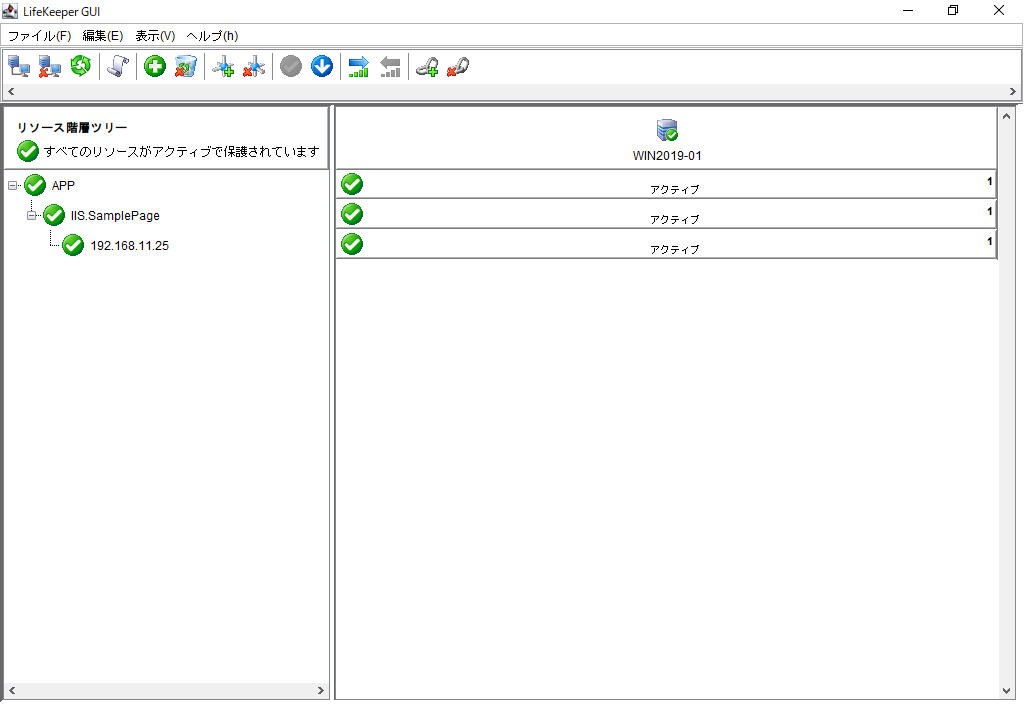
1.作業前のステータスを確認します。
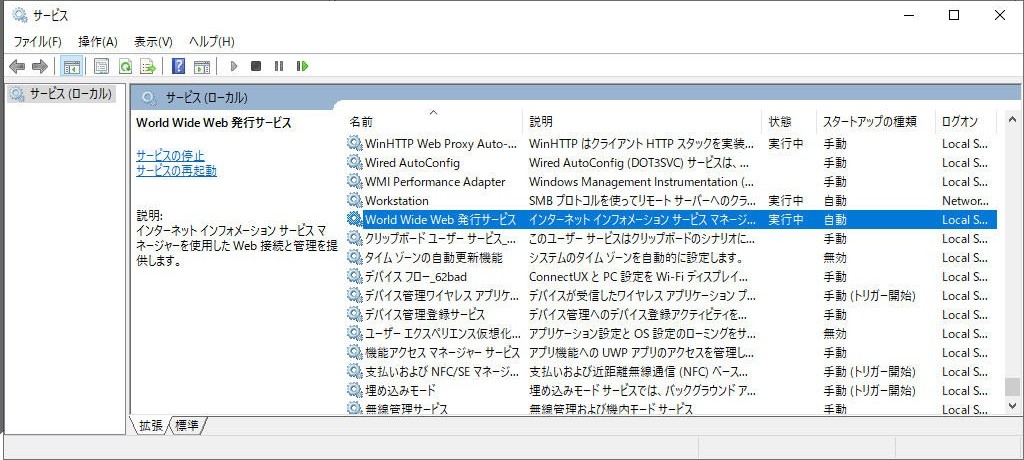
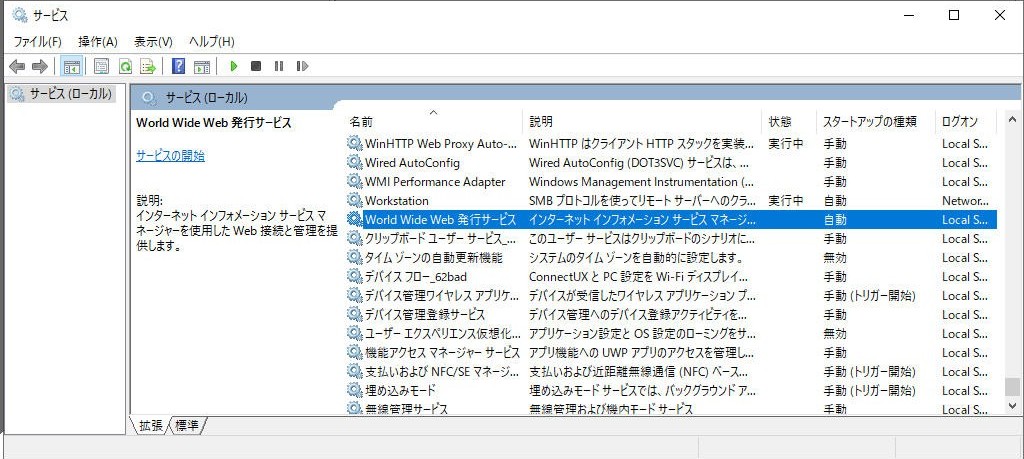
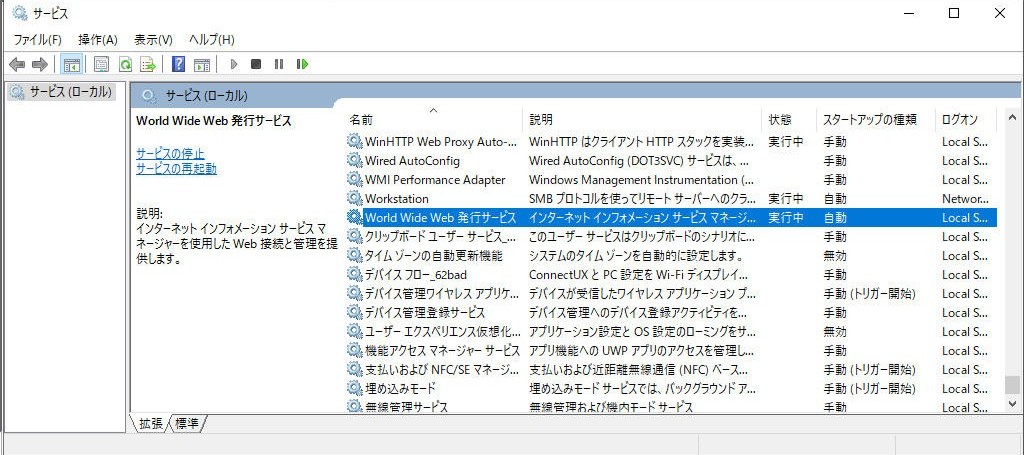
2.サービス「World Wide Web発行サービス」(IISサービス)を停止します。
↓↓↓
3.リソース「IIS.SamplePage」にてIISサービスの異常を検知し、ローカルリカバリーが行われます。
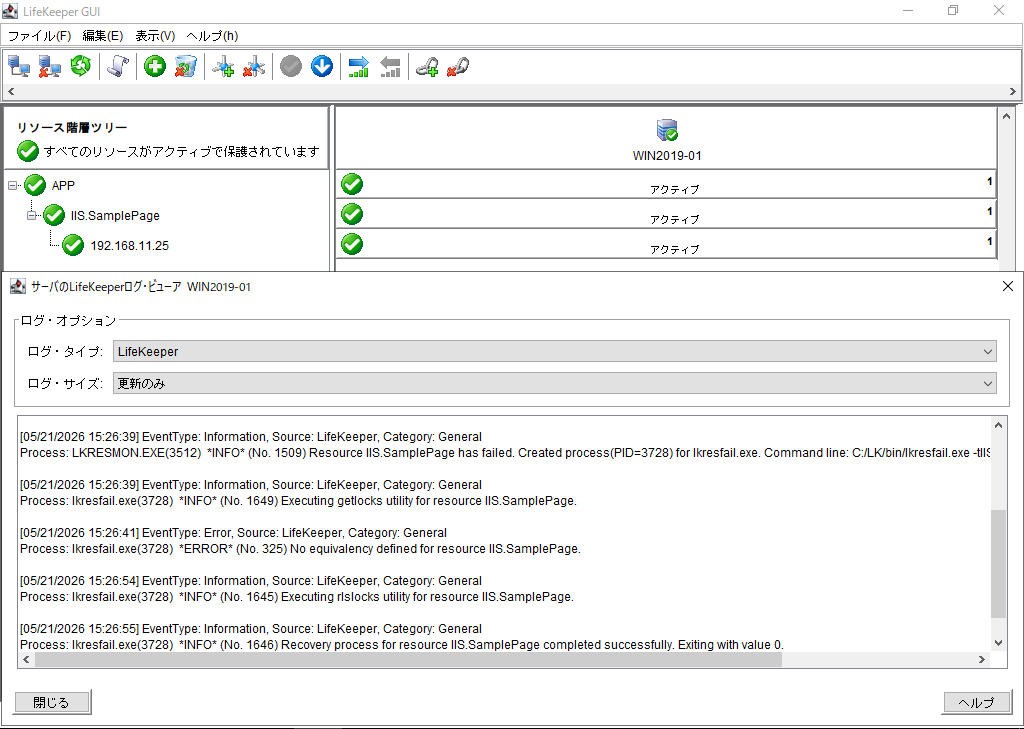
4.サービス「World Wide Web発行サービス」が起動され、”実行中”ステータスに戻ります。
5.今度は、リソース「APP」のrecoverスクリプトとquickcheckスクリプトをOS再起動まで一時的に変更して『異常(exit 1)』を返すようにします。
※タスクスケジューラーで、OS起動時に各スクリプトが元に戻るようにしてます。
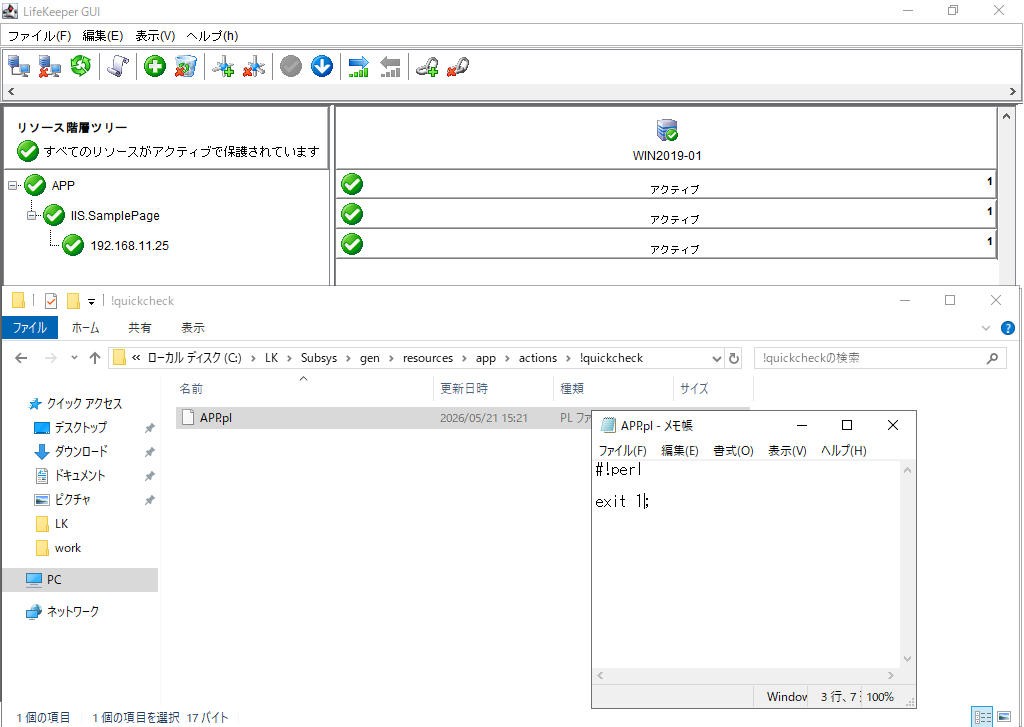
6.少し待つとリソース「APP」のローカルリカバリーに失敗し、OS再起動が行われます。

7.OS再起動後、すべてのリソースが復旧しております。
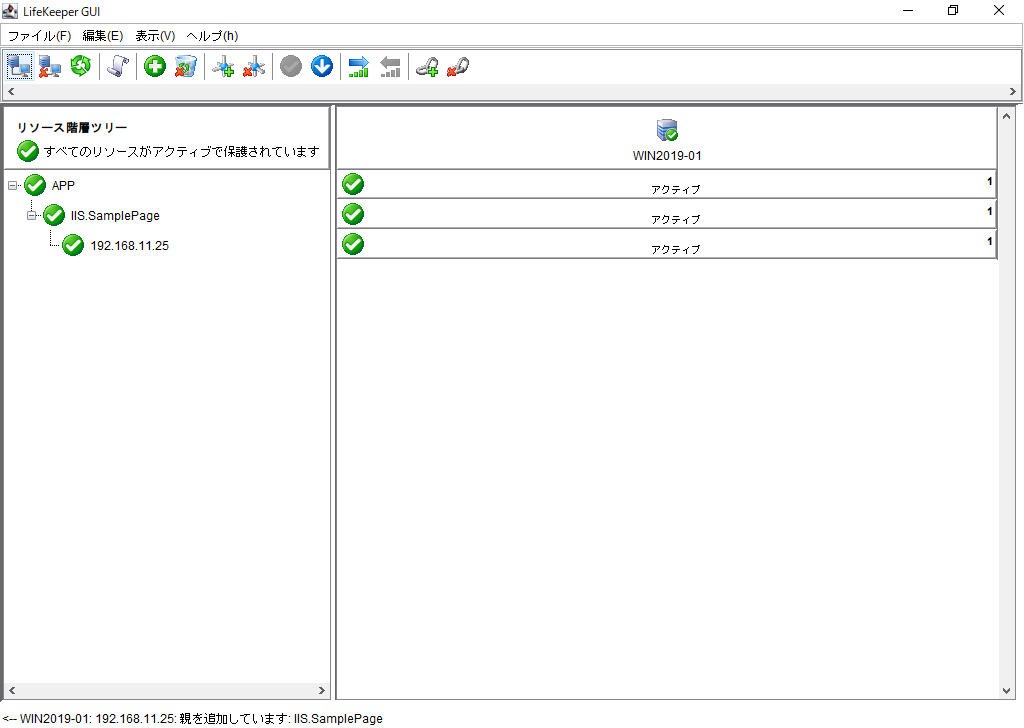
このように、『アプリケーションの復旧を試して、ダメならOS再起動で復旧させる』ことで、サーバ1台で可用性を高めることを実現してます。
さいごに
『ダウンタイムをある程度許容するので、少ない予算で少しでも可用性を高めたい!』というニーズに合致する面白い製品であることがわかったかと思います。
少しでも参考になれば幸いです。
詳しい内容をお知りになりたいかたは、以下のバナーからSCSKLifekeeper公式サイトまで