
こんにちは、広野です。
以前、以下の記事を書きました。
その当時からだいぶ時間が経っていたので、セキュリティ対策を見直し、jQuery ではなく Vanilla JS (素の JavaScript) を使用した構成で書き直したものを紹介します。また、Lambda 関数を使用しない構成になっています。環境は 2 つの AWS CloudFormation テンプレートに分けてデプロイできるようにしています。
- WEB サイト本体
- Amazon CloudFront のアクセスログ
フロント側の index.html は、CSS すらない超簡易ダミーコードを用意しています。
完成イメージ
ブラウザには、次のような問い合わせフォームが表示されます。
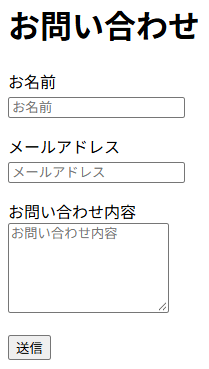
必要事項を入力して送信ボタンを押すと、あらかじめ決めた宛先に、次のようなメールが届きます。
件名: Website feedback (xxxxx.example.com)
差出人: sender@example.com
宛先: receiver@example.com
返信先: (フォームに入力されたメールアドレス)

NAME: 山田 太郎
MAILADDRESS: taro@example.com

MESSAGE:
問い合わせの内容がここに入ります。
返信先 (Reply-To) にフォームへ入力されたアドレスを入れているので、受信したメールにそのまま返信できます。
アーキテクチャ
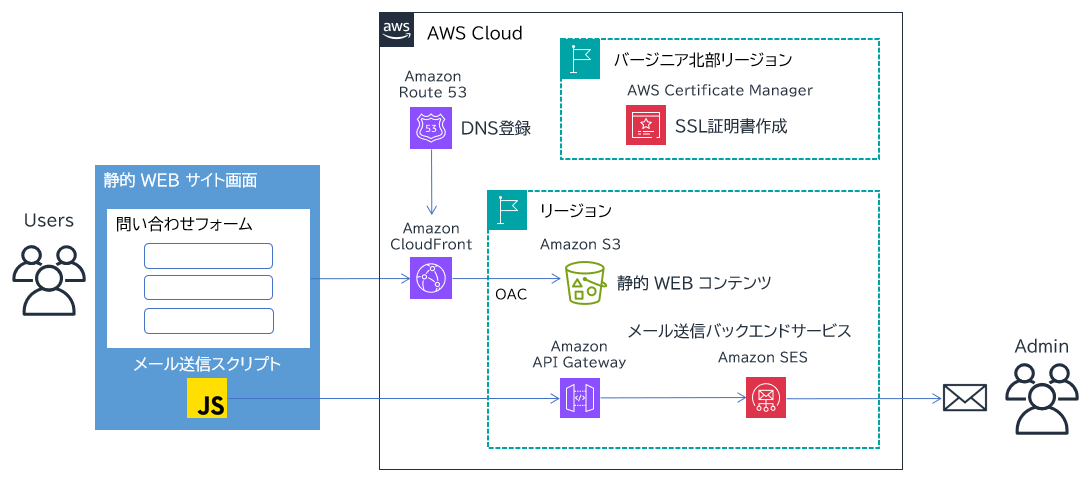
- 独自ドメインで公開するため、Amazon CloudFront と Amazon Route 53 を使用します。
- 通信を暗号化するため、AWS Certificate Manager (ACM) の証明書を CloudFront に関連付けます。
- 静的 WEB コンテンツは Amazon S3 に配置しています。S3 は非公開にして、CloudFront からだけ読めるようにします。(OAC)
- 問い合わせフォームは index.html に作成し、contact-form.js が入力チェックと送信を行います。
- contact-form.js は、Amazon API Gateway の REST API に問い合わせ内容を送信します。
- API Gateway は入力を検証した後、Amazon SES で予め設定されたメールアドレスにメールを送信します。
- API Gateway の実行ログとアクセスログは Amazon CloudWatch Logs に、CloudFront のアクセスログは Amazon S3 に出力します。保持期間はパラメータで指定します。
- 連続して送信すると、API のスロットリングで失敗することがあります。月に数回程度の、低頻度な問い合わせを想定した設定になっています。
前提事項
事前に用意するもの
以下は構築済みであることを前提にします。構築方法は、この記事では扱いません。これらリソースの情報を AWS CloudFormation テンプレートに入力することになります。
| 事前に用意するもの | 用途 | テンプレートのパラメータ |
|---|---|---|
Route 53 のパブリックホストゾーン (example.com) |
サイトの DNS レコードを登録する | DomainName |
| ACM の証明書 (us-east-1) | CloudFront で HTTPS を使用する | CertificateArn |
| SES の検証済み ID (送信元) | メールの送信元にする | FeedbackSenderEmail、AllowedSesId |
| SES の検証済み ID (送信先) | 問い合わせを受け取る | FeedbackReceiverEmail |
| API Gateway のアカウント単位の CloudWatch ログ用ロール | API のログを CloudWatch Logs に出力する | (なし) |
上の表のパラメータ以外に、デプロイ時に自分で決める値が 4 つあります。
| パラメータ | 内容 |
|---|---|
SiteName |
リソース名の共通部分になる、サイトの管理用の名前。S3 バケット名にも使うため、大文字は使えません |
SubDomainName |
サイトのサブドメイン名。Zone Apex (サブドメインなし) には対応していません。 |
FeedbackSubject |
メールの固定の件名 |
LogRetentionInDays |
ログの保持期間 (日) |
Route 53 のパブリックホストゾーンと ACM の証明書 (us-east-1) の作り方は、旧記事の「独自ドメインの準備 (Amazon Route 53)」と「SSL 証明書の準備 (AWS Certificate Manager)」を参照してください。
Amazon SES の準備
SES はリージョンサービスです。API Gateway と同じリージョンで送信元と送信先を「検証済み ID」にしておきます。
SES の新しいアカウントは、サンドボックスという制限下に置かれます。サンドボックスのままでは、検証済みのアドレスとドメインにしかメールを送れません。このテンプレートが送る宛先は `FeedbackReceiverEmail` の 1 つだけなので、そのアドレスを検証済み ID にしてあれば、サンドボックスのままでも動作します。送信量を増やしたい場合などは、次のドキュメントを参照して、サンドボックスの解除を申請してください。
Amazon API Gateway のアカウント設定
API Gateway の実行ログとアクセスログを CloudWatch Logs に出力するには、API Gateway が CloudWatch Logs に書き込むための IAM ロールを、アカウントに登録しておく必要があります。リージョンごとの設定で、この記事のテンプレートには含まれません。
実装しているセキュリティ対策
セキュリティ対策を実装するのが、今回のリニューアルの目的の 1 つでした。先に、実装している対策の一覧を示します。それぞれの意図は、テンプレートのコメントで説明します。
| 対策 | 実装箇所 | 目的 |
|---|---|---|
| S3 を非公開にし、CloudFront (OAC) からの読み取りだけを許可 | S3 バケットとバケットポリシー | S3 への直接アクセスを防ぐ |
| TLS 以外の通信を拒否 | S3 バケットポリシー | 平文での通信を防ぐ |
| Web サイトへの HTTPS 強制と TLS 1.3 のみに限定 | CloudFront | 古い TLS の排除 |
| 許可メソッドを GET と HEAD に限定 | CloudFront | 不要なメソッドを受け付けない |
| セキュリティヘッダーの付与 (CSP、HSTS など) | CloudFront のレスポンスヘッダーポリシー | XSS やクリックジャッキングなどの緩和 |
CSP の connect-src で、通信先をこの API だけに限定 |
CloudFront のレスポンスヘッダーポリシー | 情報の送信先を絞る |
| 入力の検証 (必須項目、文字数、形式、余分な項目の禁止) | API Gateway のモデルとリクエストバリデーター | 不正な入力を、SES を呼ぶ前に拒否する |
| すべての入力値の URL エンコード | API Gateway のマッピングテンプレート | SES へのパラメータ注入を防ぐ |
| 送信元、送信先、件名の固定 | API Gateway マッピングテンプレートと IAM ポリシー | なりすましと、メール送信の踏み台化を防ぐ |
| API のスロットリング | API Gateway のステージ | 大量送信を抑える |
| API の TLS を 1.3 のみに限定 | API Gateway の REST API | 古い TLS の排除 |
| CORS で許可するオリジンを、自サイトだけに限定 | API Gateway | 他サイトのページからの利用を防ぐ |
最小権限の IAM ロール (送信先を ses:Recipients で限定) |
IAM ロール | 万一のときの被害を限定する |
| エラー応答の本文を固定 | API Gateway の統合レスポンス | 内部情報の漏えいを防ぐ |
| リクエスト本文をログに残さない | API Gateway のステージ | 個人情報を、保持期間の長いログに残さない |
| アクセスログの取得と、保持期間の設定 | API Gateway と CloudFront | 不審なアクセスの調査と、不要なデータの削除 |
| インラインスクリプトを使わない | index.html と contact-form.js |
CSP の script-src 'self' に適合させる |
一方で、次のことは行っていません。
- 利用者ごとのレート制限。API のスロットリングはステージ全体の合計に対するものです。利用者ごとに制限するには AWS WAF のレートベースルールが必要になります。
- CAPTCHA などのボット対策
- アクセス元の地域制限
AWS CloudFormation テンプレート 1: WEB サイト
- S3 バケット (サイト用)、S3 バケット (CloudFront のアクセスログ用)、それぞれのバケットポリシー
- CloudFront のディストリビューション、OAC、キャッシュポリシー、レスポンスヘッダーポリシー
- Route 53 の A レコードと AAAA レコード
- API Gateway の REST API、デプロイ、ステージ、リソース、メソッド (POST と OPTIONS)、リクエストバリデーター、モデル
- API Gateway が SES を呼び出すための IAM ロール
- API Gateway の実行ログとアクセスログ用の CloudWatch Logs ロググループ
AWSTemplateFormatVersion: "2010-09-09"
Description: "The CloudFormation template to create a static website hosting environment with a backend API for receiving emails from the feedback form."
# ------------------------------------------------------------#
# General Information
#
# Last update: 2026-10-26
# Author: Hirono
# ------------------------------------------------------------#
# ------------------------------------------------------------#
# Input Parameters
# ------------------------------------------------------------#
Parameters:
# リソース名の共通部分。S3 バケット名 (website-<SiteName>) にも使うため、大文字は使えない。
SiteName:
Type: String
Description: "Your Site name. (Not any upper case characters)"
Default: "xxxxx"
MaxLength: 40
MinLength: 1
DomainName:
Type: String
Description: "Domain name for URL."
Default: "example.com"
MaxLength: 100
MinLength: 5
AllowedPattern: "([a-zA-Z0-9][a-zA-Z0-9-]*[a-zA-Z0-9]*\\.)+[a-zA-Z]{2,}"
SubDomainName:
Type: String
Description: "Sub domain name for URL."
Default: "xxxxx"
MaxLength: 20
MinLength: 1
# メールアドレスの AllowedPattern は、API Gateway のモデルと contact-form.js の正規表現と同じにしている。
FeedbackSenderEmail:
Type: String
Description: "E-mail address for sending feedback emails."
Default: "sender@example.com"
MaxLength: 100
MinLength: 5
AllowedPattern: "^[A-Za-z0-9._%+-]+@[A-Za-z0-9-]+(\\.[A-Za-z0-9-]+)*\\.[A-Za-z]{2,}$"
FeedbackReceiverEmail:
Type: String
Description: "E-mail address for receiving feedback emails."
Default: "receiver@example.com"
MaxLength: 100
MinLength: 5
AllowedPattern: "^[A-Za-z0-9._%+-]+@[A-Za-z0-9-]+(\\.[A-Za-z0-9-]+)*\\.[A-Za-z]{2,}$"
# IAM ポリシーで、この ID からの送信だけを許可するために使う。ドメインでもメールアドレスでもよい。
AllowedSesId:
Type: String
Description: "SES identity (domain name or e-mail address) that the API is allowed to send e-mails from. It must be a verified identity in the same region."
Default: "example.com"
MaxLength: 254
MinLength: 4
AllowedPattern: "^([A-Za-z0-9._%+-]+@)?[A-Za-z0-9-]+(\\.[A-Za-z0-9-]+)*\\.[A-Za-z]{2,}$"
# 件名は、後述の API Gateway のマッピングテンプレート (VTL) の文字列リテラルに埋め込まれる。
# AllowedPattern で " $ # \ を禁止しているのは、パラメータの値でテンプレートの構文を壊したり、
# 処理を書き換えたりできないようにするため。
FeedbackSubject:
Type: String
Description: "Fixed subject of feedback emails. The site address is appended in parentheses. Double quotes, dollar signs, number signs and backslashes are not allowed."
Default: "Website feedback"
MaxLength: 100
MinLength: 1
AllowedPattern: "^[^\"$#\\\\]+$"
# ID ではなく ARN で受け取る。CloudFront で使える証明書は us-east-1 のものだけなので、リージョンは固定。
CertificateArn:
Type: String
Description: "ACM certificate ARN. CloudFront only supports ACM certificates in us-east-1 region."
Default: "arn:aws:acm:us-east-1:123456789012:certificate/00000000-0000-0000-0000-000000000000"
AllowedPattern: "^arn:aws:acm:us-east-1:[0-9]{12}:certificate/[0-9a-f]{8}-[0-9a-f]{4}-[0-9a-f]{4}-[0-9a-f]{4}-[0-9a-f]{12}$"
# CloudWatch Logs のロググループ 2 つと、CloudFront のアクセスログ用 S3 バケットの保持期間 (日) を、まとめて決める。
# AllowedValues は、CloudWatch Logs で設定できる保持期間の一覧。
LogRetentionInDays:
Type: Number
Description: "Retention period in days for the CloudWatch Logs log groups of the API Gateway execution logs and access logs, and for the objects in the S3 bucket of the CloudFront access logs."
Default: 400
AllowedValues:
- 1
- 3
- 5
- 7
- 14
- 30
- 60
- 90
- 120
- 150
- 180
- 365
- 400
- 545
- 731
- 1096
- 1827
- 2192
- 2557
- 2922
- 3288
- 3653
# ------------------------------------------------------------#
# Metadata
# ------------------------------------------------------------#
Metadata:
# マネジメントコンソールでのパラメータの表示順を固定する。
AWS::CloudFormation::Interface:
ParameterGroups:
- Label:
default: "General Configuration"
Parameters:
- SiteName
- Label:
default: "Domain Configuration"
Parameters:
- DomainName
- SubDomainName
- Label:
default: "Email Configuration"
Parameters:
- FeedbackSenderEmail
- FeedbackReceiverEmail
- AllowedSesId
- FeedbackSubject
- Label:
default: "Security Configuration"
Parameters:
- CertificateArn
- Label:
default: "Log Configuration"
Parameters:
- LogRetentionInDays
# Ref や GetAtt で依存関係が決まっているリソースにも、人が読んで分かるように DependsOn を書いている。
# cfn-lint はそれを W3005 として警告するので、ここで無視する。
cfn-lint:
config:
ignore_checks:
- "W3005"
Resources:
# ------------------------------------------------------------#
# S3
# ------------------------------------------------------------#
# サイトのコンテンツを置くバケット。パブリックアクセスを 4 項目すべてブロックし、CloudFront 経由でしか読めないようにする。
S3Bucket:
Type: AWS::S3::Bucket
Properties:
BucketName: !Sub "website-${SiteName}"
PublicAccessBlockConfiguration:
BlockPublicAcls: true
BlockPublicPolicy: true
IgnorePublicAcls: true
RestrictPublicBuckets: true
Tags:
- Key: Cost
Value: !Sub "website-${SiteName}"
S3BucketPolicy:
Type: AWS::S3::BucketPolicy
Properties:
Bucket: !Ref S3Bucket
PolicyDocument:
Version: "2012-10-17"
Statement:
# CloudFront (OAC) からの GetObject だけを許可する。
# AWS:SourceArn で、このアカウントのこのディストリビューションに限定している。
# 条件が無いと、他のアカウントの CloudFront からも読めてしまう。
- Action:
- "s3:GetObject"
Effect: Allow
Resource: !Sub "arn:aws:s3:::${S3Bucket}/*"
Principal:
Service: cloudfront.amazonaws.com
Condition:
StringEquals:
AWS:SourceArn: !Sub arn:aws:cloudfront::${AWS::AccountId}:distribution/${CloudFrontDistribution}
# TLS を使わない通信をすべて拒否する。予防的な設定。
- Sid: "RestrictToTlsRequestsOnly"
Action: "s3:*"
Effect: Deny
Principal: "*"
Resource:
- !Sub "arn:aws:s3:::${S3Bucket}"
- !Sub "arn:aws:s3:::${S3Bucket}/*"
Condition:
Bool:
aws:SecureTransport: "false"
DependsOn:
- S3Bucket
- CloudFrontDistribution
# ------------------------------------------------------------#
# S3 (CloudFront access logs)
# ------------------------------------------------------------#
# CloudFront のアクセスログを保存するバケット。ログには IP アドレスなどが含まれるため、
# 暗号化を明示し、保持期間を過ぎたオブジェクトはライフサイクルで自動削除する。
S3BucketLogs:
Type: AWS::S3::Bucket
Properties:
BucketName: !Sub "website-${SiteName}-logs"
BucketEncryption:
ServerSideEncryptionConfiguration:
- ServerSideEncryptionByDefault:
SSEAlgorithm: AES256
LifecycleConfiguration:
Rules:
- Id: "ExpireAccessLogs"
Status: Enabled
ExpirationInDays: !Ref LogRetentionInDays
OwnershipControls:
Rules:
- ObjectOwnership: BucketOwnerEnforced
PublicAccessBlockConfiguration:
BlockPublicAcls: true
BlockPublicPolicy: true
IgnorePublicAcls: true
RestrictPublicBuckets: true
Tags:
- Key: Cost
Value: !Sub "website-${SiteName}"
# CloudFront の標準ログ (v2) は、ログ配信サービス (delivery.logs.amazonaws.com) が S3 に書き込む。
# このバケットポリシーは、テンプレート 2 で作る配信設定に対応している。
S3BucketPolicyLogs:
Type: AWS::S3::BucketPolicy
Properties:
Bucket: !Ref S3BucketLogs
PolicyDocument:
Version: "2012-10-17"
Statement:
# 書き込み先を cloudfront/ 配下に限定する。この値は、テンプレート 2 の配信先 (cloudfront) と一致させる。
# 条件で、自分のアカウントが、このサイト用に作った配信元 (website-<SiteName>-*) からの書き込みだけに絞っている。
# 配信元は us-east-1 に作られるため、ARN のリージョンは us-east-1 に固定している。
- Sid: "AWSLogDeliveryWrite"
Effect: Allow
Principal:
Service: delivery.logs.amazonaws.com
Action: "s3:PutObject"
Resource: !Sub "${S3BucketLogs.Arn}/cloudfront/*"
Condition:
StringEquals:
aws:SourceAccount: !Ref AWS::AccountId
s3:x-amz-acl: "bucket-owner-full-control"
ArnLike:
aws:SourceArn: !Sub "arn:aws:logs:us-east-1:${AWS::AccountId}:delivery-source:website-${SiteName}-*"
- Sid: "AWSLogDeliveryAclCheck"
Effect: Allow
Principal:
Service: delivery.logs.amazonaws.com
Action:
- "s3:GetBucketAcl"
- "s3:ListBucket"
Resource: !GetAtt S3BucketLogs.Arn
Condition:
StringEquals:
aws:SourceAccount: !Ref AWS::AccountId
ArnLike:
aws:SourceArn: !Sub "arn:aws:logs:us-east-1:${AWS::AccountId}:delivery-source:website-${SiteName}-*"
- Sid: "RestrictToTlsRequestsOnly"
Effect: Deny
Principal: "*"
Action: "s3:*"
Resource:
- !GetAtt S3BucketLogs.Arn
- !Sub "${S3BucketLogs.Arn}/*"
Condition:
Bool:
aws:SecureTransport: "false"
DependsOn:
- S3BucketLogs
# ------------------------------------------------------------#
# CloudFront
# ------------------------------------------------------------#
CloudFrontDistribution:
Type: AWS::CloudFront::Distribution
Properties:
DistributionConfig:
Enabled: true
Comment: !Sub "CloudFront distribution for website-${SiteName}"
Aliases:
- !Sub ${SubDomainName}.${DomainName}
HttpVersion: http2
# IPv6 でアクセスできるようにする。Route 53 の AAAA レコードと対になっている。
IPV6Enabled: true
# 料金節約のため一部のエッジロケーションを使わない設定。
PriceClass: PriceClass_200
DefaultCacheBehavior:
TargetOriginId: !Sub S3Origin-website-${SiteName}
# HTTP でのアクセスは HTTPS にリダイレクトする。
ViewerProtocolPolicy: redirect-to-https
# 静的サイトに必要なのは GET と HEAD だけ。他のメソッドは受け付けない。
AllowedMethods:
- GET
- HEAD
CachedMethods:
- GET
- HEAD
CachePolicyId: !Ref CloudFrontCachePolicy
ResponseHeadersPolicyId: !Ref CloudFrontResponseHeadersPolicy
Compress: true
SmoothStreaming: false
DefaultRootObject: index.html
# S3 は、存在しないオブジェクトに対して 403 を返す (バケットの一覧を読む権限を与えていないため)。
# それを 404 に変換して 404.html を返す。CloudFront のエラーメッセージを表示しない対策。
CustomErrorResponses:
- ErrorCachingMinTTL: 10
ErrorCode: 403
ResponseCode: 404
ResponsePagePath: /404.html
Origins:
- Id: !Sub S3Origin-website-${SiteName}
DomainName: !Sub ${S3Bucket}.s3.${AWS::Region}.amazonaws.com
OriginAccessControlId: !GetAtt CloudFrontOriginAccessControl.Id
# OAC を使うときも、S3OriginConfig は必要。OriginAccessIdentity は空にする。
S3OriginConfig:
OriginAccessIdentity: ""
ConnectionAttempts: 3
ConnectionTimeout: 10
ViewerCertificate:
AcmCertificateArn: !Ref CertificateArn
# TLS 1.3 のみを受け付けるセキュリティポリシー。TLS 1.3 に対応していないブラウザからは接続できない。
MinimumProtocolVersion: TLSv1.3_2025
SslSupportMethod: sni-only
Tags:
- Key: Cost
Value: !Sub "website-${SiteName}"
DependsOn:
- CloudFrontCachePolicy
- CloudFrontResponseHeadersPolicy
- CloudFrontOriginAccessControl
- S3Bucket
# S3 へのリクエストにすべて SigV4 の署名を付ける。(OAC)
CloudFrontOriginAccessControl:
Type: AWS::CloudFront::OriginAccessControl
Properties:
OriginAccessControlConfig:
Description: !Sub "CloudFront OAC for website-${SiteName}"
Name: !Sub "OriginAccessControl-website-${SiteName}"
OriginAccessControlOriginType: s3
SigningBehavior: always
SigningProtocol: sigv4
# キャッシュキーに、Cookie、ヘッダー、クエリ文字列を含めない。静的サイトでは、どれも使わないため。
CloudFrontCachePolicy:
Type: AWS::CloudFront::CachePolicy
Properties:
CachePolicyConfig:
Name: !Sub "CachePolicy-website-${SiteName}"
Comment: !Sub "CloudFront Cache Policy for website-${SiteName}"
DefaultTTL: 3600
MaxTTL: 86400
MinTTL: 60
ParametersInCacheKeyAndForwardedToOrigin:
CookiesConfig:
CookieBehavior: none
EnableAcceptEncodingBrotli: true
EnableAcceptEncodingGzip: true
HeadersConfig:
HeaderBehavior: none
QueryStringsConfig:
QueryStringBehavior: none
CloudFrontResponseHeadersPolicy:
Type: AWS::CloudFront::ResponseHeadersPolicy
Properties:
ResponseHeadersPolicyConfig:
Name: !Sub "ResponseHeadersPolicy-website-${SiteName}"
Comment: !Sub "CloudFront Response Headers Policy for website-${SiteName}"
SecurityHeadersConfig:
# CSP (Content Security Policy)。ブラウザが読み込んでよいリソースと、通信してよい相手を限定する。
# script-src 'self' なので、インラインスクリプト (HTML への直接記述や onclick 属性) は動かない。
# connect-src は、このサイトと、この API のホストだけを許可する。
# この API 以外への fetch は、ブラウザが遮断する。
# style-src と font-src の Google Fonts は、Google Fonts を使うサイト用。使わないなら削除してよい。
ContentSecurityPolicy:
ContentSecurityPolicy: !Sub >-
default-src 'self';
img-src 'self' data:;
style-src 'self' https://fonts.googleapis.com;
font-src 'self' https://fonts.gstatic.com;
script-src 'self';
connect-src 'self' https://${RestApiSendEmail}.execute-api.${AWS::Region}.${AWS::URLSuffix};
object-src 'none';
base-uri 'self';
form-action 'self';
frame-ancestors 'none';
Override: true
# MIME タイプの推測 (スニッフィング) を禁止する。
ContentTypeOptions:
Override: true
# 他のサイトの iframe に埋め込まれるのを禁止する。CSP の frame-ancestors の、古いブラウザ向けの代替。
FrameOptions:
FrameOption: DENY
Override: true
ReferrerPolicy:
Override: true
ReferrerPolicy: strict-origin-when-cross-origin
# 1 年間、このドメインとサブドメインへの HTTPS を強制する。
# includeSubDomains と preload を付けているため、同じドメインの他のサブドメインにも影響する。使う前に確認すること。
StrictTransportSecurity:
AccessControlMaxAgeSec: 31536000
IncludeSubdomains: true
Override: true
Preload: true
CustomHeadersConfig:
Items:
# ブラウザにキャッシュを保存させない。CloudFront のエッジのキャッシュはキャッシュポリシーの TTL で保持される。
- Header: Cache-Control
Value: "no-store"
Override: true
# ブラウザの機能 (カメラ、位置情報など) の利用を、すべて無効にする。
- Header: Permissions-Policy
Value: "accelerometer=(), camera=(), display-capture=(), geolocation=(), gyroscope=(), hid=(), magnetometer=(), microphone=(), midi=(), payment=(), publickey-credentials-get=(), screen-wake-lock=(), serial=(), usb=(), xr-spatial-tracking=()"
Override: true
- Header: Cross-Origin-Opener-Policy
Value: "same-origin"
Override: true
- Header: X-Permitted-Cross-Domain-Policies
Value: "none"
Override: true
DependsOn:
- RestApiSendEmail
# ------------------------------------------------------------#
# Route 53
# ------------------------------------------------------------#
# Z2FDTNDATAQYW2 は、CloudFront のエイリアスレコードに使う、固定のホストゾーン ID。
Route53RecordIpv4:
Type: AWS::Route53::RecordSet
Properties:
HostedZoneName: !Sub ${DomainName}.
Name: !Sub "${SubDomainName}.${DomainName}."
Type: A
AliasTarget:
HostedZoneId: Z2FDTNDATAQYW2
DNSName: !GetAtt CloudFrontDistribution.DomainName
DependsOn:
- CloudFrontDistribution
Route53RecordIpv6:
Type: AWS::Route53::RecordSet
Properties:
HostedZoneName: !Sub ${DomainName}.
Name: !Sub "${SubDomainName}.${DomainName}."
Type: AAAA
AliasTarget:
HostedZoneId: Z2FDTNDATAQYW2
DNSName: !GetAtt CloudFrontDistribution.DomainName
DependsOn:
- CloudFrontDistribution
# ------------------------------------------------------------#
# API Gateway
# ------------------------------------------------------------#
RestApiSendEmail:
Type: AWS::ApiGateway::RestApi
Properties:
Name: !Sub "SendEmail-website-${SiteName}"
Description: !Sub "REST API to send user's feedback email for website-${SiteName}"
EndpointConfiguration:
Types:
- REGIONAL
IpAddressType: dualstack
# TLS 1.3 のみを受け付けるセキュリティポリシー。拡張ポリシーには、エンドポイントアクセスモードの指定が必要。
# AWS は、可能なら STRICT を推奨している。ここでは、移行時の最初の段階である BASIC のままにしている。
EndpointAccessMode: BASIC
SecurityPolicy: SecurityPolicy_TLS13_1_3_2025_09
Tags:
- Key: Cost
Value: !Sub "website-${SiteName}"
RestApiDeploymentSendEmail:
Type: AWS::ApiGateway::Deployment
Properties:
RestApiId: !Ref RestApiSendEmail
DependsOn:
- RestApiMethodSendEmailPost
- RestApiMethodSendEmailOptions
- RestApiRequestValidatorSendEmail
- RestApiRequestModelSendEmail
RestApiStageSendEmail:
Type: AWS::ApiGateway::Stage
Properties:
StageName: prod
Description: "production stage"
RestApiId: !Ref RestApiSendEmail
DeploymentId: !Ref RestApiDeploymentSendEmail
MethodSettings:
# DataTraceEnabled を false にしているのは、リクエスト本文 (名前、メールアドレス、問い合わせ内容) を実行ログに平文で残さないため。
# スロットリングは、ステージ全体の合計に対する制限。利用者ごとの制限ではない。
# OPTIONS (プリフライト) もカウントされるため、1 回の送信で 2 回分を消費する。
- ResourcePath: "/*"
HttpMethod: "*"
LoggingLevel: INFO
DataTraceEnabled: false
ThrottlingRateLimit: 1
ThrottlingBurstLimit: 2
TracingEnabled: false
# アクセスログは JSON の 1 行で出力する (CloudWatch Logs Insights で検索しやすいため)。
# リクエスト本文は含めない。$context.error.validationErrorString は、入力値を含むことがあるので使わない。
AccessLogSetting:
DestinationArn: !GetAtt LogGroupApiAccess.Arn
Format: >-
{
"requestId":"$context.requestId",
"extendedRequestId":"$context.extendedRequestId",
"requestTime":"$context.requestTime",
"ip":"$context.identity.sourceIp",
"userAgent":"$context.identity.userAgent",
"tlsVersion":"$context.tlsVersion",
"cipherSuite":"$context.cipherSuite",
"httpMethod":"$context.httpMethod",
"resourcePath":"$context.resourcePath",
"status":"$context.status",
"responseLatency":"$context.responseLatency",
"integrationLatency":"$context.integrationLatency",
"integrationRequestId":"$context.integration.requestId",
"errorResponseType":"$context.error.responseType",
"errorMessage":"$context.error.message"
}
Tags:
- Key: Cost
Value: !Sub "website-${SiteName}"
DependsOn:
- LogGroupApiExecution
- LogGroupApiAccess
RestApiResourceSendEmail:
Type: AWS::ApiGateway::Resource
Properties:
RestApiId: !Ref RestApiSendEmail
ParentId: !GetAtt RestApiSendEmail.RootResourceId
PathPart: sendemail
# POST /sendemail。Lambda を使わず、API Gateway から SES の SendEmail を直接呼び出す (AWS サービス統合)。
RestApiMethodSendEmailPost:
Type: AWS::ApiGateway::Method
Properties:
RestApiId: !Ref RestApiSendEmail
ResourceId: !Ref RestApiResourceSendEmail
HttpMethod: POST
# 認証は無い。誰でも呼べる API なので、入力検証、スロットリング、IAM の最小権限で守る。
AuthorizationType: NONE
# リクエストの本文を、統合に渡す前にモデルで検証する。検証に失敗すると、API Gateway が 400 を返す。
RequestValidatorId: !Ref RestApiRequestValidatorSendEmail
RequestModels:
application/json: !Ref RestApiRequestModelSendEmail
Integration:
Type: AWS
IntegrationHttpMethod: POST
Credentials: !GetAtt ApigSesInvocationRole.Arn
Uri: !Sub arn:aws:apigateway:${AWS::Region}:email:action/SendEmail
PassthroughBehavior: WHEN_NO_TEMPLATES
RequestParameters:
integration.request.header.Content-Type: "'application/x-www-form-urlencoded'"
# JSON の入力を、SES が受け取るフォーム形式に変換する VTL (Velocity Template Language) のマッピングテンプレート。
RequestTemplates:
application/json: !Sub
- |-
#set($inputRoot = $input.path('$'))
#set($tempbodya = "NAME: $inputRoot.name
MAILADDRESS: $inputRoot.email
MESSAGE:
$inputRoot.body")
#set($tempbodyb = $tempbodya.replaceAll("\r\n", "\n"))
#set($body = $util.urlEncode($tempbodyb))
#set($destination = $util.urlEncode("${FeedbackReceiverEmail}"))
#set($replyto = $util.urlEncode($inputRoot.email))
#set($subjectraw = "${FeedbackSubject} (${SubDomainName}.${DomainName})")
#set($subject = $util.urlEncode($subjectraw))
#set($source = $util.urlEncode("${FeedbackSenderEmail}"))
Action=SendEmail&Destination.ToAddresses.member.1=$destination&Message.Body.Text.Data=$body&Message.Subject.Data=$subject&ReplyToAddresses.member.1=$replyto&Source=$source
- {}
IntegrationResponses:
- StatusCode: 200
SelectionPattern: "2\\d{2}"
ResponseTemplates:
application/json: "{\"message\":\"Message sent\"}"
ResponseParameters:
method.response.header.Access-Control-Allow-Headers: "'Content-Type'"
method.response.header.Access-Control-Allow-Methods: "'POST,OPTIONS'"
method.response.header.Access-Control-Allow-Origin: !Sub "'https://${SubDomainName}.${DomainName}'"
- StatusCode: 400
SelectionPattern: "400"
ResponseTemplates:
application/json: "{\"message\":\"Bad request\"}"
ResponseParameters:
method.response.header.Access-Control-Allow-Headers: "'Content-Type'"
method.response.header.Access-Control-Allow-Methods: "'POST,OPTIONS'"
method.response.header.Access-Control-Allow-Origin: !Sub "'https://${SubDomainName}.${DomainName}'"
- StatusCode: 403
SelectionPattern: "403"
ResponseTemplates:
application/json: "{\"message\":\"Forbidden\"}"
ResponseParameters:
method.response.header.Access-Control-Allow-Headers: "'Content-Type'"
method.response.header.Access-Control-Allow-Methods: "'POST,OPTIONS'"
method.response.header.Access-Control-Allow-Origin: !Sub "'https://${SubDomainName}.${DomainName}'"
- StatusCode: 404
SelectionPattern: "404"
ResponseTemplates:
application/json: "{\"message\":\"Not found\"}"
ResponseParameters:
method.response.header.Access-Control-Allow-Headers: "'Content-Type'"
method.response.header.Access-Control-Allow-Methods: "'POST,OPTIONS'"
method.response.header.Access-Control-Allow-Origin: !Sub "'https://${SubDomainName}.${DomainName}'"
- StatusCode: 500
ResponseTemplates:
application/json: "{\"message\":\"Internal server error\"}"
ResponseParameters:
method.response.header.Access-Control-Allow-Headers: "'Content-Type'"
method.response.header.Access-Control-Allow-Methods: "'POST,OPTIONS'"
method.response.header.Access-Control-Allow-Origin: !Sub "'https://${SubDomainName}.${DomainName}'"
- StatusCode: 503
SelectionPattern: "503"
ResponseTemplates:
application/json: "{\"message\":\"Service unavailable\"}"
ResponseParameters:
method.response.header.Access-Control-Allow-Headers: "'Content-Type'"
method.response.header.Access-Control-Allow-Methods: "'POST,OPTIONS'"
method.response.header.Access-Control-Allow-Origin: !Sub "'https://${SubDomainName}.${DomainName}'"
MethodResponses:
- StatusCode: 200
ResponseModels:
application/json: Empty
ResponseParameters:
method.response.header.Access-Control-Allow-Origin: true
method.response.header.Access-Control-Allow-Headers: true
method.response.header.Access-Control-Allow-Methods: true
- StatusCode: 400
ResponseModels:
application/json: Empty
ResponseParameters:
method.response.header.Access-Control-Allow-Origin: true
method.response.header.Access-Control-Allow-Headers: true
method.response.header.Access-Control-Allow-Methods: true
- StatusCode: 403
ResponseModels:
application/json: Empty
ResponseParameters:
method.response.header.Access-Control-Allow-Origin: true
method.response.header.Access-Control-Allow-Headers: true
method.response.header.Access-Control-Allow-Methods: true
- StatusCode: 404
ResponseModels:
application/json: Empty
ResponseParameters:
method.response.header.Access-Control-Allow-Origin: true
method.response.header.Access-Control-Allow-Headers: true
method.response.header.Access-Control-Allow-Methods: true
- StatusCode: 500
ResponseModels:
application/json: Empty
ResponseParameters:
method.response.header.Access-Control-Allow-Origin: true
method.response.header.Access-Control-Allow-Headers: true
method.response.header.Access-Control-Allow-Methods: true
- StatusCode: 503
ResponseModels:
application/json: Empty
ResponseParameters:
method.response.header.Access-Control-Allow-Origin: true
method.response.header.Access-Control-Allow-Headers: true
method.response.header.Access-Control-Allow-Methods: true
RestApiRequestValidatorSendEmail:
Type: AWS::ApiGateway::RequestValidator
Properties:
Name: !Sub "RequestValidator-website-${SiteName}"
RestApiId: !Ref RestApiSendEmail
ValidateRequestBody: true
ValidateRequestParameters: false
DependsOn:
- RestApiSendEmail
# リクエスト本文の JSON スキーマ。必須項目、文字数、メールアドレスの形式を検証し、定義の無い項目は禁止する。
# 文字数の上限とメールアドレスの正規表現は、contact-form.js と同じ値にそろえる。
RestApiRequestModelSendEmail:
Type: AWS::ApiGateway::Model
Properties:
Name: "SendEmailRequestModel"
Description: !Sub "Request body model of the feedback form for website-${SiteName}. Validated by the request validator."
ContentType: application/json
RestApiId: !Ref RestApiSendEmail
Schema: |-
{
"$schema": "http://json-schema.org/draft-04/schema#",
"title": "SendEmail",
"type": "object",
"properties": {
"name": {
"type": "string",
"minLength": 1,
"maxLength": 100
},
"email": {
"type": "string",
"minLength": 1,
"maxLength": 254,
"pattern": "^[A-Za-z0-9._%+-]+@[A-Za-z0-9-]+(\\.[A-Za-z0-9-]+)*\\.[A-Za-z]{2,}$"
},
"body": {
"type": "string",
"minLength": 1,
"maxLength": 5000
}
},
"required": ["name", "email", "body"],
"additionalProperties": false
}
# OPTIONS /sendemail。ブラウザが POST の前に送る CORS のプリフライトリクエストに答える。
# MOCK 統合なので、バックエンドは呼び出さず、API Gateway が CORS のヘッダーだけを返す。
RestApiMethodSendEmailOptions:
Type: AWS::ApiGateway::Method
Properties:
RestApiId: !Ref RestApiSendEmail
ResourceId: !Ref RestApiResourceSendEmail
HttpMethod: OPTIONS
AuthorizationType: NONE
Integration:
Type: MOCK
IntegrationResponses:
- ResponseParameters:
method.response.header.Access-Control-Allow-Headers: "'Content-Type'"
method.response.header.Access-Control-Allow-Methods: "'POST,OPTIONS'"
method.response.header.Access-Control-Allow-Origin: !Sub "'https://${SubDomainName}.${DomainName}'"
ResponseTemplates:
application/json: ''
StatusCode: 200
PassthroughBehavior: WHEN_NO_MATCH
RequestTemplates:
application/json: '{"statusCode": 200}'
MethodResponses:
- ResponseModels:
application/json: Empty
ResponseParameters:
method.response.header.Access-Control-Allow-Headers: true
method.response.header.Access-Control-Allow-Methods: true
method.response.header.Access-Control-Allow-Origin: true
StatusCode: 200
# ------------------------------------------------------------#
# API Gateway SES Invocation Role (IAM)
# ------------------------------------------------------------#
ApigSesInvocationRole:
Type: AWS::IAM::Role
Properties:
RoleName: !Sub "ApigSesInvocationRole-website-${SiteName}"
Description: "This role allows API Gateways to invoke SES."
AssumeRolePolicyDocument:
Version: "2012-10-17"
Statement:
- Effect: Allow
Principal:
Service:
- apigateway.amazonaws.com
Action:
- sts:AssumeRole
Path: /
Policies:
- PolicyName: !Sub "ApigSesInvocationPolicy-website-${SiteName}"
PolicyDocument:
Version: "2012-10-17"
Statement:
# 許可するのは ses:SendEmail だけ。リソースは、送信元の ID、送信先の ID、構成セットに絞る。
# さらに ses:Recipients の条件で、宛先を FeedbackReceiverEmail だけに限定する。
# 決めた宛先以外には送れない。
- Effect: Allow
Action:
- "ses:SendEmail"
Resource:
- !Sub "arn:${AWS::Partition}:ses:${AWS::Region}:${AWS::AccountId}:identity/${AllowedSesId}"
- !Sub "arn:${AWS::Partition}:ses:${AWS::Region}:${AWS::AccountId}:identity/${FeedbackReceiverEmail}"
- !Sub "arn:${AWS::Partition}:ses:${AWS::Region}:${AWS::AccountId}:configuration-set/*"
Condition:
ForAllValues:StringEqualsIgnoreCase:
"ses:Recipients":
- !Ref FeedbackReceiverEmail
# ------------------------------------------------------------#
# CloudWatch Logs
# ------------------------------------------------------------#
LogGroupApiExecution:
Type: AWS::Logs::LogGroup
Properties:
LogGroupName: !Sub "API-Gateway-Execution-Logs_${RestApiSendEmail}/prod"
RetentionInDays: !Ref LogRetentionInDays
Tags:
- Key: Cost
Value: !Sub "website-${SiteName}"
DependsOn:
- RestApiSendEmail
LogGroupApiAccess:
Type: AWS::Logs::LogGroup
Properties:
LogGroupName: !Sub "API-Gateway-Access-Logs_${RestApiSendEmail}/prod"
RetentionInDays: !Ref LogRetentionInDays
Tags:
- Key: Cost
Value: !Sub "website-${SiteName}"
DependsOn:
- RestApiSendEmail
# ------------------------------------------------------------#
# Output Parameters
# ------------------------------------------------------------#
Outputs:
APIGatewayEndpointSendEmail:
Value: !Sub "https://${RestApiSendEmail}.execute-api.${AWS::Region}.${AWS::URLSuffix}/${RestApiStageSendEmail}/sendemail"
SiteURL:
Value: !Sub "https://${SubDomainName}.${DomainName}"
CloudFrontDistributionId:
Value: !Ref CloudFrontDistribution
AWS CloudFormation テンプレート 2: CloudFront アクセスログ (us-east-1 限定)
Amazon CloudFront の標準ログ (v2) は、Amazon CloudWatch Logs の配信 API (PutDeliverySource など) で設定します。CloudFront に関するこの API の呼び出しは、us-east-1 で行う必要があります。ログの保存先 S3 バケットは、別のリージョンでかまいません。
AWSTemplateFormatVersion: "2010-09-09"
Description: "The CloudFormation template to create the CloudFront standard logging (v2) delivery to the S3 bucket for the static website. This template must be deployed in us-east-1."
# ------------------------------------------------------------#
# General Information
#
# Last update: 2026-10-26
# Author: Hirono
#
# Notes:
# - Deploy this template in us-east-1. The CloudWatch Logs delivery API for CloudFront must be called in us-east-1.
# - The log bucket (website--logs) is created by General_Cfn_StaticWebSiteWithEmailFeedbackWithoutLambda.yml in ap-northeast-1. Update that stack first.
# - Delete this stack before deleting the log bucket stack.
# ------------------------------------------------------------#

# ------------------------------------------------------------#
# Input Parameters
# ------------------------------------------------------------#
Parameters:
  SiteName:
    Type: String
    Description: "Your Site name. It must be the same as the SiteName of the website stack. (Not any upper case characters)"
    Default: "xxxxx"
    MaxLength: 40
    MinLength: 1
    AllowedPattern: "^[a-z0-9-]+$"

  # テンプレート 1 の Outputs に出力される値。
  CloudFrontDistributionId:
    Type: String
    Description: "The CloudFront distribution id of the website. It is in the Outputs of the website stack."
    MaxLength: 15
    MinLength: 12
    AllowedPattern: "^[A-Z0-9]+$"

Metadata:
  AWS::CloudFormation::Interface:
    ParameterGroups:
      - Label:
          default: "General Configuration"
        Parameters:
          - SiteName
      - Label:
          default: "Target CloudFront Configuration"
        Parameters:
          - CloudFrontDistributionId
  cfn-lint:
    config:
      ignore_checks:
        - "W3005"

Resources:
# ------------------------------------------------------------#
# CloudWatch Logs delivery (CloudFront standard logging v2)
# ------------------------------------------------------------#
  # ログの出どころ。CloudFront のディストリビューションを指定する。
  LogsDeliverySource:
    Type: AWS::Logs::DeliverySource
    Properties:
      Name: !Sub "website-${SiteName}-cf-src"
      ResourceArn: !Sub "arn:aws:cloudfront::${AWS::AccountId}:distribution/${CloudFrontDistributionId}"
      LogType: ACCESS_LOGS
      Tags:
        - Key: Cost
          Value: !Sub "website-${SiteName}"

  # ログの届け先。テンプレート 1 のログ用バケットの cloudfront 配下を指定する。
  # 出力形式は、作成時にしか指定できず、後から変更できない。
  LogsDeliveryDestination:
    Type: AWS::Logs::DeliveryDestination
    Properties:
      Name: !Sub "website-${SiteName}-cf-dest"
      DestinationResourceArn: !Sub "arn:aws:s3:::website-${SiteName}-logs/cloudfront"
      OutputFormat: json
      Tags:
        - Key: Cost
          Value: !Sub "website-${SiteName}"

  # 出どころと届け先を結びつける。出力する項目と、S3 のパス構成もここで決める。
  # 出力項目は、調査に使う項目に絞っている。
  # S3SuffixPath は {yyyy}/{MM}/{dd}。
  LogsDelivery:
    Type: AWS::Logs::Delivery
    Properties:
      DeliverySourceName: !Sub "website-${SiteName}-cf-src"
      DeliveryDestinationArn: !GetAtt LogsDeliveryDestination.Arn
      RecordFields:
        - date
        - time
        - x-edge-location
        - c-ip
        - c-country
        - asn
        - cs-method
        - x-host-header
        - cs-protocol
        - cs-protocol-version
        - cs-uri-stem
        - cs-uri-query
        - cs-bytes
        - cs(Referer)
        - cs(User-Agent)
        - sc-status
        - sc-bytes
        - sc-content-type
        - time-taken
        - time-to-first-byte
        - x-edge-result-type
        - x-edge-response-result-type
        - x-edge-detailed-result-type
        - x-edge-request-id
        - cache-behavior-path-pattern
        - ssl-protocol
        - ssl-cipher
      S3SuffixPath: "{yyyy}/{MM}/{dd}"
      S3EnableHiveCompatiblePath: false
      Tags:
        - Key: Cost
          Value: !Sub "website-${SiteName}"
    DependsOn:
      - LogsDeliveryDestination
      - LogsDeliverySource
静的コンテンツ
静的コンテンツは、`index.html`、`404.html`、`contact-form.js` の 3 ファイルです。S3 バケットの直下に置きます。
index.html サンプル
フォームだけのダミーサイトです。実際のサイトでは、この HTML を参考に自分のページにフォームを組み込んでください。フォームの `id` は `contact-form.js` が参照するため、変えるときは JavaScript も合わせて変えます。
<!DOCTYPE html>
<html lang="ja">
<head>
  <meta charset="utf-8">
  <meta name="viewport" content="width=device-width, initial-scale=1">
  <title>お問い合わせ</title>
</head>
<body>
  <h1>お問い合わせ</h1>
  <form id="contact-form" method="POST">
    <p>
      <label for="name-input">お名前</label><br>
      <!-- maxlength は、API Gateway のモデルと同じ値 -->
      <input type="text" id="name-input" placeholder="お名前" maxlength="100">
    </p>
    <p>
      <label for="email-input">メールアドレス</label><br>
      <input type="email" id="email-input" placeholder="メールアドレス" maxlength="254">
    </p>
    <p>
      <label for="message-input">お問い合わせ内容</label><br>
      <textarea id="message-input" placeholder="お問い合わせ内容" rows="6" maxlength="5000"></textarea>
    </p>
    <p>
      <!-- onclick 属性は使わない。CSP の script-src 'self' で、インラインのイベントハンドラは動かないため -->
      <button type="button" id="contact-submit">送信</button>
    </p>
  </form>

  <!-- スクリプトは、同じオリジンの外部ファイルとして読み込む -->
  <script src="/contact-form.js"></script>
</body>
</html>
404.html サンプル
`404.html` も用意します。CloudFront の `CustomErrorResponses` が、存在しないページへのアクセスで、これを返すためです。
<!DOCTYPE html>
<html lang="ja">
<head>
  <meta charset="utf-8">
  <meta name="viewport" content="width=device-width, initial-scale=1">
  <title>ページが見つかりません</title>
</head>
<body>
  <h1>ページが見つかりません</h1>
  <p><a href="/">トップページへ戻る</a></p>
</body>
</html>
contact-form.js
入力のチェックと、API への送信を行う JavaScript です。jQuery は使っていません。ブラウザ標準の `fetch` を使います。`API_URL` には、テンプレート 1 の出力 `APIGatewayEndpointSendEmail` の値を、デプロイ後に手動で書き込みます。
// お問い合わせフォーム: 入力を検証し、API Gateway 経由で、SES からメールを送信する
(() => {
  "use strict";

  // テンプレート 1 のデプロイ後に、出力 APIGatewayEndpointSendEmail の値を書き込む。
  const API_URL = "https://xxxxxxxxxx.execute-api.ap-northeast-1.amazonaws.com/prod/sendemail";

  // 入力チェックの条件 (API Gateway のモデルと同じ値にすること)
  // 値がずれると、ブラウザは通すのに API Gateway が 400 で拒否する、という状態になる。
  const MAX_NAME_LENGTH = 100;
  const MAX_EMAIL_LENGTH = 254;
  const MAX_MESSAGE_LENGTH = 5000;
  const EMAIL_PATTERN = /^[A-Za-z0-9._%+-]+@[A-Za-z0-9-]+(\.[A-Za-z0-9-]+)*\.[A-Za-z]{2,}$/;

  const form = document.getElementById("contact-form");
  const submitButton = document.getElementById("contact-submit");

  // フォームが無いページでは、何もしない
  if (!form || !submitButton) {
    return;
  }

  // 入力チェック
  const validate = (name, email, message) => {
    if (!name) {
      alert("名前を入力して下さい。");
      return false;
    }
    if (!email) {
      alert("メールアドレスを入力して下さい。");
      return false;
    }
    if (!message) {
      alert("メッセージを入力して下さい。");
      return false;
    }
    if (name.length > MAX_NAME_LENGTH) {
      alert("名前は" + MAX_NAME_LENGTH + "文字以内で入力して下さい。");
      return false;
    }
    if (email.length > MAX_EMAIL_LENGTH) {
      alert("メールアドレスは" + MAX_EMAIL_LENGTH + "文字以内で入力して下さい。");
      return false;
    }
    if (message.length > MAX_MESSAGE_LENGTH) {
      alert("メッセージは" + MAX_MESSAGE_LENGTH + "文字以内で入力して下さい。");
      return false;
    }
    if (!EMAIL_PATTERN.test(email)) {
      alert("メールアドレスの形式が誤っているようです。");
      return false;
    }
    return true;
  };

  // API に送信する。HTTP ステータスが 2xx 以外のときは、失敗として扱う
  // 送るのは name、email、body の 3 項目だけ。
  const sendMessage = (data) => {
    return fetch(API_URL, {
      method: "POST",
      headers: { "Content-Type": "application/json; charset=utf-8" },
      body: JSON.stringify(data)
    }).then((response) => {
      if (!response.ok) {
        throw new Error("HTTP " + response.status);
      }
    });
  };

  // onclick 属性ではなく、スクリプトの側でイベントを登録する (CSP の script-src 'self' のため)
  submitButton.addEventListener("click", (event) => {
    // リンク (href="#") の既定動作による、ページ先頭へのスクロールを防ぐ (送信ボタンをリンクにした場合に備える)
    event.preventDefault();

    const name = document.getElementById("name-input").value;
    const email = document.getElementById("email-input").value;
    const message = document.getElementById("message-input").value;

    if (!validate(name, email, message)) {
      return;
    }

    sendMessage({ name: name, email: email, body: message })
      .then(() => {
        alert("お問い合わせ内容を送信しました。");
        form.reset();
      })
      .catch(() => {
        alert("お問い合わせ内容の送信に失敗しました。");
      });
  });
})();
デプロイ手順
デプロイは次の順番で行います。
- テンプレート 1 をデプロイします。
- スタックの「出力」で、API のエンドポイント (`APIGatewayEndpointSendEmail`) と、CloudFront のディストリビューション ID (`CloudFrontDistributionId`) を確認します。
- API のエンドポイントを `contact-form.js` に、手動で書き込みます。
- 静的コンテンツ (`index.html`、`404.html`、`contact-form.js`) を、サイト用の S3 バケット (`website-<SiteName>`) に配置します。
- テンプレート 2 を us-east-1 リージョンでデプロイします。`SiteName` はテンプレート 1 と同じ値、`CloudFrontDistributionId` は手順 2 で確認した値です。
運用上の注意
API Gateway の設定を変えたら、prod ステージを再デプロイする
REST API には、自動デプロイの機能がありません。テンプレートで API Gateway のメソッド、統合、モデルなどを変更しても、`prod` ステージには自動では反映されません。変更したら、必ず `prod` ステージを再デプロイしてください。
特に注意が必要なのは、API の設定を直接いじっていなくても、再デプロイが必要になるパラメータの変更です。次のパラメータは、マッピングテンプレートや CORS のヘッダーに埋め込まれています。
| パラメータ | 埋め込まれている場所 |
|---|---|
FeedbackReceiverEmail |
マッピングテンプレートの宛先 |
FeedbackSenderEmail |
マッピングテンプレートの送信元 |
FeedbackSubject |
マッピングテンプレートの件名 |
SubDomainName、DomainName |
マッピングテンプレートの件名と、CORS の Access-Control-Allow-Origin |
これらを変更してスタックを更新した後は、再デプロイが必要です。
静的コンテンツを更新したら、キャッシュをクリアする
S3 のファイルを更新しても、CloudFront のエッジには古いファイルが、キャッシュポリシーの TTL (最大 1 時間) まで残ります。更新したら、CloudFront のキャッシュをクリア (invalidation) することを忘れないようにしてください。
スロットリングの値
ステージのスロットリングは、1 秒あたり 1 リクエスト、バーストが 2 リクエストです。OPTIONS も数に入るため、1 回の送信で 2 回分を使います。連続して送信すると、429 で失敗することがあります。
月に数回程度の問い合わせであれば問題ありませんが、利用が増えるサイトでは、`ThrottlingRateLimit` と `ThrottlingBurstLimit` を調整してください。この制限はステージ全体の合計に対するものなので、1 人の利用者が大量に送信すると、他の利用者も送れなくなります。利用者ごとに制限したい場合は、AWS WAF のレートベースルールが必要です。
まとめ
いかがでしたでしょうか。
説明が足りていませんが、結構セキュリティ対策を組み込んでいます。AI に本記事の CloudFormation テンプレートの解説を依頼すればより深く理解できると思います。
実際に使用する際には、WAF を入れたり、入力された問い合わせ内容を AI でチェックする機能も追加したりするとより安心だと思います。
本記事が皆様の参考になれば幸いです。