
こんにちは、広野です。
最近 Amazon API Gateway REST API を検証用途で作成する機会があり、検証用とは言え認証なしで公開するのは嫌だなぁ、、、ということで、API キーを使用したものを AWS CloudFormation でデプロイしました。普段 Amazon Cognito 認証とのセットで作成しているので、REST API を単体で作成する機会がなく、今さら?になりました。
Amazon API Gateway はときどき細かいアップデートが入っているみたいで、以前よりもオプションが増えていて、テンプレート作成に少々調査が必要だったのでそれについてもここに残しておきます。
AWS マネジメントコンソール上の設定
Amazon API Gateway の API キーを作成すると、以下のようになります。
使用量プラン、API、ステージとの関連付けがあります。使用量プランを定義しないといけないわけですね。
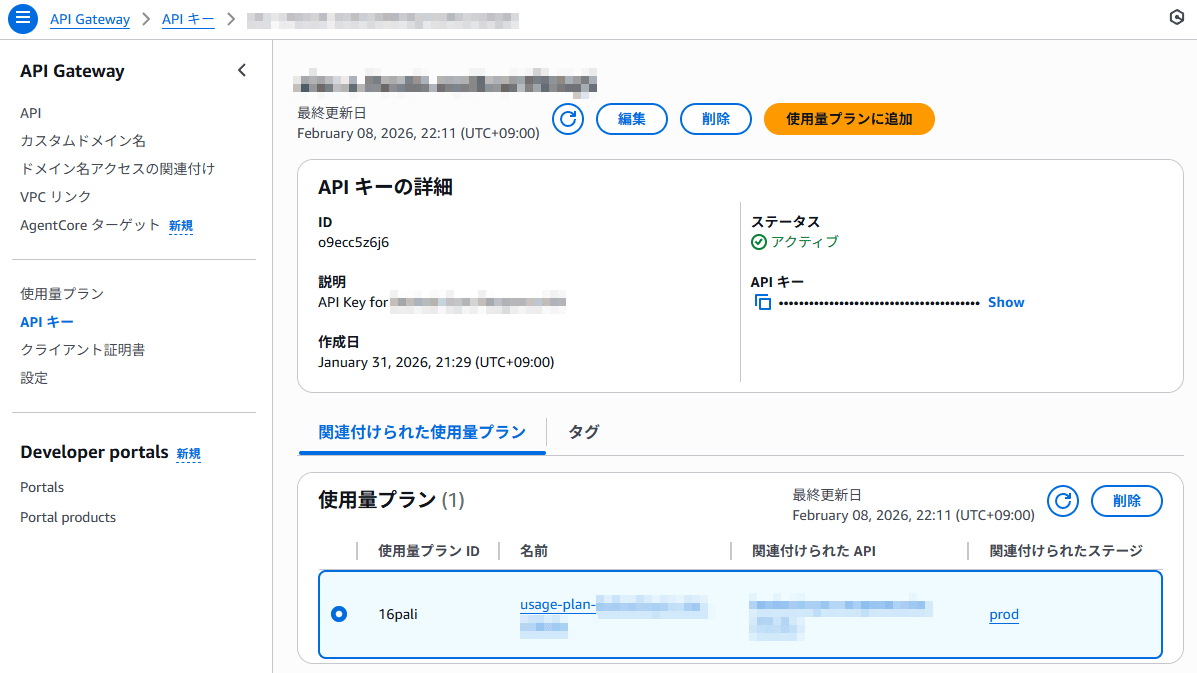
あと、この API キーをどこか (例えば Secrets Manager とか) に自動保存できないかな、と思ったのですが、AWS CloudFormation の出力に出せない情報だったので、あきらめました。リソース作成後は、この画面で API キーを確認しています。
次に Amazon API Gateway REST API の設定画面です。
アプリから API キーを X-Api-Key ヘッダーに入れて送る場合は、API キーのソースを「Header」にします。デフォルトでそうなっています。
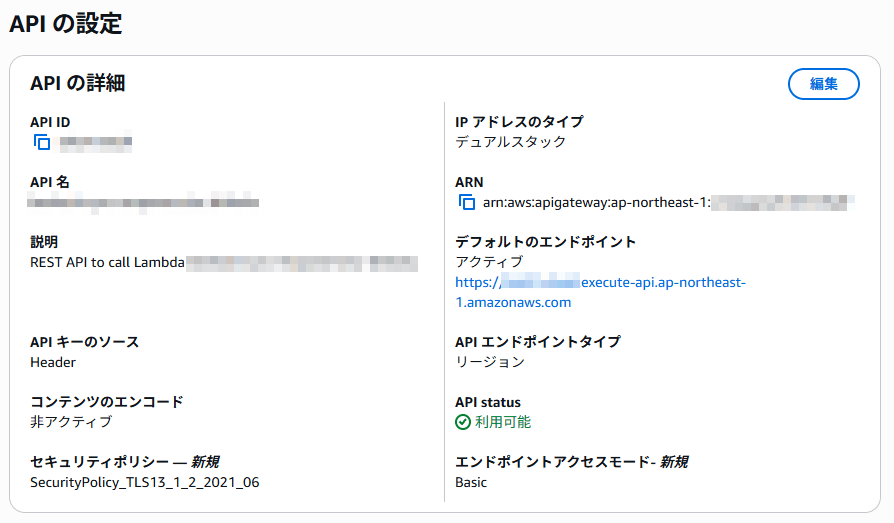
それ以外に、「新規」と書いてある設定がありました。
セキュリティポリシーで、使用する TLS バージョン (というか API がサポートする暗号化アルゴリズム) を選択できるようです。ALB を使ったことがある人なら、想像しやすいと思います。ところが AWS 公式ドキュメントに書いてあるオプションと画面のオプションがだいぶ異なっていたので、はてどう記述したらよいのだろう?と悩みましたが AWS マネジメントコンソールで表示されるままに書いてみたら通りました。
セキュリティポリシーを明示的に定義する場合には、エンドポイントアクセスモードも定義する必要があるようです。ここも AWS CloudFormation テンプレートの公式ドキュメントに記述方法が載っておらず悩みましたが、オプションが 2つしかないようでして、BASIC を書いてみたら通りました。
これまで AWS CloudFormation テンプレートを書きすぎて、どう書けば通るのか勘が利くようになってきましたね。笑
AWS CloudFormation テンプレート
AWS Lambda 関数との統合付きテンプレートにしていますが、Lambda 関数コードは省略しています。ARN を入れる箇所だけそのように明記しておきます。
AWSTemplateFormatVersion: 2010-09-09
Description: The CloudFormation template that creates an API Gateway REST API with an API key.

# ------------------------------------------------------------#
# Input Parameters
# ------------------------------------------------------------#
Parameters:
  SystemName:
    Type: String
    Description: System name. use lower case only. (e.g. example)
    Default: example
    MaxLength: 10
    MinLength: 1
    AllowedPattern: "^[a-z0-9]+$"

  SubName:
    Type: String
    Description: System sub name. use lower case only. (e.g. prod or dev)
    Default: dev
    MaxLength: 10
    MinLength: 1
    AllowedPattern: "^[a-z0-9]+$"

Metadata:
  AWS::CloudFormation::Interface:
    ParameterGroups:
      - Label:
          default: "General Configuration"
        Parameters:
          - SystemName
          - SubName

Resources:
# ------------------------------------------------------------#
# API Gateway REST API
# ------------------------------------------------------------#
  RestApi:
    Type: AWS::ApiGateway::RestApi
    Properties:
      Name: !Sub restapi-${SystemName}-${SubName}
      Description: !Sub REST API to call Lambda-${SystemName}-${SubName}
      ApiKeySourceType: HEADER
      EndpointAccessMode: BASIC
      EndpointConfiguration:
        Types:
          - REGIONAL
        IpAddressType: dualstack
      SecurityPolicy: SecurityPolicy_TLS13_1_2_2021_06
      Tags:
        - Key: Cost
          Value: !Sub ${SystemName}-${SubName}

  RestApiDeployment:
    Type: AWS::ApiGateway::Deployment
    Properties:
      RestApiId: !Ref RestApi
    DependsOn:
      - RestApiMethodPost
      - RestApiMethodOptions

  RestApiStage:
    Type: AWS::ApiGateway::Stage
    Properties:
      StageName: prod
      Description: production stage
      RestApiId: !Ref RestApi
      DeploymentId: !Ref RestApiDeployment
      MethodSettings:
        - ResourcePath: "/*"
          HttpMethod: "*"
          LoggingLevel: INFO
          DataTraceEnabled : true
      TracingEnabled: false
      Tags:
        - Key: Cost
          Value: !Sub ${SystemName}-${SubName}

  RestApiKey:
    Type: AWS::ApiGateway::ApiKey
    Properties:
      Description: !Sub API Key for ${SystemName}-${SubName}
      Enabled: true
      Tags:
        - Key: Cost
          Value: !Sub ${SystemName}-${SubName}

  RestApiUsagePlan:
    Type: AWS::ApiGateway::UsagePlan
    Properties:
      UsagePlanName: !Sub usage-plan-${SystemName}-${SubName}
      ApiStages:
        - ApiId: !Ref RestApi
          Stage: !Ref RestApiStage
      Throttle:
        RateLimit: 100
        BurstLimit: 200

  RestApiUsagePlanKey:
    Type: AWS::ApiGateway::UsagePlanKey
    Properties:
      KeyId: !Ref RestApiKey
      KeyType: API_KEY
      UsagePlanId: !Ref RestApiUsagePlan

  RestApiResource:
    Type: AWS::ApiGateway::Resource
    Properties:
      RestApiId: !Ref RestApi
      ParentId: !GetAtt RestApi.RootResourceId
      PathPart: post

  RestApiMethodPost:
    Type: AWS::ApiGateway::Method
    Properties:
      RestApiId: !Ref RestApi
      ResourceId: !Ref RestApiResource
      HttpMethod: POST
      AuthorizationType: NONE
      ApiKeyRequired: true
      Integration:
        Type: AWS_PROXY
        IntegrationHttpMethod: POST
        Credentials: !GetAtt ApigLambdaInvocationRole.Arn
        # 以下に Lambda 関数の ARN を入れる箇所がある
        Uri: !Sub "arn:aws:apigateway:${AWS::Region}:lambda:path/2015-03-31/functions/Lambda関数のARN/invocations"
    DependsOn:
      - ApigLambdaInvocationRole

  RestApiMethodOptions:
    Type: AWS::ApiGateway::Method
    Properties:
      RestApiId: !Ref RestApi
      ResourceId: !Ref RestApiResource
      HttpMethod: OPTIONS
      AuthorizationType: NONE
      Integration:
        Type: MOCK
        Credentials: !GetAtt ApigLambdaInvocationRole.Arn
        IntegrationResponses:
          - ResponseParameters:
              method.response.header.Access-Control-Allow-Headers: "'Content-Type,X-Api-Key'"
              method.response.header.Access-Control-Allow-Methods: "'POST,OPTIONS'"
              method.response.header.Access-Control-Allow-Origin: "'*'"
            ResponseTemplates:
              application/json: ''
            StatusCode: '200'
        PassthroughBehavior: WHEN_NO_MATCH
        RequestTemplates:
          application/json: '{"statusCode": 200}'
      MethodResponses:
        - ResponseModels:
            application/json: Empty
          ResponseParameters:
            method.response.header.Access-Control-Allow-Headers: true
            method.response.header.Access-Control-Allow-Methods: true
            method.response.header.Access-Control-Allow-Origin: true
          StatusCode: '200'

# ------------------------------------------------------------#
# API Gateway Lambda Invocation Role (IAM)
# ------------------------------------------------------------#
  ApigLambdaInvocationRole:
    Type: AWS::IAM::Role
    Properties:
      RoleName: !Sub ApigLambdaInvocationRole-${SystemName}-${SubName}
      Description: This role allows API Gateway to invoke specific Lambda functions.
      AssumeRolePolicyDocument:
        Version: 2012-10-17
        Statement:
          - Effect: Allow
            Principal:
              Service:
              - apigateway.amazonaws.com
            Action:
              - sts:AssumeRole
      Path: /
      Policies:
        - PolicyName: !Sub ApigLambdaInvocationPolicy-${SystemName}-${SubName}
          PolicyDocument:
            Version: 2012-10-17
            Statement:
              - Effect: Allow
                Action:
                  - lambda:InvokeFunction
                Resource:
                  # ここに Lambda 関数の ARN を入れる

# ------------------------------------------------------------#
# Output Parameters
# ------------------------------------------------------------#
Outputs:
# API Gateway
  APIGatewayEndpoint:
    Value: !Sub https://${RestApi}.execute-api.${AWS::Region}.${AWS::URLSuffix}/${RestApiStage}/post
まとめ
いかがでしたでしょうか?
本記事が、お困りの方の検索に引っかかってお役に立てれば幸いです。