
こんにちは、広野です。
以下の記事の続編記事です。RAG で CSV データからの検索精度向上を目指してみました。本記事は実装編で、主にバックエンドの設定について記載しています。UI や実際の動作については続編記事の UI 編で紹介します。
やりたいこと (再掲)
以下のような架空のヘルプデスク問い合わせ履歴データ (CSV) を用意しました。
ヘルプデスク担当者が新たな問い合わせを受けたときに、似たような過去の対応履歴を引き当てられるようにしたい、というのが目的です。

- LLM に、今届いた新しい問い合わせに対する回答案を提案させたい。
- 回答案を生成するために、自然言語で書かれた問い合わせ内容と回答内容から、意味的に近いデータを引き当てたい。
- カテゴリで検索対象をフィルタしたい。その方が精度が上がるケースがあると考えられる。
- LLM が回答案を提案するときには、参考にした過去対応履歴がどの問合せ番号のものか、提示させたい。その問合せ番号をキーに、生の対応履歴データを参照できるようにしたい。
以下の前提があります。
- データソースとなる CSV ファイルは 1つのみ。過去の対応履歴は 1 つの CSV ファイルに収まっているということ。
- つまり、データの1行が1件の問い合わせであり、その項目間には意味的なつながりがある。
まあ、ごくごく一般的なニーズではないかと思います。
関連記事
以前、私が公開した Amazon Bedrock Knowledge Bases や Amazon S3 Vectors を使用した RAG 基盤の記事です。今回はこの基盤のチャンキング戦略をカスタマイズして臨みました。
本記事の言及範囲
RAG そのものや、RAG 基盤については本記事では語りません。
以下のアーキテクチャ図の中の、赤枠の部分に着目します。ベクトルデータを格納するまでのデータソースのカスタムチャンキングと、それを実装した Amazon Bedrock Knowledge Bases にどう問い合わせするか、です。
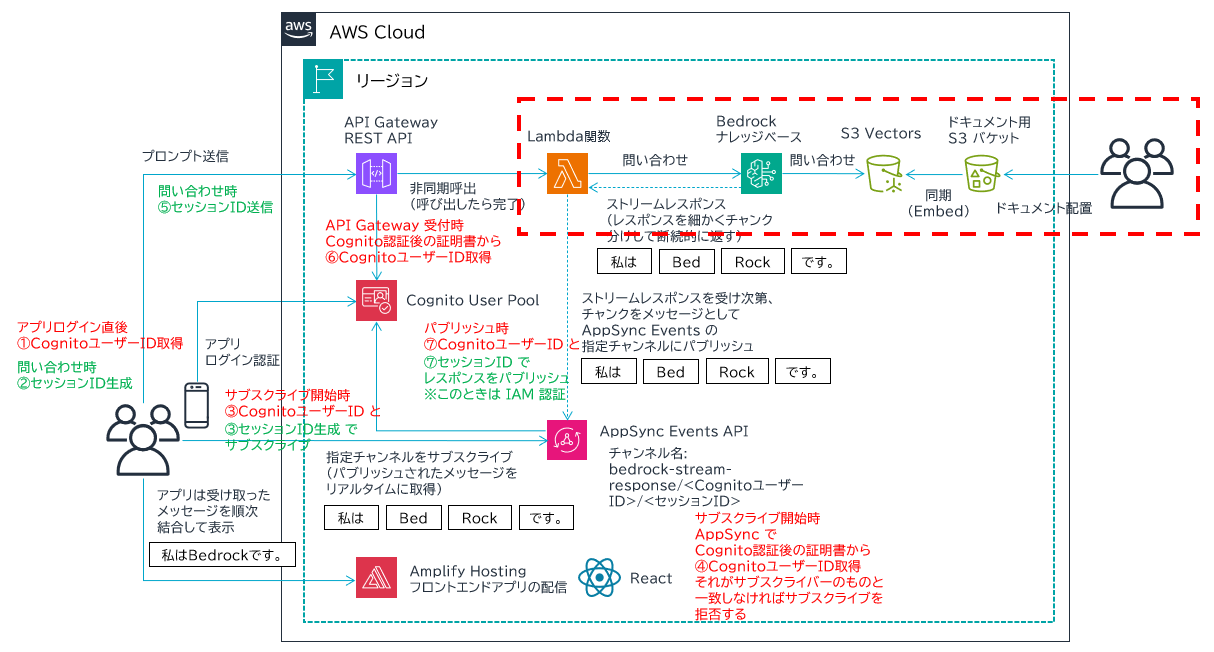
アーキテクチャ (再掲)
前回記事で紹介した、カスタムチャンキングを実装するアーキテクチャです。

実装
Amazon Bedrock Knowledge Bases
カスタムチャンキングの一連の処理は、Amazon Bedrock Knowledge Bases で行われます。各種設定の全体像は AWS マネジメントコンソールの画面で一望できます。
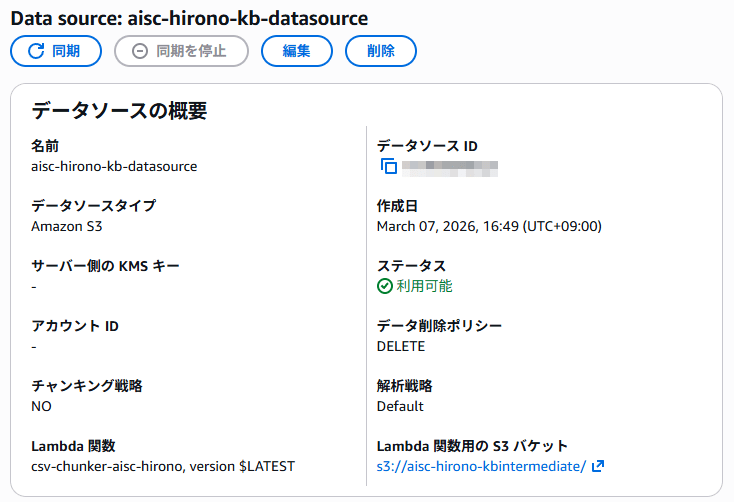
- カスタムチャンキングを AWS Lambda 関数に処理させるので、当然 Lambda 関数が必要です。(内容は後述)
- Lambda 関数が出力するチャンク分割後のデータ (中間成果物の JSON) を保存する S3 バケットが必要です。これはオリジナルのドキュメント配置用 S3 バケットとは別にする必要があります。
- チャンキング戦略は NO にします。NO にすると、オリジナルのドキュメントの内容をそのまま Lambda 関数に渡してくれます。別の戦略を選択すると、その戦略によってチャンク分割されたデータごとに Lambda 関数を実行してしまうので、期待するカスタムチャンク分割ができなくなります。
- 解析戦略は Default にします。
- チャンキング戦略と解析戦略は、データソース作成後には変更できません。変更したいときは作り直しになります。
- データ削除ポリシーは DELETE にすることをお勧めします。同期をかけたときに過去のデータを残すかどうかの設定で、残してしまうと古い情報が検索に引っ掛かってしまいます。
AWS Lambda 関数 (カスタムチャンキング)
カスタムチャンキングする Lambda 関数コード (Python) です。
冒頭に紹介した CSV を、Amazon Bedrock Knowledge Bases が理解できるフォーマットの JSON データに変換します。内部的には 1 チャンクごとに自然言語で検索させたいデータとメタデータに分けて出力します。
Lambda レイヤーは不要です。モジュールは Lambda 標準でサポートしているものだけで実装可能でした。
インプットとなる S3 バケット内の CSV データのメタデータは、Amazon Bedrock Knowledge Bases がこの Lambda 関数を呼び出すときに渡してくれるので、こちらが特に気にすることはありません。受け取ったバケット名、キーから CSV データを取得しに行きます。出力先となる S3 バケットやキー名も Amazon Bedrock Knowledge Bases から渡されますのでこの関数内でベタ書きすることはありません。
データフォーマットの変換処理の内容的には、そんなに難しいことはしていません。大事なのは出力フォーマットです。
import json
import csv
import boto3
from io import StringIO
s3 = boto3.client('s3')
def lambda_handler(event, context):
  try:
    bucket_name = event.get('bucketName')
    input_files = event.get('inputFiles', [])
    output_files = []
    for file_info in input_files:
      original_file_location = file_info.get('originalFileLocation', {})
      s3_location = original_file_location.get('s3Location', {})
      original_uri = s3_location.get('uri', '')
      content_batches = file_info.get('contentBatches', [])
      output_batches = []
      for batch in content_batches:
        input_key = batch.get('key')
        # Read input file from S3
        response = s3.get_object(Bucket=bucket_name, Key=input_key)
        input_content = json.loads(response['Body'].read().decode('utf-8'))
        # Extract CSV content
        csv_content = input_content['fileContents'][0]['contentBody']
        # Remove BOM if present (input may have BOM)
        if csv_content.startswith('\ufeff'):
          csv_content = csv_content[1:]
        csv_reader = csv.DictReader(StringIO(csv_content))
        # Process each row as a chunk
        file_contents = []
        for row in csv_reader:
          content_body = f"問合せ番号: {row.get('問合せ番号', '')}\n商品番号: {row.get('商品番号', '')}\n\n問合せ内容:\n{row.get('問合せ内容', '')}\n\n回答内容:\n{row.get('回答内容', '')}"
          content_metadata = {
            "問合せ番号": row.get('問合せ番号', ''),
            "販売形態": row.get('販売形態', ''),
            "受付日時": row.get('受付日時', ''),
            "完了日時": row.get('完了日時', ''),
            "商品番号": row.get('商品番号', ''),
            "カテゴリ": row.get('カテゴリ', ''),
            "ステータス": row.get('ステータス', '')
          }
          file_contents.append({
            "contentBody": content_body,
            "contentType": "TEXT",
            "contentMetadata": content_metadata
          })
        # Write output file to S3
        output_key = input_key.replace('.json', '_transformed.json')
        output_data = {"fileContents": file_contents}
        s3.put_object(
          Bucket=bucket_name,
          Key=output_key,
          Body=json.dumps(output_data, ensure_ascii=False),
          ContentType='application/json'
        )
        output_batches.append({"key": output_key})
      output_files.append({
        "originalFileLocation": original_file_location,
        "fileMetadata": file_info.get('fileMetadata', {}),
        "contentBatches": output_batches
      })
    return {"outputFiles": output_files}
  except Exception as e:
    print(f"Error: {str(e)}")
    import traceback
    traceback.print_exc()
    raise
チャンク分割された後のデータ構造 (再掲)
Lambda 関数がチャンク分割した後のデータ構造 (上のアーキテクチャ図では 5番の処理によって作成されるもの) は、以下のようになります。
{
  "fileContents": [
    {
      "contentBody": "問合せ番号: AB01234569\n商品番号: SH001-01BL\n\n問合せ内容:\n[問合せ内容の文章]\n\n回答内容:\n[回答内容の文章]",
      "contentType": "TEXT",
      "contentMetadata": {
        "問合せ番号": "AB01234569",
        "販売形態": "代理店",
        "受付日時": "2026/2/23 12:59",
        "完了日時": "2026/2/23 13:39",
        "商品番号": "SH001-01BL",
        "カテゴリ": "家庭用収納棚",
        "ステータス": "完了"
      }
    },
    {
      "contentBody": "問合せ番号: AB01234573\n商品番号: TB19541\n\n問合せ内容:\n[問合せ内容の文章]\n\n回答内容:\n[回答内容の文章]",
      "contentType": "TEXT",
      "contentMetadata": {
        "問合せ番号": "AB01234573",
        "販売形態": "直販",
        "受付日時": "2026/2/24 9:15",
        "完了日時": "2026/2/24 14:30",
        "商品番号": "TB19541",
        "カテゴリ": "家庭用テーブル",
        "ステータス": "完了"
      }
    }
  ]
}
- fileContents 配列の各要素が 1 チャンク(CSV の 1 行に相当)
- contentBody がベクトル化・検索対象にできるテキスト
- contentMetadata が引用表示やフィルタリングに使用されるメタデータ ※contentBody ももちろん引用可能
ここまで実装できると、Amazon Bedrock Knowledge Bases に対して contentBody に書かれた内容に対して自然言語で検索できたり、検索時にメタデータの項目単位でフィルタリングできるようになります。
メタデータフィルタリングについて
Amazon Bedrock Knowledge Bases ができてしまえば、自然言語による問い合わせは RetrieveAndGenerate API を使用して極論プロンプトさえ送ればいいので、難しいことはありません。しかし、メタデータフィルタリング機能を追加すると、設計次第ではコードが複雑になります。
ここで、メタデータフィルタリングについて仕様を説明します。
- メタデータ条件にマッチするチャンクのみにベクトル検索を行うため、不要な結果を排除することができ、検索精度の向上が期待できる。
- メタデータ項目に対してかけられる文字列検索条件は、完全一致や、指定した文字列を含む、などいろいろできる。Amazon S3 Vectors でサポートしている条件は以下公式ドキュメントを参照。
- メタデータ項目は、複数項目を And や Or で組み合わせることが可能。


つまり、かなり細かいフィルタリングができるということです。
以下にメタデータフィルタリングを設定するときの Lambda 関数コードの一部を紹介します。
- 単一のメタデータ条件
「販売形態が代理店で完全一致」でフィルタリングしたいとき
retrievalConfiguration={
  "vectorSearchConfiguration": {
    "filter": {
      "equals": { "key": "販売形態", "value": "代理店" }
    }
  }
}
- 複数のメタデータ条件
「販売形態が代理店で完全一致」かつ「カテゴリが家庭用コタツで完全一致」でフィルタリングしたいとき
retrievalConfiguration={
  "vectorSearchConfiguration": {
    "filter": {
      "andAll": [
        { "equals": { "key": "販売形態", "value": "代理店" } },
        { "equals": { "key": "カテゴリ", "value": "家庭用コタツ" } }
      ]
    }
  }
}
見てもらえるとわかると思いますが、複数のメタデータ条件では 2 つの equals 条件を andAll で囲んでいると思います。上記はまだシンプルですが、複数の条件が重なれば重なるほど、このような階層構造をさらにコーディングしなければなりません。Or 条件も可能とすると、さらに複雑になりそうです。
今回のブログ記事では、簡略化のため上記のように「販売形態」と「カテゴリ」の 2 つのメタデータのみフィルタリング可能なように設計します。
- フィルタ対象項目
- 販売形態(2種類: 直販, 代理店)
- カテゴリ(10種類: 家庭用コタツ, 家庭用テーブル, 家庭用収納棚, 家庭用チェア, 家庭用デスク, 業務用ラック, 業務用キャビネット, 業務用会議テーブル, 業務用チェア, 業務用デスク)
- フィルタ条件選択時の動作
- 両方未選択 → フィルタリングなし(全件検索)
- 片方のみ選択 → 選択したキーワードに完全一致で単一条件検索
- 両方選択 → AND 条件検索、それぞれ選択したキーワードに完全一致とする
AWS Lambda 関数 (ナレッジベースへの問い合わせ)
前述のメタデータフィルタリング機能を実装した、Amazon Bedrock Knowledge Bases の RetrieveAndGenerate API をコールする AWS Lambda 関数コードは以下のようになります。
Amazon API Gateway REST API から呼び出され、AWS AppSync Events にストリームレスポンスを返す構成です。コメントで メタデータフィルタリングの組み立て と書いてある部分が先ほど説明した部分の実装です。
インプットとして
"filters": [
  {"販売形態": "代理店"},
  {"カテゴリ": "家庭用コタツ"}
]
のようなメタデータフィルタリングパラメータを受け取る想定です。条件が2つあれば andAll で囲う処理を実装しています。
import os
import json
import boto3
import urllib.request
from botocore.auth import SigV4Auth
from botocore.awsrequest import AWSRequest
# common objects and valiables
session = boto3.session.Session()
bedrock_agent = boto3.client('bedrock-agent-runtime')
endpoint = os.environ['APPSYNC_API_ENDPOINT']
model_arn = os.environ['MODEL_ARN']
knowledge_base_id = os.environ['KNOWLEDGE_BASE_ID']
region = os.environ['REGION']
service = 'appsync'
headers = {'Content-Type': 'application/json'}
# AppSync publish message function
def publish_appsync_message(sub, appsync_session_id, payload, credentials):
  body = json.dumps({
    "channel": f"rag-stream-response/{sub}/{appsync_session_id}",
    "events": [ json.dumps(payload) ]
  }).encode("utf-8")
  aws_request = AWSRequest(
    method='POST',
    url=endpoint,
    data=body,
    headers=headers
  )
  SigV4Auth(credentials, service, region).add_auth(aws_request)
  req = urllib.request.Request(
    url=endpoint,
    data=aws_request.body,
    method='POST'
  )
  for k, v in aws_request.headers.items():
    req.add_header(k, v)
  with urllib.request.urlopen(req) as res:
    return res.read().decode('utf-8')
# handler
def lambda_handler(event, context):
  try:
    credentials = session.get_credentials().get_frozen_credentials()
    # API Gateway からのインプットを取得
    prompt = event['body']['prompt']
    appsync_session_id = event['body']['appsyncSessionId']
    bedrock_session_id = event['body'].get('bedrockSessionId')
    sub = event['sub']
    # Amazon Bedrock Knowledge Bases への問い合わせパラメータ作成
    request = {
      "input": {
        "text": prompt
      },
      "retrieveAndGenerateConfiguration": {
        "type": "KNOWLEDGE_BASE",
        "knowledgeBaseConfiguration": {
          "knowledgeBaseId": knowledge_base_id,
          "modelArn": model_arn,
          "generationConfiguration": {
            "inferenceConfig": {
              "textInferenceConfig": {
                "maxTokens": 10000,
                "temperature": 0.5,
                "topP": 0.9
              }
            },
            "performanceConfig": {
              "latency": "standard"
            },
            "promptTemplate": {
              "textPromptTemplate": (
                "あなたは優秀なヘルプデスクアシスタントです。ヘルプデスク担当者からの質問に対して、必ず日本語で回答してください。"
                "適切な回答が見つからない場合は、正直に「分かりません」と回答してください。\n\n"
                "検索結果:\n$search_results$\n\n"
                "回答指示: $output_format_instructions$"
              )
            }
          }
        }
      }
    }
    # メタデータフィルタ条件の組み立て
    filters = event['body'].get('filters', [])
    if filters:
      conditions = [{"equals": {"key": k, "value": v}} for f in filters for k, v in f.items()]
      if len(conditions) == 1:
        retrieval_filter = conditions[0]
      else:
        retrieval_filter = {"andAll": conditions}
      request["retrieveAndGenerateConfiguration"]["knowledgeBaseConfiguration"]["retrievalConfiguration"] = {
        "vectorSearchConfiguration": {
          "filter": retrieval_filter
        }
      }
    # Bedrock sessionId は存在するときのみ渡す (継続会話時のみ)
    if bedrock_session_id:
      request["sessionId"] = bedrock_session_id
    # Bedrock Knowledge Bases への問い合わせ
    response = bedrock_agent.retrieve_and_generate_stream(**request)
    # Bedrock sessionId
    if "sessionId" in response:
      publish_appsync_message(
        sub,
        appsync_session_id,
        {
          "type": "bedrock_session",
          "bedrock_session_id": response["sessionId"]
        },
        credentials
      )
    for chunk in response["stream"]:
      payload = None
      # Generated text
      if "output" in chunk and "text" in chunk["output"]:
        payload = {
          "type": "text",
          "message": chunk["output"]["text"]
        }
        print({"t": chunk["output"]["text"]})
      # Citation
      elif "citation" in chunk:
        payload = {
          "type": "citation",
          "citation": chunk['citation']['retrievedReferences']
        }
        print({"c": chunk['citation']['retrievedReferences']})
      # Continue
      if not payload:
        continue
      # Publish AppSync
      publish_appsync_message(sub, appsync_session_id, payload, credentials)
  except Exception as e:
    print(str(e))
    raise
AWS CloudFormation テンプレート
Amazon API Gateway REST API や AWS AppSync Events API など、関連するリソースを一式デプロイするテンプレートを掲載します。これ単体では動かないと思いますので、参考までに。ここまで実装できると、アプリ UI から API をコールすることでチャットボット UI を作れます。
AWSTemplateFormatVersion: 2010-09-09
Description: The CloudFormation template that creates a S3 vector bucket and index as a RAG Knowledge base.
# ------------------------------------------------------------#
# Input Parameters
# ------------------------------------------------------------#
Parameters:
SystemName:
Type: String
Description: System name. use lower case only. (e.g. example)
Default: example
MaxLength: 10
MinLength: 1
SubName:
Type: String
Description: System sub name. use lower case only. (e.g. prod or dev)
Default: dev
MaxLength: 10
MinLength: 1
DomainName:
Type: String
Description: Domain name for URL. xxxxx.xxx (e.g. example.com)
Default: example.com
AllowedPattern: "[^\\s@]+\\.[^\\s@]+"
SubDomainName:
Type: String
Description: Sub domain name for URL. (e.g. example-prod or example-dev)
Default: example-dev
MaxLength: 20
MinLength: 1
Dimension:
Type: Number
Description: The dimensions of the vectors to be inserted into the vector index. The value depends on the embedding model.
Default: 1024
MaxValue: 4096
MinValue: 1
EmbeddingModelId:
Type: String
Description: The embedding model ID.
Default: amazon.titan-embed-text-v2:0
MaxLength: 100
MinLength: 1
LlmModelId:
Type: String
Description: The LLM model ID for the Knowledge base.
Default: global.amazon.nova-2-lite-v1:0
MaxLength: 100
MinLength: 1
Metadata:
AWS::CloudFormation::Interface:
ParameterGroups:
- Label:
default: "General Configuration"
Parameters:
- SystemName
- SubName
- Label:
default: "Domain Configuration"
Parameters:
- DomainName
- SubDomainName
- Label:
default: "Embedding Configuration"
Parameters:
- Dimension
- EmbeddingModelId
- Label:
default: "Knowledge Base Configuration"
Parameters:
- LlmModelId
Resources:
# ------------------------------------------------------------#
# S3
# ------------------------------------------------------------#
S3BucketKbDatasource:
Type: AWS::S3::Bucket
Properties:
BucketName: !Sub ${SystemName}-${SubName}-kbdatasource
PublicAccessBlockConfiguration:
BlockPublicAcls: true
BlockPublicPolicy: true
IgnorePublicAcls: true
RestrictPublicBuckets: true
CorsConfiguration:
CorsRules:
- AllowedHeaders:
- "*"
AllowedMethods:
- "GET"
- "HEAD"
- "PUT"
- "POST"
- "DELETE"
AllowedOrigins:
- !Sub https://${SubDomainName}.${DomainName}
ExposedHeaders:
- last-modified
- content-type
- content-length
- etag
- x-amz-version-id
- x-amz-request-id
- x-amz-id-2
- x-amz-cf-id
- x-amz-storage-class
- date
- access-control-expose-headers
MaxAge: 3000
Tags:
- Key: Cost
Value: !Sub ${SystemName}-${SubName}
S3BucketPolicyKbDatasource:
Type: AWS::S3::BucketPolicy
Properties:
Bucket: !Ref S3BucketKbDatasource
PolicyDocument:
Version: "2012-10-17"
Statement:
- Effect: Deny
Principal: "*"
Action: "s3:*"
Resource:
- !Sub "arn:aws:s3:::${S3BucketKbDatasource}"
- !Sub "arn:aws:s3:::${S3BucketKbDatasource}/*"
Condition:
Bool:
"aws:SecureTransport": "false"
DependsOn:
- S3BucketKbDatasource
S3VectorBucket:
Type: AWS::S3Vectors::VectorBucket
Properties:
VectorBucketName: !Sub ${SystemName}-${SubName}-vectordb
S3BucketKbIntermediate:
Type: AWS::S3::Bucket
Properties:
BucketName: !Sub ${SystemName}-${SubName}-kbintermediate
PublicAccessBlockConfiguration:
BlockPublicAcls: true
BlockPublicPolicy: true
IgnorePublicAcls: true
RestrictPublicBuckets: true
Tags:
- Key: Cost
Value: !Sub ${SystemName}-${SubName}
S3BucketPolicyKbIntermediate:
Type: AWS::S3::BucketPolicy
Properties:
Bucket: !Ref S3BucketKbIntermediate
PolicyDocument:
Version: "2012-10-17"
Statement:
- Effect: Deny
Principal: "*"
Action: "s3:*"
Resource:
- !Sub "arn:aws:s3:::${S3BucketKbIntermediate}"
- !Sub "arn:aws:s3:::${S3BucketKbIntermediate}/*"
Condition:
Bool:
"aws:SecureTransport": "false"
DependsOn:
- S3BucketKbIntermediate
S3VectorBucketIndex:
Type: AWS::S3Vectors::Index
Properties:
IndexName: !Sub ${SystemName}-${SubName}-vectordb-index
DataType: float32
Dimension: !Ref Dimension
DistanceMetric: cosine
VectorBucketArn: !GetAtt S3VectorBucket.VectorBucketArn
MetadataConfiguration:
NonFilterableMetadataKeys:
- AMAZON_BEDROCK_TEXT
- AMAZON_BEDROCK_METADATA
DependsOn:
- S3VectorBucket
# ------------------------------------------------------------#
# Bedrock Knowledge Base
# ------------------------------------------------------------#
BedrockKnowledgeBase:
Type: AWS::Bedrock::KnowledgeBase
Properties:
Name: !Sub ${SystemName}-${SubName}-kb
Description: !Sub RAG Knowledge Base for ${SystemName}-${SubName}
KnowledgeBaseConfiguration:
Type: VECTOR
VectorKnowledgeBaseConfiguration:
EmbeddingModelArn: !Sub arn:aws:bedrock:${AWS::Region}::foundation-model/${EmbeddingModelId}
RoleArn: !GetAtt IAMRoleBedrockKb.Arn
StorageConfiguration:
Type: S3_VECTORS
S3VectorsConfiguration:
IndexArn: !GetAtt S3VectorBucketIndex.IndexArn
VectorBucketArn: !GetAtt S3VectorBucket.VectorBucketArn
Tags:
Cost: !Sub ${SystemName}-${SubName}
DependsOn:
- IAMRoleBedrockKb
BedrockKnowledgeBaseDataSource:
Type: AWS::Bedrock::DataSource
Properties:
Name: !Sub ${SystemName}-${SubName}-kb-datasource
Description: !Sub RAG Knowledge Base Data Source for ${SystemName}-${SubName}
KnowledgeBaseId: !Ref BedrockKnowledgeBase
DataDeletionPolicy: DELETE
DataSourceConfiguration:
Type: S3
S3Configuration:
BucketArn: !GetAtt S3BucketKbDatasource.Arn
VectorIngestionConfiguration:
ChunkingConfiguration:
ChunkingStrategy: NONE
CustomTransformationConfiguration:
Transformations:
- TransformationFunction:
TransformationLambdaConfiguration:
LambdaArn: !GetAtt LambdaCsvChunker.Arn
StepToApply: POST_CHUNKING
IntermediateStorage:
S3Location:
URI: !Sub s3://${S3BucketKbIntermediate}/
DependsOn:
- S3BucketKbDatasource
- BedrockKnowledgeBase
- S3BucketKbIntermediate
# ------------------------------------------------------------#
# AppSync Events
# ------------------------------------------------------------#
AppSyncChannelNamespaceRagSR:
Type: AWS::AppSync::ChannelNamespace
Properties:
Name: rag-stream-response
ApiId:
Fn::ImportValue:
!Sub AppSyncApiId-${SystemName}-${SubName}
CodeHandlers: |
import { util } from '@aws-appsync/utils';
export function onSubscribe(ctx) {
const requested = ctx.info.channel.path;
if (!requested.startsWith(`/rag-stream-response/${ctx.identity.sub}`)) {
util.unauthorized();
}
}
Tags:
- Key: Cost
Value: !Sub ${SystemName}-${SubName}
# ------------------------------------------------------------#
# API Gateway REST API
# ------------------------------------------------------------#
RestApiRagSR:
Type: AWS::ApiGateway::RestApi
Properties:
Name: !Sub rag-sr-${SystemName}-${SubName}
Description: !Sub REST API to call Lambda rag-stream-response-${SystemName}-${SubName}
EndpointConfiguration:
Types:
- REGIONAL
IpAddressType: dualstack
Tags:
- Key: Cost
Value: !Sub ${SystemName}-${SubName}
RestApiDeploymentRagSR:
Type: AWS::ApiGateway::Deployment
Properties:
RestApiId: !Ref RestApiRagSR
DependsOn:
- RestApiMethodRagSRPost
- RestApiMethodRagSROptions
RestApiStageRagSR:
Type: AWS::ApiGateway::Stage
Properties:
StageName: prod
Description: production stage
RestApiId: !Ref RestApiRagSR
DeploymentId: !Ref RestApiDeploymentRagSR
MethodSettings:
- ResourcePath: "/*"
HttpMethod: "*"
LoggingLevel: INFO
DataTraceEnabled : true
TracingEnabled: false
AccessLogSetting:
DestinationArn: !GetAtt LogGroupRestApiRagSR.Arn
Format: '{"requestId":"$context.requestId","status":"$context.status","sub":"$context.authorizer.claims.sub","email":"$context.authorizer.claims.email","resourcePath":"$context.resourcePath","requestTime":"$context.requestTime","sourceIp":"$context.identity.sourceIp","userAgent":"$context.identity.userAgent","apigatewayError":"$context.error.message","authorizerError":"$context.authorizer.error","integrationError":"$context.integration.error"}'
Tags:
- Key: Cost
Value: !Sub ${SystemName}-${SubName}
RestApiAuthorizerRagSR:
Type: AWS::ApiGateway::Authorizer
Properties:
Name: !Sub restapi-authorizer-ragsr-${SystemName}-${SubName}
RestApiId: !Ref RestApiRagSR
Type: COGNITO_USER_POOLS
ProviderARNs:
- Fn::ImportValue:
!Sub CognitoArn-${SystemName}-${SubName}
AuthorizerResultTtlInSeconds: 300
IdentitySource: method.request.header.Authorization
RestApiResourceRagSR:
Type: AWS::ApiGateway::Resource
Properties:
RestApiId: !Ref RestApiRagSR
ParentId: !GetAtt RestApiRagSR.RootResourceId
PathPart: ragsr
RestApiMethodRagSRPost:
Type: AWS::ApiGateway::Method
Properties:
RestApiId: !Ref RestApiRagSR
ResourceId: !Ref RestApiResourceRagSR
HttpMethod: POST
AuthorizationType: COGNITO_USER_POOLS
AuthorizerId: !Ref RestApiAuthorizerRagSR
Integration:
Type: AWS
IntegrationHttpMethod: POST
Credentials:
Fn::ImportValue:
!Sub ApigLambdaInvocationRoleArn-${SystemName}-${SubName}
Uri: !Sub "arn:aws:apigateway:${AWS::Region}:lambda:path/2015-03-31/functions/${LambdaRagSR.Arn}/invocations"
PassthroughBehavior: NEVER
RequestTemplates:
application/json: |
{
"body": $input.json('$'),
"sub": "$context.authorizer.claims.sub"
}
RequestParameters:
integration.request.header.X-Amz-Invocation-Type: "'Event'"
IntegrationResponses:
- ResponseParameters:
method.response.header.Access-Control-Allow-Headers: "'Content-Type,X-Amz-Date,Authorization,X-Api-Key,X-Amz-Security-Token,Cache-Control'"
method.response.header.Access-Control-Allow-Methods: "'POST,OPTIONS'"
method.response.header.Access-Control-Allow-Origin: !Sub "'https://${SubDomainName}.${DomainName}'"
ResponseTemplates:
application/json: ''
StatusCode: '202'
MethodResponses:
- StatusCode: '202'
ResponseModels:
application/json: Empty
ResponseParameters:
method.response.header.Access-Control-Allow-Origin: true
method.response.header.Access-Control-Allow-Headers: true
method.response.header.Access-Control-Allow-Methods: true
RestApiMethodRagSROptions:
Type: AWS::ApiGateway::Method
Properties:
RestApiId: !Ref RestApiRagSR
ResourceId: !Ref RestApiResourceRagSR
HttpMethod: OPTIONS
AuthorizationType: NONE
Integration:
Type: MOCK
Credentials:
Fn::ImportValue:
!Sub ApigLambdaInvocationRoleArn-${SystemName}-${SubName}
IntegrationResponses:
- ResponseParameters:
method.response.header.Access-Control-Allow-Headers: "'Content-Type,X-Amz-Date,Authorization,X-Api-Key,X-Amz-Security-Token,Cache-Control'"
method.response.header.Access-Control-Allow-Methods: "'POST,OPTIONS'"
method.response.header.Access-Control-Allow-Origin: !Sub "'https://${SubDomainName}.${DomainName}'"
ResponseTemplates:
application/json: ''
StatusCode: '200'
PassthroughBehavior: WHEN_NO_MATCH
RequestTemplates:
application/json: '{"statusCode": 200}'
MethodResponses:
- ResponseModels:
application/json: Empty
ResponseParameters:
method.response.header.Access-Control-Allow-Headers: true
method.response.header.Access-Control-Allow-Methods: true
method.response.header.Access-Control-Allow-Origin: true
StatusCode: '200'
# ------------------------------------------------------------#
# API Gateway LogGroup (CloudWatch Logs)
# ------------------------------------------------------------#
LogGroupRestApiRagSR:
Type: AWS::Logs::LogGroup
Properties:
LogGroupName: !Sub /aws/apigateway/${RestApiRagSR}
RetentionInDays: 365
Tags:
- Key: Cost
Value: !Sub ${SystemName}-${SubName}
# ------------------------------------------------------------#
# Lambda
# ------------------------------------------------------------#
LambdaRagSR:
Type: AWS::Lambda::Function
Properties:
FunctionName: !Sub rag-sr-${SystemName}-${SubName}
Description: !Sub Lambda Function to invoke Bedrock Knowledge Bases for ${SystemName}-${SubName}
Architectures:
- x86_64
Runtime: python3.14
Timeout: 300
MemorySize: 128
Environment:
Variables:
APPSYNC_API_ENDPOINT:
Fn::ImportValue:
!Sub AppSyncEventsEndpointHttp-${SystemName}-${SubName}
MODEL_ARN: !Sub "arn:aws:bedrock:${AWS::Region}:${AWS::AccountId}:inference-profile/${LlmModelId}"
KNOWLEDGE_BASE_ID: !Ref BedrockKnowledgeBase
REGION: !Ref AWS::Region
Role: !GetAtt LambdaBedrockKbRole.Arn
Handler: index.lambda_handler
Tags:
- Key: Cost
Value: !Sub ${SystemName}-${SubName}
Code:
ZipFile: |
import os
import json
import boto3
import urllib.request
from botocore.auth import SigV4Auth
from botocore.awsrequest import AWSRequest
# common objects and valiables
session = boto3.session.Session()
bedrock_agent = boto3.client('bedrock-agent-runtime')
endpoint = os.environ['APPSYNC_API_ENDPOINT']
model_arn = os.environ['MODEL_ARN']
knowledge_base_id = os.environ['KNOWLEDGE_BASE_ID']
region = os.environ['REGION']
service = 'appsync'
headers = {'Content-Type': 'application/json'}
# AppSync publish message function
def publish_appsync_message(sub, appsync_session_id, payload, credentials):
body = json.dumps({
"channel": f"rag-stream-response/{sub}/{appsync_session_id}",
"events": [ json.dumps(payload) ]
}).encode("utf-8")
aws_request = AWSRequest(
method='POST',
url=endpoint,
data=body,
headers=headers
)
SigV4Auth(credentials, service, region).add_auth(aws_request)
req = urllib.request.Request(
url=endpoint,
data=aws_request.body,
method='POST'
)
for k, v in aws_request.headers.items():
req.add_header(k, v)
with urllib.request.urlopen(req) as res:
return res.read().decode('utf-8')
# handler
def lambda_handler(event, context):
try:
credentials = session.get_credentials().get_frozen_credentials()
# API Gateway からのインプットを取得
prompt = event['body']['prompt']
appsync_session_id = event['body']['appsyncSessionId']
bedrock_session_id = event['body'].get('bedrockSessionId')
sub = event['sub']
# Amazon Bedrock Knowledge Bases への問い合わせパラメータ作成
request = {
"input": {
"text": prompt
},
"retrieveAndGenerateConfiguration": {
"type": "KNOWLEDGE_BASE",
"knowledgeBaseConfiguration": {
"knowledgeBaseId": knowledge_base_id,
"modelArn": model_arn,
"generationConfiguration": {
"inferenceConfig": {
"textInferenceConfig": {
"maxTokens": 10000,
"temperature": 0.5,
"topP": 0.9
}
},
"performanceConfig": {
"latency": "standard"
},
"promptTemplate": {
"textPromptTemplate": (
"あなたは優秀なヘルプデスクアシスタントです。ヘルプデスク担当者からの質問に対して、必ず日本語で回答してください。"
"適切な回答が見つからない場合は、正直に「分かりません」と回答してください。\n\n"
"検索結果:\n$search_results$\n\n"
"回答指示: $output_format_instructions$"
)
}
}
}
}
}
# メタデータフィルタ条件の組み立て
filters = event['body'].get('filters', [])
if filters:
conditions = [{"equals": {"key": k, "value": v}} for f in filters for k, v in f.items()]
if len(conditions) == 1:
retrieval_filter = conditions[0]
else:
retrieval_filter = {"andAll": conditions}
request["retrieveAndGenerateConfiguration"]["knowledgeBaseConfiguration"]["retrievalConfiguration"] = {
"vectorSearchConfiguration": {
"filter": retrieval_filter
}
}
# Bedrock sessionId は存在するときのみ渡す (継続会話時のみ)
if bedrock_session_id:
request["sessionId"] = bedrock_session_id
# Bedrock Knowledge Bases への問い合わせ
response = bedrock_agent.retrieve_and_generate_stream(**request)
# Bedrock sessionId
if "sessionId" in response:
publish_appsync_message(
sub,
appsync_session_id,
{
"type": "bedrock_session",
"bedrock_session_id": response["sessionId"]
},
credentials
)
for chunk in response["stream"]:
payload = None
# Generated text
if "output" in chunk and "text" in chunk["output"]:
payload = {
"type": "text",
"message": chunk["output"]["text"]
}
print({"t": chunk["output"]["text"]})
# Citation
elif "citation" in chunk:
payload = {
"type": "citation",
"citation": chunk['citation']['retrievedReferences']
}
print({"c": chunk['citation']['retrievedReferences']})
# Continue
if not payload:
continue
# Publish AppSync
publish_appsync_message(sub, appsync_session_id, payload, credentials)
except Exception as e:
print(str(e))
raise
DependsOn:
- LambdaBedrockKbRole
- BedrockKnowledgeBase
LambdaRagSREventInvokeConfig:
Type: AWS::Lambda::EventInvokeConfig
Properties:
FunctionName: !GetAtt LambdaRagSR.Arn
Qualifier: $LATEST
MaximumRetryAttempts: 0
MaximumEventAgeInSeconds: 300
LambdaCsvChunker:
Type: AWS::Lambda::Function
Properties:
FunctionName: !Sub csv-chunker-${SystemName}-${SubName}
Description: !Sub Lambda Function to embed with custom chunk for ${SystemName}-${SubName}
Architectures:
- x86_64
Runtime: python3.14
Handler: index.lambda_handler
Timeout: 900
MemorySize: 512
Role: !GetAtt LambdaCsvChunkerRole.Arn
Tags:
- Key: Cost
Value: !Sub ${SystemName}-${SubName}
Code:
ZipFile: |
import json
import csv
import boto3
from io import StringIO
s3 = boto3.client('s3')
def lambda_handler(event, context):
try:
bucket_name = event.get('bucketName')
input_files = event.get('inputFiles', [])
output_files = []
for file_info in input_files:
original_file_location = file_info.get('originalFileLocation', {})
s3_location = original_file_location.get('s3Location', {})
original_uri = s3_location.get('uri', '')
content_batches = file_info.get('contentBatches', [])
output_batches = []
for batch in content_batches:
input_key = batch.get('key')
# Read input file from S3
response = s3.get_object(Bucket=bucket_name, Key=input_key)
input_content = json.loads(response['Body'].read().decode('utf-8'))
# Extract CSV content
csv_content = input_content['fileContents'][0]['contentBody']
# Remove BOM if present (input may have BOM)
if csv_content.startswith('\ufeff'):
csv_content = csv_content[1:]
csv_reader = csv.DictReader(StringIO(csv_content))
# Process each row as a chunk
file_contents = []
for row in csv_reader:
content_body = f"問合せ番号: {row.get('問合せ番号', '')}\n商品番号: {row.get('商品番号', '')}\n\n問合せ内容:\n{row.get('問合せ内容', '')}\n\n回答内容:\n{row.get('回答内容', '')}"
content_metadata = {
"問合せ番号": row.get('問合せ番号', ''),
"販売形態": row.get('販売形態', ''),
"受付日時": row.get('受付日時', ''),
"完了日時": row.get('完了日時', ''),
"商品番号": row.get('商品番号', ''),
"カテゴリ": row.get('カテゴリ', ''),
"ステータス": row.get('ステータス', '')
}
file_contents.append({
"contentBody": content_body,
"contentType": "TEXT",
"contentMetadata": content_metadata
})
# Write output file to S3
output_key = input_key.replace('.json', '_transformed.json')
output_data = {"fileContents": file_contents}
s3.put_object(
Bucket=bucket_name,
Key=output_key,
Body=json.dumps(output_data, ensure_ascii=False),
ContentType='application/json'
)
output_batches.append({"key": output_key})
output_files.append({
"originalFileLocation": original_file_location,
"fileMetadata": file_info.get('fileMetadata', {}),
"contentBatches": output_batches
})
return {"outputFiles": output_files}
except Exception as e:
print(f"Error: {str(e)}")
import traceback
traceback.print_exc()
raise
LambdaInvokePermissionCsvChunker:
Type: AWS::Lambda::Permission
Properties:
FunctionName: !Ref LambdaCsvChunker
Action: lambda:InvokeFunction
Principal: bedrock.amazonaws.com
SourceAccount: !Ref AWS::AccountId
# SourceArn: !Sub "arn:aws:bedrock:${AWS::Region}:${AWS::AccountId}:knowledge-base/${BedrockKnowledgeBase}"
DependsOn:
- LambdaCsvChunker
# - BedrockKnowledgeBase
# ------------------------------------------------------------#
# Lambda Role (IAM)
# ------------------------------------------------------------#
LambdaBedrockKbRole:
Type: AWS::IAM::Role
Properties:
RoleName: !Sub LambdaBedrockKbRole-${SystemName}-${SubName}
Description: This role allows Lambda functions to invoke Bedrock Knowledge Bases and AppSync Events API.
AssumeRolePolicyDocument:
Version: 2012-10-17
Statement:
- Effect: Allow
Principal:
Service:
- lambda.amazonaws.com
Action:
- sts:AssumeRole
Path: /
ManagedPolicyArns:
- arn:aws:iam::aws:policy/service-role/AWSLambdaBasicExecutionRole
- arn:aws:iam::aws:policy/AWSXRayDaemonWriteAccess
Policies:
- PolicyName: !Sub LambdaBedrockKbPolicy-${SystemName}-${SubName}
PolicyDocument:
Version: 2012-10-17
Statement:
- Effect: Allow
Action:
- "bedrock:InvokeModel"
- "bedrock:InvokeModelWithResponseStream"
- "bedrock:GetInferenceProfile"
- "bedrock:ListInferenceProfiles"
Resource:
- !Sub "arn:aws:bedrock:*::foundation-model/*"
- !Sub "arn:aws:bedrock:*:${AWS::AccountId}:inference-profile/*"
- Effect: Allow
Action:
- "bedrock:RetrieveAndGenerate"
- "bedrock:Retrieve"
Resource:
- !GetAtt BedrockKnowledgeBase.KnowledgeBaseArn
- Effect: Allow
Action:
- "appsync:connect"
Resource:
- Fn::ImportValue:
!Sub AppSyncApiArn-${SystemName}-${SubName}
- Effect: Allow
Action:
- "appsync:publish"
- "appsync:EventPublish"
Resource:
- Fn::Join:
- ""
- - Fn::ImportValue:
!Sub AppSyncApiArn-${SystemName}-${SubName}
- /channelNamespace/rag-stream-response
LambdaCsvChunkerRole:
Type: AWS::IAM::Role
Properties:
RoleName: !Sub LambdaCsvChunkerRole-${SystemName}-${SubName}
AssumeRolePolicyDocument:
Version: 2012-10-17
Statement:
- Effect: Allow
Principal:
Service: lambda.amazonaws.com
Action: sts:AssumeRole
ManagedPolicyArns:
- arn:aws:iam::aws:policy/service-role/AWSLambdaBasicExecutionRole
Policies:
- PolicyName: !Sub LambdaCsvChunkerPolicy-${SystemName}-${SubName}
PolicyDocument:
Version: 2012-10-17
Statement:
- Effect: Allow
Action:
- "s3:GetObject"
- "s3:PutObject"
- "s3:ListObject"
Resource:
- !GetAtt S3BucketKbDatasource.Arn
- !Sub ${S3BucketKbDatasource.Arn}/*
- !GetAtt S3BucketKbIntermediate.Arn
- !Sub ${S3BucketKbIntermediate.Arn}/*
# ------------------------------------------------------------#
# IAM Role for Bedrock Knowledge Base
# ------------------------------------------------------------#
IAMRoleBedrockKb:
Type: AWS::IAM::Role
Properties:
RoleName: !Sub BedrockKbRole-${SystemName}-${SubName}
AssumeRolePolicyDocument:
Version: 2012-10-17
Statement:
- Effect: Allow
Action:
- sts:AssumeRole
Principal:
Service:
- bedrock.amazonaws.com
Condition:
StringEquals:
"aws:SourceAccount": !Ref AWS::AccountId
# ArnLike:
# "aws:SourceArn": !Sub "arn:aws:bedrock:${AWS::Region}:${AWS::AccountId}:knowledge-base/*"
Policies:
- PolicyName: !Sub BedrockKbPolicy-${SystemName}-${SubName}
PolicyDocument:
Version: 2012-10-17
Statement:
- Effect: Allow
Action:
- "s3:GetObject"
- "s3:ListBucket"
- "s3:PutObject"
Resource:
- !GetAtt S3BucketKbDatasource.Arn
- !Sub ${S3BucketKbDatasource.Arn}/*
- !GetAtt S3BucketKbIntermediate.Arn
- !Sub ${S3BucketKbIntermediate.Arn}/*
- Effect: Allow
Action:
- "s3vectors:GetIndex"
- "s3vectors:QueryVectors"
- "s3vectors:PutVectors"
- "s3vectors:GetVectors"
- "s3vectors:DeleteVectors"
Resource:
- !GetAtt S3VectorBucketIndex.IndexArn
- Effect: Allow
Action:
- "bedrock:InvokeModel"
Resource:
- !Sub arn:aws:bedrock:${AWS::Region}::foundation-model/${EmbeddingModelId}
- Effect: Allow
Action:
- "lambda:InvokeFunction"
Resource:
- !Sub "arn:aws:lambda:${AWS::Region}:${AWS::AccountId}:function:csv-chunker-${SystemName}-${SubName}*"
DependsOn:
- S3BucketKbDatasource
- S3VectorBucketIndex
- LambdaCsvChunker
- S3BucketKbIntermediate
# ------------------------------------------------------------#
# Output Parameters
# ------------------------------------------------------------#
Outputs:
# S3
S3BucketKbDatasourceName:
Value: !Ref S3BucketKbDatasource
# API Gateway
APIGatewayEndpointRagSR:
Value: !Sub https://${RestApiRagSR}.execute-api.${AWS::Region}.${AWS::URLSuffix}/${RestApiStageRagSR}/ragsr
Export:
Name: !Sub RestApiEndpointRagSR-${SystemName}-${SubName}
続編記事
まとめ
いかがでしたでしょうか。
メタデータフィルタリングは設計次第でかなり細かい検索ができそうですが、その分コーディングが大変です。むやみに汎用的なフィルタ設定を実装しようとすると開発負担増やバグの温床になりそうなので、フィルタ対象項目はなるべく厳選した方がよいと思います。
本記事が皆様のお役に立てれば幸いです。