こんにちは。SCSK渡辺(大)です。
Proプランをサブスクリプションする前にClaude Codeをお試しで触ってみたかったので、世の中的には何番煎じか分かりませんが、Claude CodeをAmazon Bedrock経由で利用するための環境を作りました。
環境構築に必要なリソース群はAWS CloudFormationテンプレート(YAML)1つにまとめたので、デプロイも後片付けもコマンド一発です。
Amazon Bedrock経由の場合は従量課金で青天井になるため、おまけ程度ですがトークン数の監視アラートも仕込んでいます。
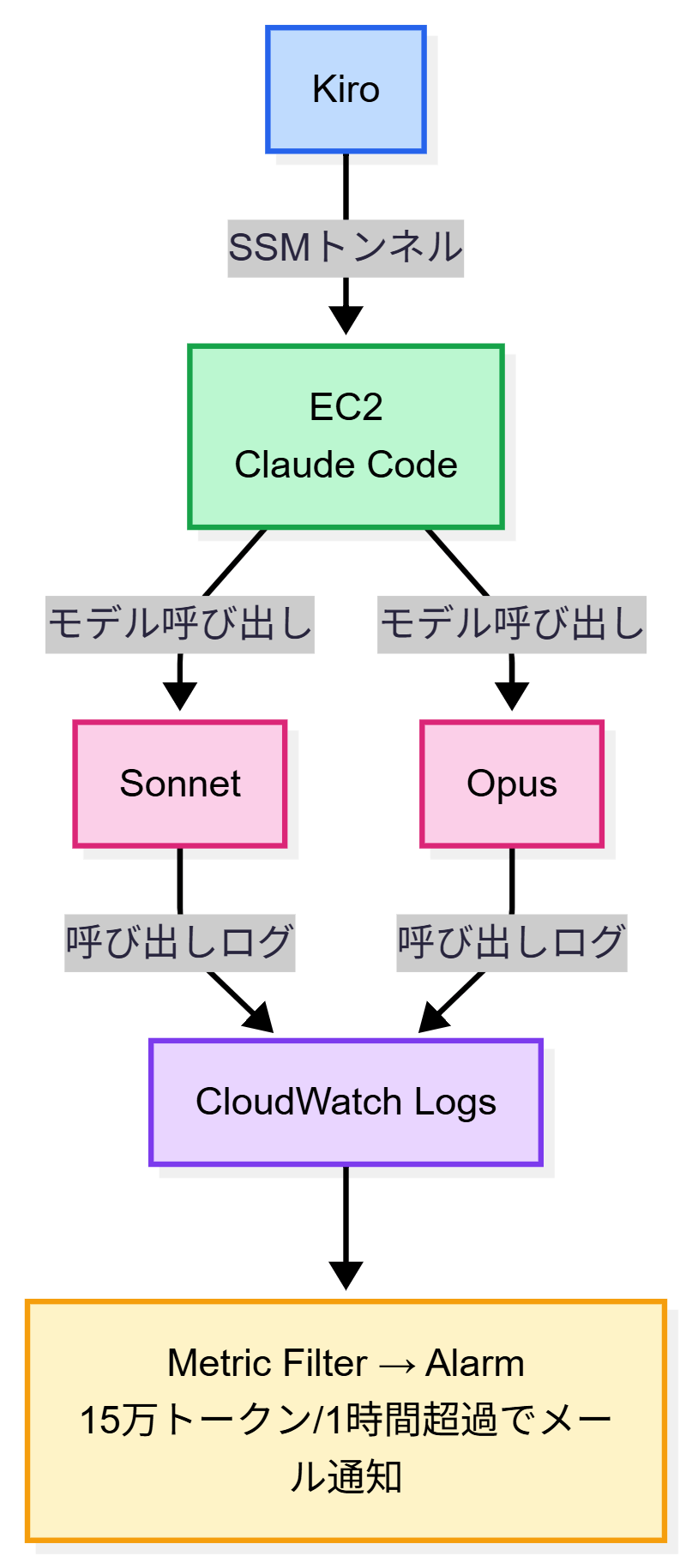
構成図
作るもの
YAMLのテンプレート1つで(AWS CloudFormationスタック1つで)以下を全部作ります。
- VPC + パブリックサブネット(SSM用)
- EC2(Amazon Linux 2023、Claude Code・uv・AWS MCP自動インストール)
- Amazon Bedrock Application Inference Profile(Sonnet/Opus)※1
- Claude Code設定(Amazon Bedrock接続、サブエージェントはSonnet、Haiku非推奨)
- AWS MCPサーバー設定(.mcp.json)
- ccstatusline設定(Model・Cost・Tokens表示)
- トークン監視(CloudWatch Metric Filter + Alarm → SNSメール通知)※2
- Amazon Bedrockログ用IAMロール※3
※1
Haikuは除外しています。
理由は、Haiku 4.5はClaude Codeの tool_reference blocks 機能に非対応で、ツール操作(ファイル読み書き、bash実行など)でAPIエラー(400)が出るためです。
参考:#14863 – Haiku agents fail with “tool_reference blocks not supported” error
※2
個人利用向けのおまけ程度の設計です。アカウント全体の合計トークン数で監視しています。複数人で「誰が何トークン使ったか」を把握したい場合は別の構成が必要です。
※3
Amazon Bedrockログが既存している場合には作成は任意。
前提条件
構築するためには様々な方法があります。
下記は参考として私が実施した環境を記載します。
- ローカル
- Windows 11
- Kiro (ターミナルはpowershell)
- AWS CLI (v2.32.3)
- Session Manager Plugin (v1.2.804.0)
- AWS
- AWSアカウント
- 管理者権限が付与されたIAMユーザー
事前準備
Kiroをインストール
- 以下の公式サイトからダウンロードした後、インストールします。
Downloads – Kiro - KiroにGoogle、GitHub、またはAWS Builder IDでサインインします。
- 必要に応じてPro以上のプランをサブスクライブしてください。
以降の手順の中でKiroとチャットはしないので、Freeプランでも今回の構築には影響はないかと思います。
AWS CLIをインストール
- 以下の公式ガイドからインストールします。
AWS CLI の最新バージョンのインストールまたは更新 – AWS Command Line Interface
Session Manager Pluginをインストール
- 以下の公式ガイド通りにインストールしていきます。
AWS CLI 用の Session Manager プラグインをインストールする – AWS Systems Manager
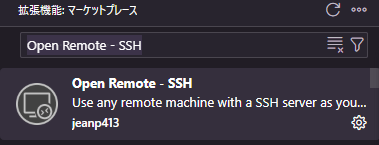
拡張機能「Open Remote – SSH」(jeanp413)をインストール
- Kiroで拡張機能「Open Remote – SSH」を検索すると出てくる「Open Remote – SSH」(jeanp413)をインストールします。
デプロイ準備
- Kiroのターミナルで以下のコマンドを入力してエンターを押します。
値をクォーテーションで囲み、任意のスタック名を指定してください。
この名前がAWS CloudFormationのスタック名になり、以降のコマンドでも使用します。
$STACK_NAME = "任意のスタック名"
2. ワークスペースに claude-code-on-aws.yaml というファイルを作成します。
3. claude-code-on-aws.yaml に以下を記載して保存します。長すぎるので畳んでいます。
BOM付きUTF-8やShift_JIS(cp932)で保存するとデプロイ時にエラーになります。
Kiroの場合、下部のステータスバーに「UTF-8」と表示されてればOKです。
「UTF-8 with BOM」など他のものになっている場合には、そこをクリックして「UTF-8」に変更してから保存してください。
▶ claude-code-on-aws.yaml(クリックで展開)
AWSTemplateFormatVersion: "2010-09-09"
Description: >
  Claude Code on AWS - Linux EC2 + Bedrock + Token Monitoring.
  Single stack. SSM tunnel SSH for VSCode Remote SSH. Cost-aware.

# ============================================================
# Parameter Groups (for AWS Console display)
# ============================================================
Metadata:
  AWS::CloudFormation::Interface:
    ParameterGroups:
      - Label:
          default: Project Settings
        Parameters:
          - ProjectName
          - CostTag
      - Label:
          default: EC2 Configuration
        Parameters:
          - InstanceType
          - VolumeSize
      - Label:
          default: Network Configuration
        Parameters:
          - VpcCidr
          - SubnetCidr
      - Label:
          default: Bedrock Model Configuration
        Parameters:
          - SonnetInferenceProfileId
          - OpusInferenceProfileId
      - Label:
          default: Token Monitoring
        Parameters:
          - AlertEmail
          - TokenThreshold

# ============================================================
# Parameters
# ============================================================
Parameters:
  ProjectName:
    Type: String
    Default: claude-code
    Description: "Prefix for all resource names (e.g. claude-code -> claude-code-vpc)"
    AllowedPattern: "^[a-zA-Z][a-zA-Z0-9-]*$"
    ConstraintDescription: "Must start with a letter, then alphanumeric and hyphens only"

  CostTag:
    Type: String
    Default: claude-code
    Description: "Cost allocation tag applied to all resources"

  InstanceType:
    Type: String
    Default: t3.medium
    Description: "EC2 instance type (e.g. t3.small, t3.medium, t3.large)"

  VolumeSize:
    Type: Number
    Default: 20
    MinValue: 8
    MaxValue: 100
    Description: "EBS disk size in GiB. Amazon Linux uses ~2GB. 20GB is sufficient"

  VpcCidr:
    Type: String
    Default: 10.0.0.0/16
    Description: "VPC CIDR block"
    AllowedPattern: "^\\d{1,3}\\.\\d{1,3}\\.\\d{1,3}\\.\\d{1,3}/\\d{1,2}$"

  SubnetCidr:
    Type: String
    Default: 10.0.1.0/24
    Description: "Public subnet CIDR block"
    AllowedPattern: "^\\d{1,3}\\.\\d{1,3}\\.\\d{1,3}\\.\\d{1,3}/\\d{1,2}$"

  SonnetInferenceProfileId:
    Type: String
    Default: jp.anthropic.claude-sonnet-4-6
    Description: "Bedrock Sonnet inference profile ID for ap-northeast-1"

  OpusInferenceProfileId:
    Type: String
    Default: global.anthropic.claude-opus-4-6-v1
    Description: "Bedrock Opus inference profile ID (global prefix, cross-region)"

  AlertEmail:
    Type: String
    Description: "Email address for token usage alerts"
    AllowedPattern: "^[a-zA-Z0-9._%+-]+@[a-zA-Z0-9.-]+\\.[a-zA-Z]{2,}$"
    ConstraintDescription: "Must be a valid email address"

  TokenThreshold:
    Type: Number
    Default: 150000
    Description: "Token alert threshold (input+output+cache total per hour). Alert if exceeded"

Resources:
  # ============================================================
  # VPC / Network
  # ============================================================
  VPC:
    Type: AWS::EC2::VPC
    Properties:
      CidrBlock: !Ref VpcCidr
      EnableDnsSupport: true
      EnableDnsHostnames: true
      Tags:
        - Key: Name
          Value: !Sub "${ProjectName}-vpc"
        - Key: Cost
          Value: !Ref CostTag

  InternetGateway:
    Type: AWS::EC2::InternetGateway
    Properties:
      Tags:
        - Key: Name
          Value: !Sub "${ProjectName}-igw"
        - Key: Cost
          Value: !Ref CostTag

  AttachGateway:
    Type: AWS::EC2::VPCGatewayAttachment
    Properties:
      VpcId: !Ref VPC
      InternetGatewayId: !Ref InternetGateway

  PublicSubnet:
    Type: AWS::EC2::Subnet
    Properties:
      VpcId: !Ref VPC
      CidrBlock: !Ref SubnetCidr
      AvailabilityZone: !Select [0, !GetAZs ""]
      MapPublicIpOnLaunch: true
      Tags:
        - Key: Name
          Value: !Sub "${ProjectName}-public-subnet"
        - Key: Cost
          Value: !Ref CostTag

  PublicRouteTable:
    Type: AWS::EC2::RouteTable
    Properties:
      VpcId: !Ref VPC
      Tags:
        - Key: Name
          Value: !Sub "${ProjectName}-public-rt"
        - Key: Cost
          Value: !Ref CostTag

  PublicRoute:
    Type: AWS::EC2::Route
    DependsOn: AttachGateway
    Properties:
      RouteTableId: !Ref PublicRouteTable
      DestinationCidrBlock: 0.0.0.0/0
      GatewayId: !Ref InternetGateway

  SubnetRouteTableAssociation:
    Type: AWS::EC2::SubnetRouteTableAssociation
    Properties:
      SubnetId: !Ref PublicSubnet
      RouteTableId: !Ref PublicRouteTable

  # ============================================================
  # Security Group - HTTPS outbound only, no inbound (SSM access)
  # ============================================================
  SecurityGroup:
    Type: AWS::EC2::SecurityGroup
    Properties:
      GroupDescription: !Sub "${ProjectName} - HTTPS outbound only, SSM access"
      VpcId: !Ref VPC
      SecurityGroupIngress: []
      SecurityGroupEgress:
        - IpProtocol: tcp
          FromPort: 443
          ToPort: 443
          CidrIp: 0.0.0.0/0
      Tags:
        - Key: Name
          Value: !Sub "${ProjectName}-sg"
        - Key: Cost
          Value: !Ref CostTag

  # ============================================================
  # EC2 Key Pair (for VSCode Remote SSH via SSM tunnel)
  # Private key is stored in Systems Manager Parameter Store
  # ============================================================
  EC2KeyPair:
    Type: AWS::EC2::KeyPair
    Properties:
      KeyName: !Sub "${ProjectName}-keypair"
      KeyType: rsa
      KeyFormat: pem

  # ============================================================
  # Bedrock Application Inference Profiles
  # Enables per-model cost tracking via Cost Explorer tags
  # ============================================================
  SonnetProfile:
    Type: AWS::Bedrock::ApplicationInferenceProfile
    Properties:
      InferenceProfileName: !Sub "${ProjectName}-sonnet"
      Description: !Sub "Sonnet profile: ${SonnetInferenceProfileId}"
      ModelSource:
        CopyFrom: !Sub "arn:aws:bedrock:${AWS::Region}:${AWS::AccountId}:inference-profile/${SonnetInferenceProfileId}"
      Tags:
        - Key: Application
          Value: !Ref ProjectName
        - Key: Cost
          Value: !Ref CostTag

  OpusProfile:
    Type: AWS::Bedrock::ApplicationInferenceProfile
    Properties:
      InferenceProfileName: !Sub "${ProjectName}-opus"
      Description: !Sub "Opus profile: ${OpusInferenceProfileId}"
      ModelSource:
        CopyFrom: !Sub "arn:aws:bedrock:${AWS::Region}:${AWS::AccountId}:inference-profile/${OpusInferenceProfileId}"
      Tags:
        - Key: Application
          Value: !Ref ProjectName
        - Key: Cost
          Value: !Ref CostTag

  # ============================================================
  # IAM Role - SSM + Bedrock + AWS MCP (least privilege)
  # ============================================================
  EC2Role:
    Type: AWS::IAM::Role
    Properties:
      RoleName: !Sub "${ProjectName}-ec2-role"
      AssumeRolePolicyDocument:
        Version: "2012-10-17"
        Statement:
          - Effect: Allow
            Principal:
              Service: ec2.amazonaws.com
            Action: sts:AssumeRole
      ManagedPolicyArns:
        - arn:aws:iam::aws:policy/AmazonSSMManagedInstanceCore
      Policies:
        - PolicyName: BedrockAccess
          PolicyDocument:
            Version: "2012-10-17"
            Statement:
              - Sid: InvokeModels
                Effect: Allow
                Action:
                  - bedrock:InvokeModel
                  - bedrock:InvokeModelWithResponseStream
                Resource:
                  - !GetAtt SonnetProfile.InferenceProfileArn
                  - !GetAtt OpusProfile.InferenceProfileArn
                  - "arn:aws:bedrock:*:*:foundation-model/*"
                  - "arn:aws:bedrock:*:*:inference-profile/*"
              - Sid: ListModels
                Effect: Allow
                Action:
                  - bedrock:ListFoundationModels
                  - bedrock:ListInferenceProfiles
                  - bedrock:GetFoundationModel
                Resource: "*"
        - PolicyName: AWSMCPAccess
          PolicyDocument:
            Version: "2012-10-17"
            Statement:
              - Sid: AllowAWSMCP
                Effect: Allow
                Action:
                  - aws-mcp:InvokeMcp
                  - aws-mcp:CallReadOnlyTool
                  - aws-mcp:CallReadWriteTool
                Resource: "*"
        - PolicyName: MarketplaceAccess
          PolicyDocument:
            Version: "2012-10-17"
            Statement:
              - Sid: AllowMarketplace
                Effect: Allow
                Action:
                  - aws-marketplace:ViewSubscriptions
                  - aws-marketplace:Subscribe
                Resource: "*"
                Condition:
                  StringEquals:
                    aws:CalledViaLast: bedrock.amazonaws.com
      Tags:
        - Key: Name
          Value: !Sub "${ProjectName}-ec2-role"
        - Key: Cost
          Value: !Ref CostTag

  InstanceProfile:
    Type: AWS::IAM::InstanceProfile
    Properties:
      InstanceProfileName: !Sub "${ProjectName}-instance-profile"
      Roles:
        - !Ref EC2Role

  # ============================================================
  # EC2 Instance - Amazon Linux 2023
  # Auto-installs: Git, Node.js, Python, Claude Code, uv, AWS MCP
  # ============================================================
  EC2Instance:
    Type: AWS::EC2::Instance
    DependsOn:
      - SonnetProfile
      - OpusProfile
    Properties:
      ImageId: "{{resolve:ssm:/aws/service/ami-amazon-linux-latest/al2023-ami-kernel-default-x86_64}}"
      InstanceType: !Ref InstanceType
      KeyName: !Ref EC2KeyPair
      IamInstanceProfile: !Ref InstanceProfile
      SubnetId: !Ref PublicSubnet
      SecurityGroupIds:
        - !Ref SecurityGroup
      BlockDeviceMappings:
        - DeviceName: /dev/xvda
          Ebs:
            VolumeSize: !Ref VolumeSize
            VolumeType: gp3
            Encrypted: true
      PropagateTagsToVolumeOnCreation: true
      UserData:
        Fn::Base64: !Sub
          - |
            #!/bin/bash
            set -e
            exec > >(tee /var/log/user-data.log) 2>&1
            echo "=== Setup started: $(date) ==="

            # System update
            dnf update -y

            # Install Node.js 22, Git, Python3
            curl -fsSL https://rpm.nodesource.com/setup_22.x | bash -
            dnf install -y nodejs git python3 python3-pip

            # Setup as ec2-user
            sudo -u ec2-user bash << 'USEREOF'
            set -e
            export HOME=/home/ec2-user
            cd $HOME

            # Install Claude Code (native installer)
            curl -fsSL https://claude.ai/install.sh | bash -s stable
            export PATH="$HOME/.local/bin:$PATH"

            # Install uv (required for uvx / AWS MCP proxy)
            curl -LsSf https://astral.sh/uv/install.sh | sh

            # Bedrock environment variables
            cat << EOF >> ~/.bashrc
            # Claude Code on Bedrock
            export CLAUDE_CODE_USE_BEDROCK=1
            export AWS_REGION=${AWS::Region}
            export AWS_DEFAULT_REGION=${AWS::Region}
            export ANTHROPIC_DEFAULT_SONNET_MODEL="${SonnetArn}"
            export ANTHROPIC_DEFAULT_OPUS_MODEL="${OpusArn}"
            export CLAUDE_CODE_SUBAGENT_MODEL="${SonnetArn}"
            export CLAUDE_CODE_MAX_OUTPUT_TOKENS=16384
            export MAX_THINKING_TOKENS=10000
            export PATH="\$HOME/.local/bin:\$HOME/.cargo/bin:\$PATH"
            EOF

            # Claude Code user settings
            mkdir -p ~/.claude
            cat << 'SETTINGS' > ~/.claude/settings.json
            {
              "provider": "bedrock",
              "autoUpdates": true,
              "autoUpdatesChannel": "stable",
              "language": "japanese",
              "statusLine": {
                "type": "command",
                "command": "npx -y ccstatusline@latest",
                "padding": 0
              },
              "permissions": {
                "deny": [
                  "Bash(rm -rf:*)",
                  "Bash(sudo:*)",
                  "Read(.env)"
                ]
              }
            }
            SETTINGS

            # AWS MCP Server (managed, via mcp-proxy-for-aws)
            cat << 'MCP' > ~/.mcp.json
            {
              "mcpServers": {
                "aws-mcp": {
                  "command": "uvx",
                  "timeout": 100000,
                  "transport": "stdio",
                  "args": [
                    "mcp-proxy-for-aws@latest",
                    "https://aws-mcp.us-east-1.api.aws/mcp",
                    "--metadata",
                    "AWS_REGION=us-west-2"
                  ]
                }
              }
            }
            MCP

            # ccstatusline config (Model | Session Cost | Tokens Total)
            mkdir -p ~/.config/ccstatusline
            cat << 'CCSTATUS' > ~/.config/ccstatusline/config.json
            {
              "lines": [
                [
                  {"category": "model", "widget": "model"},
                  {"category": "separator", "widget": "separator"},
                  {"category": "cost", "widget": "session_cost"},
                  {"category": "separator", "widget": "separator"},
                  {"category": "tokens", "widget": "tokens_total"}
                ]
              ]
            }
            CCSTATUS

            # Verify installations
            source ~/.bashrc
            claude --version && echo "Claude Code OK" || echo "Claude Code FAILED"
            USEREOF

            echo "=== Setup completed: $(date) ==="
          - SonnetArn: !GetAtt SonnetProfile.InferenceProfileArn
            OpusArn: !GetAtt OpusProfile.InferenceProfileArn
      Tags:
        - Key: Name
          Value: !Sub "${ProjectName}-ec2"
        - Key: Cost
          Value: !Ref CostTag

  # ============================================================
  # Bedrock Model Invocation Logging
  # Required for token monitoring via Metric Filters.
  # After deploy, enable logging in Bedrock console and
  # point to this log group and select the logging role.
  # ============================================================
  BedrockLogGroup:
    Type: AWS::Logs::LogGroup
    Properties:
      LogGroupName: !Sub "/aws/bedrock/${ProjectName}"
      RetentionInDays: 30
      Tags:
        - Key: Cost
          Value: !Ref CostTag

  BedrockLoggingRole:
    Type: AWS::IAM::Role
    Properties:
      RoleName: !Sub "${ProjectName}-bedrock-logging-role"
      AssumeRolePolicyDocument:
        Version: "2012-10-17"
        Statement:
          - Effect: Allow
            Principal:
              Service: bedrock.amazonaws.com
            Action: sts:AssumeRole
            Condition:
              StringEquals:
                aws:SourceAccount: !Ref AWS::AccountId
              ArnLike:
                aws:SourceArn: !Sub "arn:aws:bedrock:${AWS::Region}:${AWS::AccountId}:*"
      Policies:
        - PolicyName: BedrockLoggingCloudWatch
          PolicyDocument:
            Version: "2012-10-17"
            Statement:
              - Effect: Allow
                Action:
                  - logs:CreateLogStream
                  - logs:PutLogEvents
                Resource: !Sub "arn:aws:logs:${AWS::Region}:${AWS::AccountId}:log-group:/aws/bedrock/${ProjectName}:*"
      Tags:
        - Key: Cost
          Value: !Ref CostTag

  # ============================================================
  # Token Monitoring - SNS Topic (KMS encrypted)
  # Alert emails may contain IAM ARN info, so encryption applied.
  # After deploy, confirm the subscription email!
  # ============================================================
  AlertTopic:
    Type: AWS::SNS::Topic
    Properties:
      TopicName: !Sub "${ProjectName}-token-alert"
      Tags:
        - Key: Cost
          Value: !Ref CostTag

  AlertSubscription:
    Type: AWS::SNS::Subscription
    Properties:
      TopicArn: !Ref AlertTopic
      Protocol: email
      Endpoint: !Ref AlertEmail

  # ============================================================
  # Token Monitoring - CloudWatch Metric Filters
  # Extracts token counts from Bedrock invocation logs and
  # publishes as custom CloudWatch metrics. No Lambda needed.
  # Includes cache tokens (cacheRead/cacheWrite) for accurate totals.
  # ============================================================
  InputTokenMetricFilter:
    Type: AWS::Logs::MetricFilter
    Properties:
      LogGroupName: !Ref BedrockLogGroup
      FilterPattern: '{ $.input.inputTokenCount = "*" }'
      MetricTransformations:
        - MetricNamespace: !Sub "${ProjectName}/BedrockTokens"
          MetricName: InputTokenCount
          MetricValue: "$.input.inputTokenCount"
          DefaultValue: 0

  CacheReadTokenMetricFilter:
    Type: AWS::Logs::MetricFilter
    Properties:
      LogGroupName: !Ref BedrockLogGroup
      FilterPattern: '{ $.input.cacheReadInputTokenCount = "*" }'
      MetricTransformations:
        - MetricNamespace: !Sub "${ProjectName}/BedrockTokens"
          MetricName: CacheReadInputTokenCount
          MetricValue: "$.input.cacheReadInputTokenCount"
          DefaultValue: 0

  CacheWriteTokenMetricFilter:
    Type: AWS::Logs::MetricFilter
    Properties:
      LogGroupName: !Ref BedrockLogGroup
      FilterPattern: '{ $.input.cacheWriteInputTokenCount = "*" }'
      MetricTransformations:
        - MetricNamespace: !Sub "${ProjectName}/BedrockTokens"
          MetricName: CacheWriteInputTokenCount
          MetricValue: "$.input.cacheWriteInputTokenCount"
          DefaultValue: 0

  OutputTokenMetricFilter:
    Type: AWS::Logs::MetricFilter
    Properties:
      LogGroupName: !Ref BedrockLogGroup
      FilterPattern: '{ $.output.outputTokenCount = "*" }'
      MetricTransformations:
        - MetricNamespace: !Sub "${ProjectName}/BedrockTokens"
          MetricName: OutputTokenCount
          MetricValue: "$.output.outputTokenCount"
          DefaultValue: 0

  # ============================================================
  # Token Monitoring - CloudWatch Alarms
  # Fires when total tokens (input + output) exceed threshold
  # within the monitoring window. Uses Metric Math to sum both.
  # ============================================================
  TokenUsageAlarm:
    Type: AWS::CloudWatch::Alarm
    Properties:
      AlarmName: !Sub "${ProjectName}-token-threshold-alarm"
      AlarmDescription: !Sub "Bedrock token usage exceeded ${TokenThreshold} in monitoring window"
      ComparisonOperator: GreaterThanThreshold
      EvaluationPeriods: 1
      Threshold: !Ref TokenThreshold
      TreatMissingData: notBreaching
      AlarmActions:
        - !Ref AlertTopic
      Metrics:
        - Id: input_tokens
          ReturnData: false
          MetricStat:
            Metric:
              Namespace: !Sub "${ProjectName}/BedrockTokens"
              MetricName: InputTokenCount
            Period: 3600
            Stat: Sum
        - Id: cache_read_tokens
          ReturnData: false
          MetricStat:
            Metric:
              Namespace: !Sub "${ProjectName}/BedrockTokens"
              MetricName: CacheReadInputTokenCount
            Period: 3600
            Stat: Sum
        - Id: cache_write_tokens
          ReturnData: false
          MetricStat:
            Metric:
              Namespace: !Sub "${ProjectName}/BedrockTokens"
              MetricName: CacheWriteInputTokenCount
            Period: 3600
            Stat: Sum
        - Id: output_tokens
          ReturnData: false
          MetricStat:
            Metric:
              Namespace: !Sub "${ProjectName}/BedrockTokens"
              MetricName: OutputTokenCount
            Period: 3600
            Stat: Sum
        - Id: total_tokens
          Expression: "input_tokens + cache_read_tokens + cache_write_tokens + output_tokens"
          Label: "Total Tokens (1 hour)"
          ReturnData: true

# ============================================================
# Outputs
# ============================================================
Outputs:
  InstanceId:
    Description: "EC2 Instance ID"
    Value: !Ref EC2Instance

  SSMConnectCommand:
    Description: "Connect via SSM Session Manager (terminal only)"
    Value: !Sub "aws ssm start-session --target ${EC2Instance}"

  SSMPortForwardCommand:
    Description: "SSM tunnel for VSCode Remote SSH (port 22 -> localhost:10022)"
    Value: !Sub "aws ssm start-session --target ${EC2Instance} --document-name AWS-StartPortForwardingSession --parameters portNumber=22,localPortNumber=10022"

  KeyPairName:
    Description: "EC2 Key Pair name (retrieve private key from Systems Manager Parameter Store)"
    Value: !Ref EC2KeyPair

  ConsoleURL:
    Description: "EC2 Console direct link"
    Value: !Sub "https://${AWS::Region}.console.aws.amazon.com/ec2/home?region=${AWS::Region}#InstanceDetails:instanceId=${EC2Instance}"

  SonnetProfileArn:
    Description: "Bedrock Sonnet Application Inference Profile ARN"
    Value: !GetAtt SonnetProfile.InferenceProfileArn

  OpusProfileArn:
    Description: "Bedrock Opus Application Inference Profile ARN"
    Value: !GetAtt OpusProfile.InferenceProfileArn

  BedrockLogGroupName:
    Description: "Enable Bedrock Model Invocation Logging to this log group"
    Value: !Ref BedrockLogGroup

  BedrockLoggingRoleName:
    Description: "Select this role in Bedrock console when enabling invocation logging"
    Value: !Ref BedrockLoggingRole

  AlertTopicArn:
    Description: "SNS Topic for alerts (confirm email subscription after deploy!)"
    Value: !Ref AlertTopic

  StopCommand:
    Description: "Stop instance (saves cost)"
    Value: !Sub "aws ec2 stop-instances --instance-ids ${EC2Instance}"

  StartCommand:
    Description: "Start instance"
    Value: !Sub "aws ec2 start-instances --instance-ids ${EC2Instance}"

  CleanupCommand:
    Description: "Delete all resources"
    Value: !Sub "aws cloudformation delete-stack --stack-name ${AWS::StackName}"
AWS CLIの認証設定
SSO利用の場合は aws sso login を使ってください。
- ブラウザを開き、管理者権限が付与されたIAMユーザーでAWSマネジメントコンソールにログインします。
- Kiroでターミナルを開き、aws login と入力してエンターを押します。
- ブラウザの別タブで Continue with an active session の画面が出るので、AWSマネジメントコンソールにログインしているIAMユーザーをクリックします。
- 「Your credentials have been shared successfully and can be used until your session expires.」が表示されたらタブを閉じます。
- Kiroのターミナルで、aws sts get-caller-identity と入力してエンターを押します。
- 出力結果を確認し、AWSIDとIAMユーザー名が想定通りであることを確認する。
推論プロファイルIDを確認
- 現在のIDを確認します。
Kiroのターミナルで以下のコマンドを入力してエンターを押します。
aws bedrock list-inference-profiles `
--region ap-northeast-1 `
--query "inferenceProfileSummaries[?contains(inferenceProfileName, 'Claude')].{Name:inferenceProfileName, Id:inferenceProfileId}" `
--output table
環境構築
デプロイ
- AWS CloudFormationスタックをデプロイします。
Kiroのターミナルで以下のコマンドを入力してエンターを押します。
デプロイは約5〜10分で完了します。
SonnetInferenceProfileId と OpusInferenceProfileId は事前準備で確認したIDと異なる場合に書き換えてください。
ProjectName もスタック名と揃えておくとリソース名が統一されて管理しやすいですが、お好みで書き換えてください。
aws cloudformation deploy `
  --template-file claude-code-on-aws.yaml `
  --stack-name $STACK_NAME `
  --parameter-overrides `
  ProjectName=$STACK_NAME `
  CostTag=claude-code `
  InstanceType=t3.medium `
  VolumeSize=20 `
  VpcCidr=10.0.0.0/16 `
  SubnetCidr=10.0.1.0/24 `
  SonnetInferenceProfileId=jp.anthropic.claude-sonnet-4-6 `
  OpusInferenceProfileId=global.anthropic.claude-opus-4-6-v1 `
  AlertEmail=your-email@example.com `
  TokenThreshold=150000 `
  --capabilities CAPABILITY_NAMED_IAM `
  --region ap-northeast-1
| パラメータ | デフォルト値 | 説明 |
|---|---|---|
| ProjectName | claude-code | リソース名のプレフィックス |
| CostTag | claude-code | コスト配分タグ |
| InstanceType | t3.medium | EC2インスタンスタイプ |
| VolumeSize | 20 | EBSディスクサイズ(GiB) |
| VpcCidr | 10.0.0.0/16 | VPCのCIDRブロック |
| SubnetCidr | 10.0.1.0/24 | パブリックサブネットのCIDRブロック |
| SonnetInferenceProfileId | jp.anthropic.claude-sonnet-4-6 | Sonnetの推論プロファイルID |
| OpusInferenceProfileId | global.anthropic.claude-opus-4-6-v1 | Opusの推論プロファイルID |
| AlertEmail | なし(必ず指定) | トークンアラート通知先メールアドレス |
| TokenThreshold | 150000 | トークンアラート閾値(1時間あたり) |
トークン数監視アラート関連の追加設定
- Kiroのターミナルで以下のコマンドを入力してエンターを押します。
これでBedrockモデル呼び出しログを有効化します。
$ACCOUNT_ID = aws sts get-caller-identity --query "Account" --output text

$json = @"
{
  "cloudWatchConfig": {
    "logGroupName": "/aws/bedrock/$STACK_NAME",
    "roleArn": "arn:aws:iam::${ACCOUNT_ID}:role/${STACK_NAME}-bedrock-logging-role"
  },
  "textDataDeliveryEnabled": true,
  "imageDataDeliveryEnabled": false,
  "embeddingDataDeliveryEnabled": false,
  "videoDataDeliveryEnabled": false
}
"@

[System.IO.File]::WriteAllText("$PWD\logging-config.json", $json)

aws bedrock put-model-invocation-logging-configuration `
  --region ap-northeast-1 `
  --logging-config file://logging-config.json
2. AlertEmailに指定したメールアドレスに以下件名のメールが届きます。
件名:AWS Notification – Subscription Confirmation
そのメールを開き、「Confirm subscription」のリンクをクリックします。
これでトークン数が設定した閾値を超過した場合指定したメールアドレスに通知が飛ぶようになります。
接続確認
EC2インスタンスへの接続確認
- EC2インスタンスのIDを取得します。
Kiroのターミナルで以下のコマンドを入力してエンターを押します。
$INSTANCE_ID = aws cloudformation describe-stacks `
  --stack-name $STACK_NAME `
  --region ap-northeast-1 `
  --query "Stacks[0].Outputs[?OutputKey=='InstanceId'].OutputValue" `
  --output text

Write-Host "Instance ID: $INSTANCE_ID"
2. EC2インスタンスに接続します。
Kiroのターミナルで以下のコマンドを入力してエンターを押します。
「TargetNotConnected」となった場合には10分後くらいに再度試してみてください。
aws ssm start-session --target $INSTANCE_ID --region ap-northeast-1
3. EC2インスタンスへ接続でき、ターミナルにて表示が「sh-5.2$」のように変わったことを確認します。
KiroからEC2へのリモート接続設定
- SSMで接続すると ssm-user というユーザーでログインします。
Claude Codeは ec2-user にインストールされてるので、ユーザーを切り替える必要があります。
Kiroのターミナルで以下のコマンドを入力してエンターを押します。
sudo su - ec2-user
2. Claude Codeが導入されていることを確認します。
Kiroのターミナルで以下のコマンドを入力してエンターを押します。
バージョンが出ればOKです。
claude --version
3. Kiroのターミナルで「exit」を入力してエンターを押し、ec2-userを抜けます。
もう一度、「exit」を入力してエンターを押し、SSMセッションを抜けます。
4. EC2キーペアIDを取得します。
Kiroのターミナルで以下のコマンドを入力してエンターを押します。
$keyId = aws ec2 describe-key-pairs `
  --key-names "$STACK_NAME-keypair" `
  --query "KeyPairs[0].KeyPairId" `
  --output text `
  --region ap-northeast-1
5. 秘密鍵をダウンロードします。
Kiroのターミナルで以下のコマンドを入力してエンターを押します。
New-Item -ItemType Directory -Path ~\.ssh -Force

aws ssm get-parameter `
  --name "/ec2/keypair/$keyId" `
  --with-decryption `
  --query "Parameter.Value" `
  --output text `
  --region ap-northeast-1 | Out-File -Encoding ascii ~\.ssh\claude-code-key.pem
6. SSH Configを作成します。
<ユーザー名> は自分のWindowsユーザー名に置き換えてください。
Kiroのターミナルで以下のコマンドを入力してエンターを押します。
Set-Content -Path ~\.ssh\config -Value "Host claude-code`n HostName localhost`n Port 10022`n User ec2-user`n IdentityFile C:\Users\<ユーザー名>\.ssh\claude-code-key.pem"
7. SSMトンネルを開始します。
Kiroのターミナルで以下のコマンドを入力してエンターを押します。
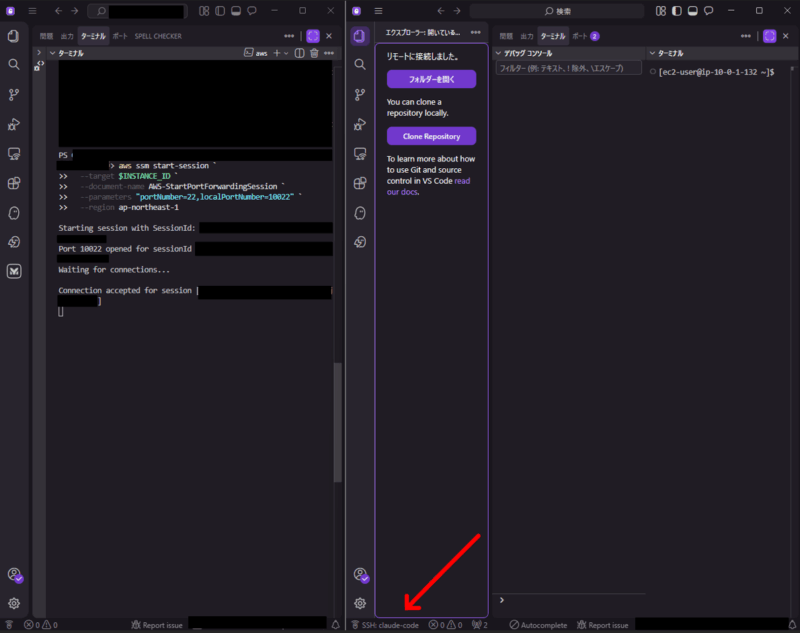
「Waiting for connections…」と表示されたら準備完了です。
aws ssm start-session `
  --target $INSTANCE_ID `
  --document-name AWS-StartPortForwardingSession `
  --parameters "portNumber=22,localPortNumber=10022" `
  --region ap-northeast-1
KiroからRemote SSH接続
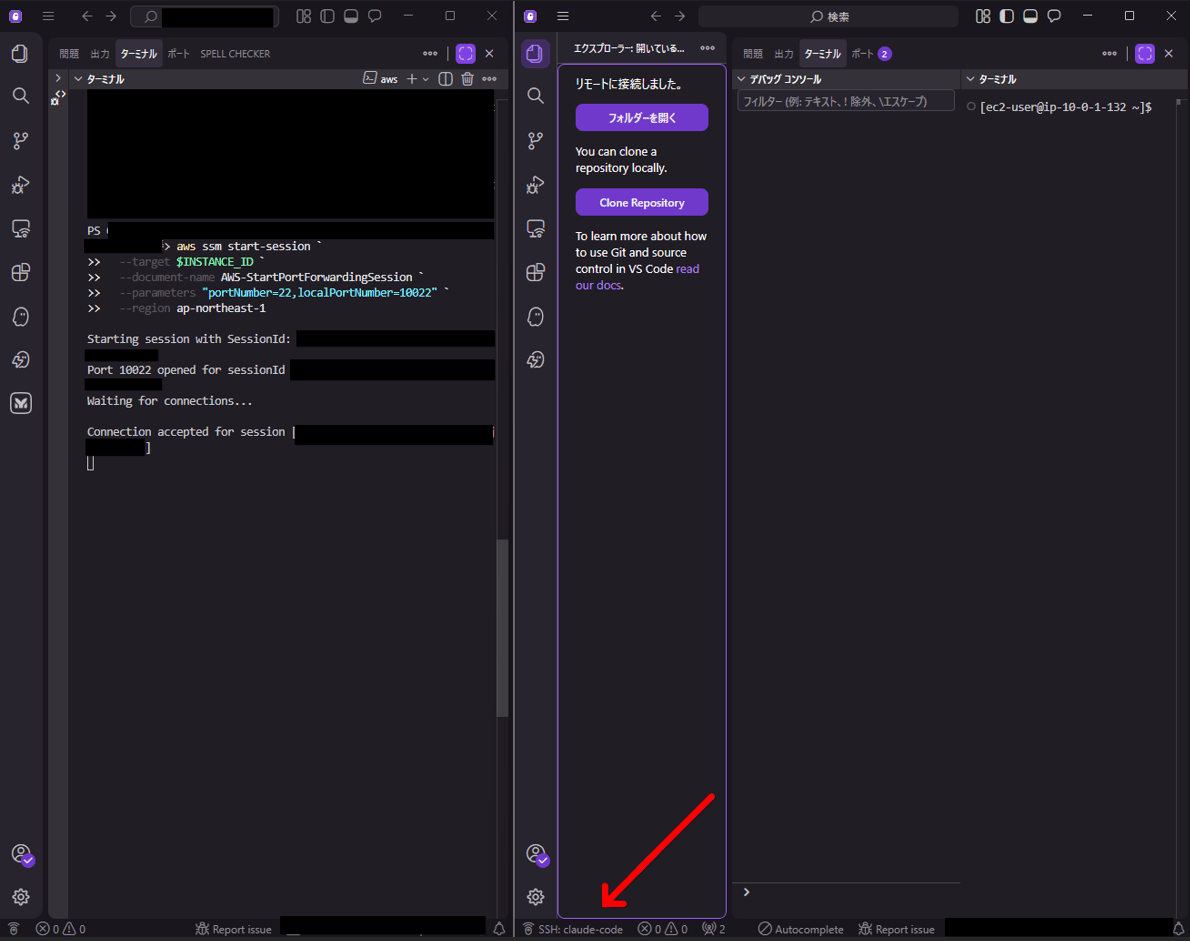
Ctrl+Shift+P→ 「Remote-SSH: Connect to Host…」→claude-codeと入力してエンターを押します。- 自動でKiroがもうひとつ立ち上がります。
- Kiroにサインインします。
- 下図の赤矢印の先のように、新たに開かれたKiroでは左下に
 と表示されていることを確認します。
Claude Codeを起動
- 念のためにルートディレクトリから移動した後、Claude Codeを起動します。
mkdir ~/projects && cd ~/projects
claude
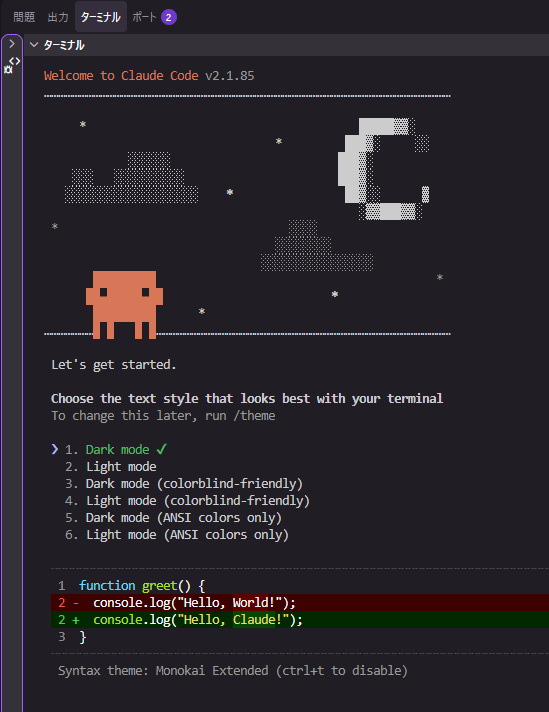
2. テーマを選択してエンターを押します。
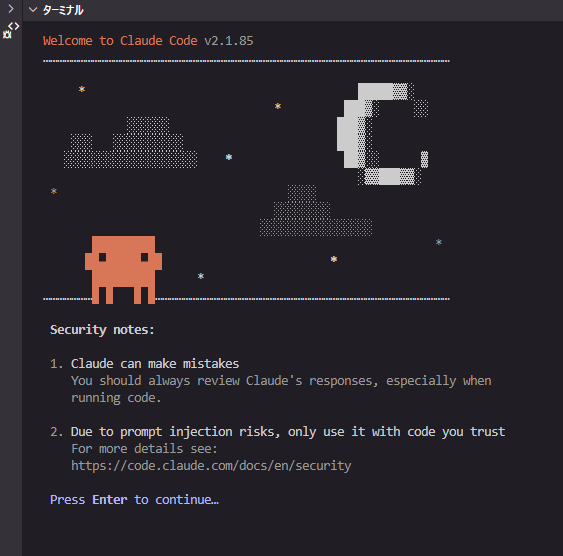
3. セキュリティに関する注意事項が出るので確認したらエンターを押します。
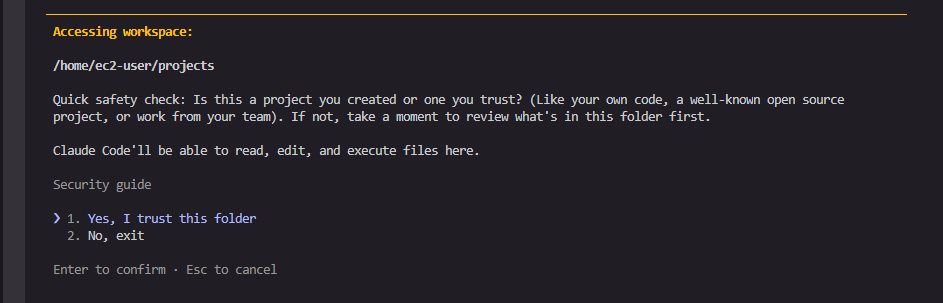
4. ワークスペースの確認で問題なければエンターを押します。
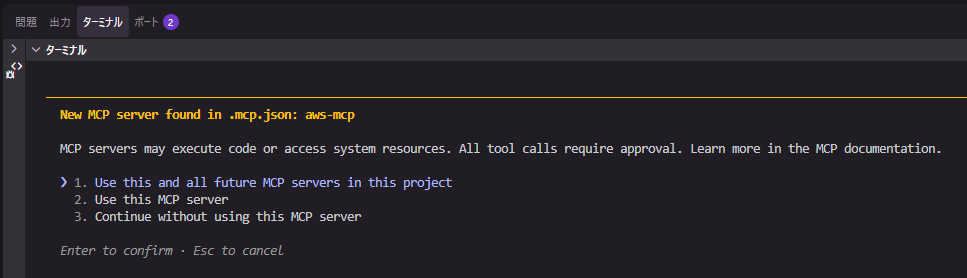
5. AWSのMCPサーバーをテンプレートで入れているので出てくる選択肢です。
お試ししてみたいということであれば2で良いかと思います。不要な場合には3を選択してください。
6. チャット画面が開きます。
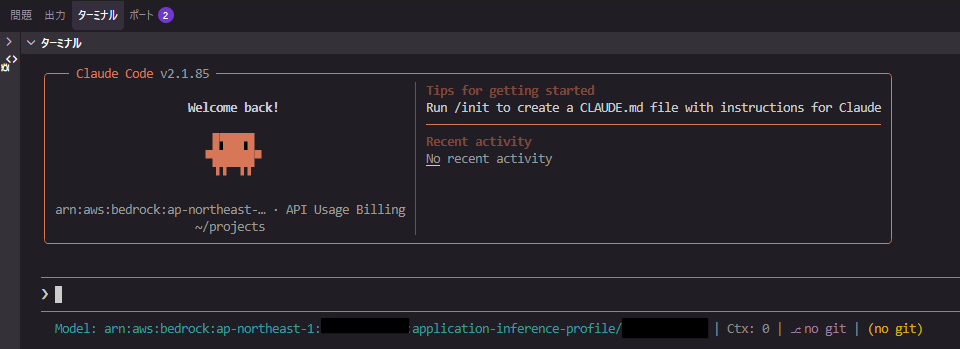
下図のようにコストとトークン数などを表示することが出来ます。
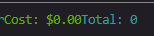
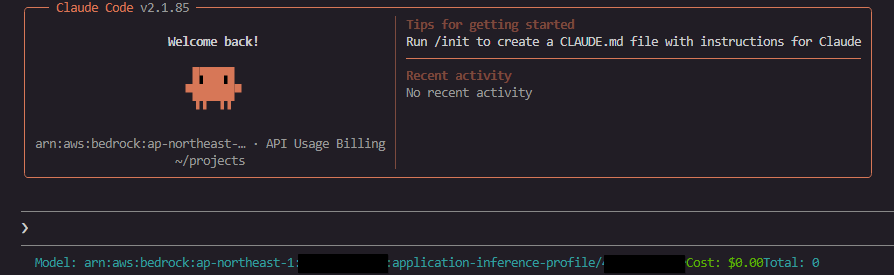
同様の情報は /cost でも見れますが、表示させたいという場合には下記を実施してください。
Claudeとの会話ではなくターミナル上で「npx ccstatusline@latest」を入力してエンターを押します。
Main Menu から Edit Lines を選択してエンターを押します。
Line 1 を選択してエンターを押します。
Model以外を選択した状態でdを押して削除します。(Modelのみ残す)
aを押した後、All を選択してエンターを押します。
追加したいものを追加します。
Escを数回押して Main Menu まで戻ります。
Save & Exit を選択してエンターを押します。
Claudeを起動して下部に追加されていることを確認します。
お試し後のリソース削除
リソース削除はスタック消すだけです。
aws cloudformation delete-stack --stack-name $STACK_NAME --region ap-northeast-1
Amazon Bedrockコンソールのモデル呼び出しログ設定だけ手動で無効化してください。
aws bedrock delete-model-invocation-logging-configuration --region ap-northeast-1
おまけ程度のトークン数の監視アラートについて
テンプレートにはおまけ程度ですが、トークン数の監視アラートを仕込んでいます。
- 仕組み
Amazon Bedrock のモデル呼び出しログを CloudWatch Logs に出力し、Metric Filter でトークン数(Input・Output・Cache Read・Cache Write)を抽出し、CloudWatchメトリクスに変換しています。
1時間あたりの合計トークン数が閾値を超えると CloudWatch Alarm がSNS経由でメール通知します。
Lambda不要で、全てマネージドサービスの組み合わせです。
閾値を超えると件名:ALARM: “claude-code-daisuke-token-threshold-alarm” in Asia Pacific (Tokyo) のようなメールが届きます。 - 注意点
個人利用向けの設計のため、AWSアカウント全体の合計トークン数で監視しています。
複数人で「誰が何トークン使ったか」を把握したい場合は別の構成が必要です。
トークン数での監視であり、料金そのものの監視ではありませんので、各モデルの料金差異は考慮されていません。
閾値はあくまで目安として捉えてください。
ALARMからOKに戻るまで、CloudWatchの評価範囲の仕様により数十分かかることがあります。
Amazon Bedrockのモデル呼び出しログの有効化はテンプレートとは別にコマンドまたはAWSマネジメントコンソールにて手動で行う必要があります。
まとめ
Claude Code on Amazon Bedrockはレートリミットなしで使えるのが魅力ですが、従量課金なのでコスト管理が大事です。
ご利用になる際はお気を付けください。
当記事において不備がございましたらご連絡いただけますと幸いです。
最後に、ここまで協力してくれたKiroから「いいね」を貰うことができて嬉しかったです。