
こんにちは、広野です。
AWS re:Invent 2025 で、Amazon S3 Vectors が GA されました。


以前は RAG 用のベクトルデータベースとして Amazon OpenSearch Service や Amazon Aurora など高額なデータベースサービスを使用しなければならなかったのですが、Amazon S3 ベースで安価に気軽に RAG 環境を作成できるようになったので嬉しいです。
それを受けて、以前作成した RAG チャットボット環境をアレンジしてみました。
内容が多いので、記事を 3つに分けます。本記事は実装編です。
つくったもの
こんな感じの RAG チャットボットです。
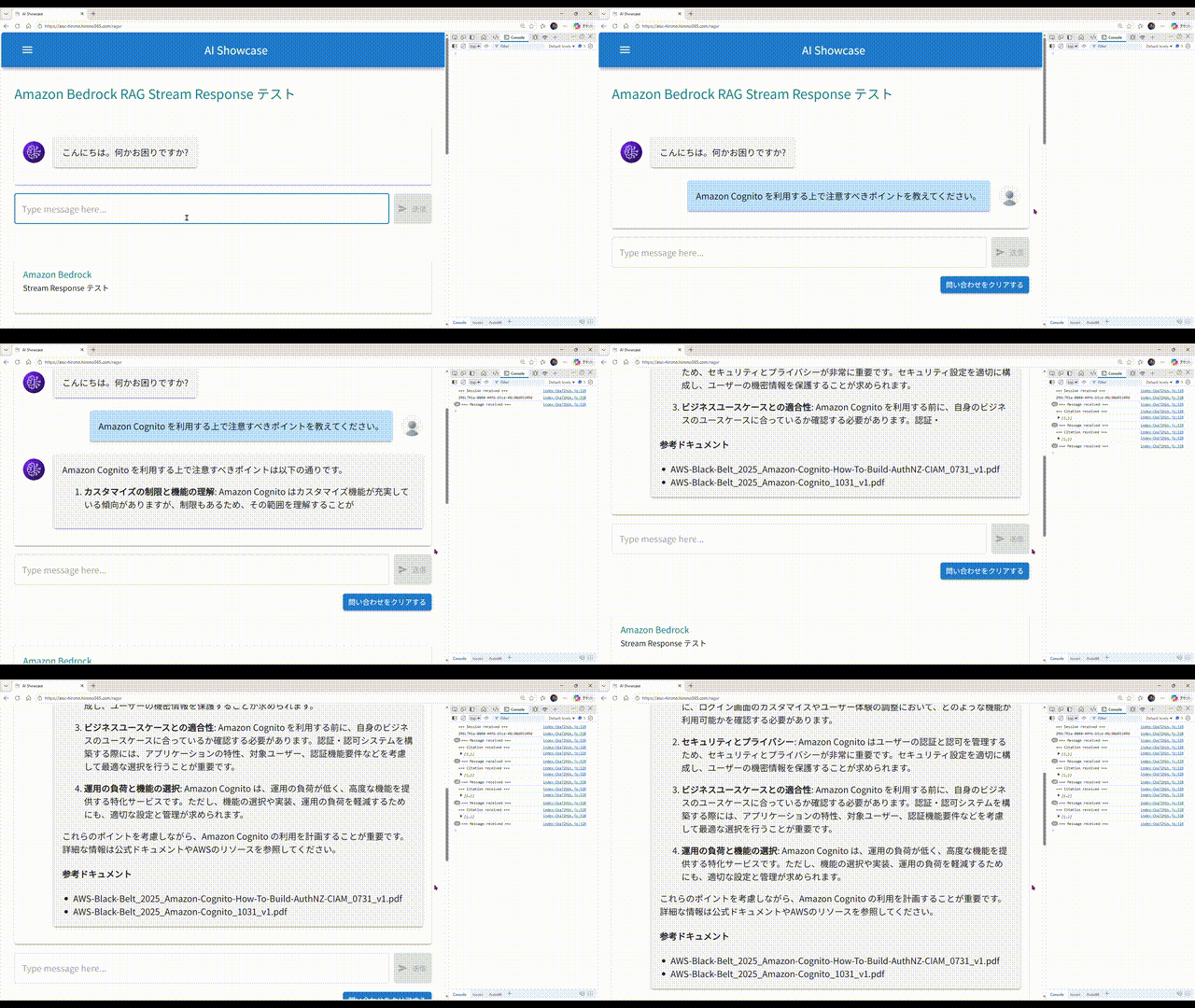
- 画面から問い合わせすると、回答が文字列細切れのストリームで返ってきます。それらをアプリ側で結合して、順次画面に表示しています。
- 回答の途中で、AI が回答生成の根拠にしたドキュメントの情報が送られてくることがあるので、あればそのドキュメント名を表示します。一般的には親切にドキュメントへのリンクも付いていると思うのですが、今回は簡略化のため省略しました。
- このサンプル環境では、AWS が提供している AWS サービス別資料 の PDF を独自ドキュメントとして読み込ませ、回答生成に使用させています。
前回の記事
本記事はアーキテクチャ概要編の続編記事です。以下の記事をお読みの上、本記事にお戻りください。
アーキテクチャ
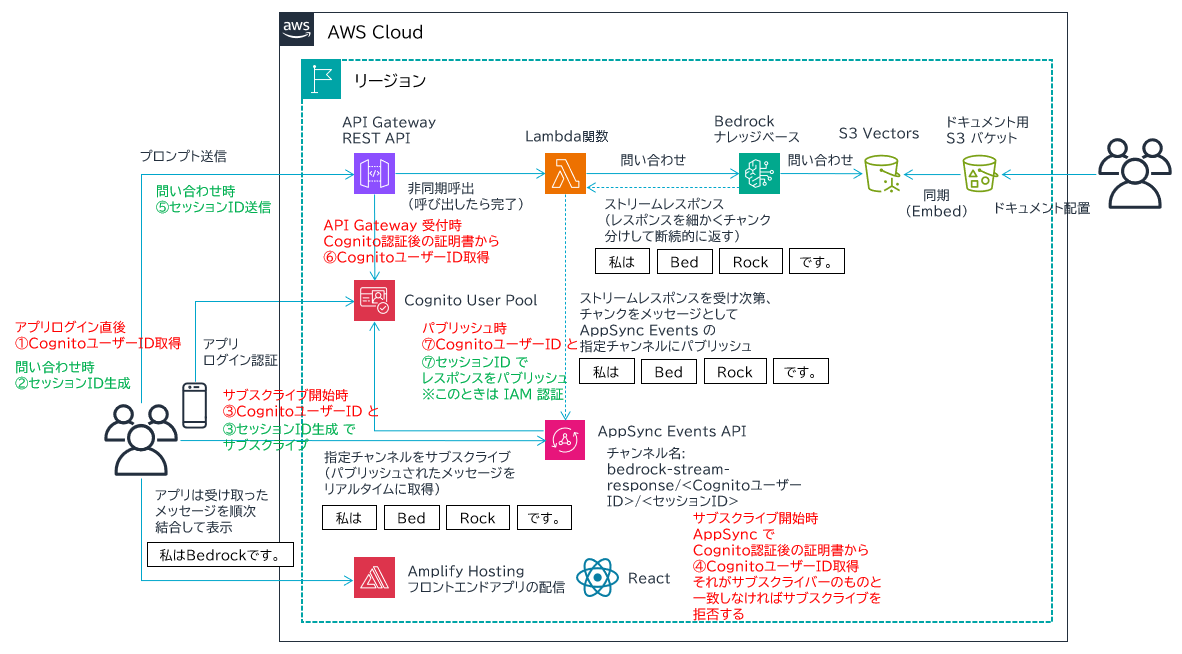
- 図の左側半分、アプリ UI 基盤は以下の記事と全く同じです。お手数ですが内容についてはこちらをご覧ください。
- 図の右側半分、Lambda 関数から Bedrock ナレッジベースに問い合わせるところを今回新たに作成しています。
- まず、RAG に必要な独自ドキュメントを用意し、ドキュメント用 S3 バケットに保存します。
- S3 Vectors を使用して、Vector バケットとインデックスを作成します。
- これら S3 リソースを Amazon Bedrock Knowledge Bases でナレッジベースとして関連付けます。
- それができると、ドキュメント用 S3 バケットのドキュメント内容をベクトルデータに変換して S3 Vectors に保存してくれます。これを埋め込み (Embedding) と言います。埋め込みに使用する AI モデルは Amazon Titan Text Embeddings V2 を使用します。
- Bedrock ナレッジベースが完成すると、それを使用して回答を生成する LLM を指定します。今回は Amazon Nova 2 Lite を使用します。Lambda 関数内でパラメータとして指定して、プロンプトとともに問い合わせることになります。
- フロントエンドの UI は React で開発します。
実装について
まず、この基盤のデプロイについては以下の Amazon Bedrock 生成 AI チャットボットの環境がデプロイできていることが前提になっています。そこで紹介されている基盤に機能追加したイメージです。
リソースは基本 AWS CloudFormation でデプロイしています。上記に続く、追加分のテンプレートをこちらに記載します。インラインで説明をコメントします。
AWSTemplateFormatVersion: 2010-09-09
Description: The CloudFormation template that creates a S3 vector bucket and index as a RAG Knowledge base.
# ------------------------------------------------------------#
# Input Parameters
# ------------------------------------------------------------#
Parameters:
SystemName:
Type: String
Description: System name. use lower case only. (e.g. example)
Default: example
MaxLength: 10
MinLength: 1
SubName:
Type: String
Description: System sub name. use lower case only. (e.g. prod or dev)
Default: dev
MaxLength: 10
MinLength: 1
DomainName:
Type: String
Description: Domain name for URL. xxxxx.xxx (e.g. example.com)
Default: example.com
AllowedPattern: "[^\\s@]+\\.[^\\s@]+"
SubDomainName:
Type: String
Description: Sub domain name for URL. (e.g. example-prod or example-dev)
Default: example-dev
MaxLength: 20
MinLength: 1
Dimension:
Type: Number
Description: The dimensions of the vectors to be inserted into the vector index. The value depends on the embedding model.
Default: 1024
MaxValue: 4096
MinValue: 1
EmbeddingModelId:
Type: String
Description: The embedding model ID.
Default: amazon.titan-embed-text-v2:0
MaxLength: 100
MinLength: 1
LlmModelId:
Type: String
Description: The LLM model ID for the Knowledge base.
Default: global.amazon.nova-2-lite-v1:0
MaxLength: 100
MinLength: 1
Metadata:
AWS::CloudFormation::Interface:
ParameterGroups:
- Label:
default: "General Configuration"
Parameters:
- SystemName
- SubName
- Label:
default: "Domain Configuration"
Parameters:
- DomainName
- SubDomainName
- Label:
default: "Embedding Configuration"
Parameters:
- Dimension
- EmbeddingModelId
- Label:
default: "Knowledge Base Configuration"
Parameters:
- LlmModelId
Resources:
# ------------------------------------------------------------#
# S3
# ------------------------------------------------------------#
# ドキュメント保存用 S3 汎用バケット
S3BucketKbDatasource:
Type: AWS::S3::Bucket
Properties:
BucketName: !Sub ${SystemName}-${SubName}-kbdatasource
PublicAccessBlockConfiguration:
BlockPublicAcls: true
BlockPublicPolicy: true
IgnorePublicAcls: true
RestrictPublicBuckets: true
CorsConfiguration:
CorsRules:
- AllowedHeaders:
- "*"
AllowedMethods:
- "GET"
- "HEAD"
- "PUT"
- "POST"
- "DELETE"
AllowedOrigins:
- !Sub https://${SubDomainName}.${DomainName}
ExposedHeaders:
- last-modified
- content-type
- content-length
- etag
- x-amz-version-id
- x-amz-request-id
- x-amz-id-2
- x-amz-cf-id
- x-amz-storage-class
- date
- access-control-expose-headers
MaxAge: 3000
Tags:
- Key: Cost
Value: !Sub ${SystemName}-${SubName}
S3BucketPolicyKbDatasource:
Type: AWS::S3::BucketPolicy
Properties:
Bucket: !Ref S3BucketKbDatasource
PolicyDocument:
Version: "2012-10-17"
Statement:
- Action: "s3:*"
Effect: Deny
Resource:
- !Sub "arn:aws:s3:::${S3BucketKbDatasource}"
- !Sub "arn:aws:s3:::${S3BucketKbDatasource}/*"
Condition:
Bool:
"aws:SecureTransport": "false"
Principal: "*"
DependsOn:
- S3BucketKbDatasource
# S3 Vector バケット
S3VectorBucket:
Type: AWS::S3Vectors::VectorBucket
Properties:
VectorBucketName: !Sub ${SystemName}-${SubName}-vectordb
# S3 Vector バケットに関連付けるインデックス
S3VectorBucketIndex:
Type: AWS::S3Vectors::Index
Properties:
IndexName: !Sub ${SystemName}-${SubName}-vectordb-index
DataType: float32
Dimension: !Ref Dimension
DistanceMetric: cosine
VectorBucketArn: !GetAtt S3VectorBucket.VectorBucketArn
MetadataConfiguration:
NonFilterableMetadataKeys:
- AMAZON_BEDROCK_TEXT
- AMAZON_BEDROCK_METADATA
DependsOn:
- S3VectorBucket
# ------------------------------------------------------------#
# Bedrock Knowledge Base
# ------------------------------------------------------------#
# ここで、各種 S3 を 1つの Knowledge Base として関連付ける
BedrockKnowledgeBase:
Type: AWS::Bedrock::KnowledgeBase
Properties:
Name: !Sub ${SystemName}-${SubName}-kb
Description: !Sub RAG Knowledge Base for ${SystemName}-${SubName}
KnowledgeBaseConfiguration:
Type: VECTOR
VectorKnowledgeBaseConfiguration:
EmbeddingModelArn: !Sub arn:aws:bedrock:${AWS::Region}::foundation-model/${EmbeddingModelId}
RoleArn: !GetAtt IAMRoleBedrockKb.Arn
StorageConfiguration:
Type: S3_VECTORS
S3VectorsConfiguration:
IndexArn: !GetAtt S3VectorBucketIndex.IndexArn
VectorBucketArn: !GetAtt S3VectorBucket.VectorBucketArn
Tags:
Cost: !Sub ${SystemName}-${SubName}
DependsOn:
- IAMRoleBedrockKb
# ドキュメント保存用 S3 バケットはここで DataSource として関連付けないと機能しない
BedrockKnowledgeBaseDataSource:
Type: AWS::Bedrock::DataSource
Properties:
Name: !Sub ${SystemName}-${SubName}-kb-datasource
Description: !Sub RAG Knowledge Base Data Source for ${SystemName}-${SubName}
KnowledgeBaseId: !Ref BedrockKnowledgeBase
DataDeletionPolicy: RETAIN
DataSourceConfiguration:
Type: S3
S3Configuration:
BucketArn: !GetAtt S3BucketKbDatasource.Arn
DependsOn:
- S3BucketKbDatasource
- BedrockKnowledgeBase
# ------------------------------------------------------------#
# AppSync Events
# ------------------------------------------------------------#
AppSyncChannelNamespaceRagSR:
Type: AWS::AppSync::ChannelNamespace
Properties:
Name: rag-stream-response
ApiId:
Fn::ImportValue:
!Sub AppSyncApiId-${SystemName}-${SubName}
CodeHandlers: |
import { util } from '@aws-appsync/utils';
export function onSubscribe(ctx) {
const requested = ctx.info.channel.path;
if (!requested.startsWith(`/rag-stream-response/${ctx.identity.sub}`)) {
util.unauthorized();
}
}
Tags:
- Key: Cost
Value: !Sub ${SystemName}-${SubName}
# ------------------------------------------------------------#
# API Gateway REST API
# ------------------------------------------------------------#
RestApiRagSR:
Type: AWS::ApiGateway::RestApi
Properties:
Name: !Sub rag-sr-${SystemName}-${SubName}
Description: !Sub REST API to call Lambda rag-stream-response-${SystemName}-${SubName}
EndpointConfiguration:
Types:
- REGIONAL
IpAddressType: dualstack
Tags:
- Key: Cost
Value: !Sub ${SystemName}-${SubName}
RestApiDeploymentRagSR:
Type: AWS::ApiGateway::Deployment
Properties:
RestApiId: !Ref RestApiRagSR
DependsOn:
- RestApiMethodRagSRPost
- RestApiMethodRagSROptions
RestApiStageRagSR:
Type: AWS::ApiGateway::Stage
Properties:
StageName: prod
Description: production stage
RestApiId: !Ref RestApiRagSR
DeploymentId: !Ref RestApiDeploymentRagSR
MethodSettings:
- ResourcePath: "/*"
HttpMethod: "*"
LoggingLevel: INFO
DataTraceEnabled : true
TracingEnabled: false
AccessLogSetting:
DestinationArn: !GetAtt LogGroupRestApiRagSR.Arn
Format: '{"requestId":"$context.requestId","status":"$context.status","sub":"$context.authorizer.claims.sub","email":"$context.authorizer.claims.email","resourcePath":"$context.resourcePath","requestTime":"$context.requestTime","sourceIp":"$context.identity.sourceIp","userAgent":"$context.identity.userAgent","apigatewayError":"$context.error.message","authorizerError":"$context.authorizer.error","integrationError":"$context.integration.error"}'
Tags:
- Key: Cost
Value: !Sub ${SystemName}-${SubName}
RestApiAuthorizerRagSR:
Type: AWS::ApiGateway::Authorizer
Properties:
Name: !Sub restapi-authorizer-ragsr-${SystemName}-${SubName}
RestApiId: !Ref RestApiRagSR
Type: COGNITO_USER_POOLS
ProviderARNs:
- Fn::ImportValue:
!Sub CognitoArn-${SystemName}-${SubName}
AuthorizerResultTtlInSeconds: 300
IdentitySource: method.request.header.Authorization
RestApiResourceRagSR:
Type: AWS::ApiGateway::Resource
Properties:
RestApiId: !Ref RestApiRagSR
ParentId: !GetAtt RestApiRagSR.RootResourceId
PathPart: ragsr
RestApiMethodRagSRPost:
Type: AWS::ApiGateway::Method
Properties:
RestApiId: !Ref RestApiRagSR
ResourceId: !Ref RestApiResourceRagSR
HttpMethod: POST
AuthorizationType: COGNITO_USER_POOLS
AuthorizerId: !Ref RestApiAuthorizerRagSR
Integration:
Type: AWS
IntegrationHttpMethod: POST
Credentials:
Fn::ImportValue:
!Sub ApigLambdaInvocationRoleArn-${SystemName}-${SubName}
Uri: !Sub "arn:aws:apigateway:${AWS::Region}:lambda:path/2015-03-31/functions/${LambdaRagSR.Arn}/invocations"
PassthroughBehavior: NEVER
RequestTemplates:
application/json: |
{
"body": $input.json('$'),
"sub": "$context.authorizer.claims.sub"
}
RequestParameters:
integration.request.header.X-Amz-Invocation-Type: "'Event'"
IntegrationResponses:
- ResponseParameters:
method.response.header.Access-Control-Allow-Headers: "'Content-Type,X-Amz-Date,Authorization,X-Api-Key,X-Amz-Security-Token,Cache-Control'"
method.response.header.Access-Control-Allow-Methods: "'POST,OPTIONS'"
method.response.header.Access-Control-Allow-Origin: !Sub "'https://${SubDomainName}.${DomainName}'"
ResponseTemplates:
application/json: ''
StatusCode: '202'
MethodResponses:
- StatusCode: '202'
ResponseModels:
application/json: Empty
ResponseParameters:
method.response.header.Access-Control-Allow-Origin: true
method.response.header.Access-Control-Allow-Headers: true
method.response.header.Access-Control-Allow-Methods: true
RestApiMethodRagSROptions:
Type: AWS::ApiGateway::Method
Properties:
RestApiId: !Ref RestApiRagSR
ResourceId: !Ref RestApiResourceRagSR
HttpMethod: OPTIONS
AuthorizationType: NONE
Integration:
Type: MOCK
Credentials:
Fn::ImportValue:
!Sub ApigLambdaInvocationRoleArn-${SystemName}-${SubName}
IntegrationResponses:
- ResponseParameters:
method.response.header.Access-Control-Allow-Headers: "'Content-Type,X-Amz-Date,Authorization,X-Api-Key,X-Amz-Security-Token,Cache-Control'"
method.response.header.Access-Control-Allow-Methods: "'POST,OPTIONS'"
method.response.header.Access-Control-Allow-Origin: !Sub "'https://${SubDomainName}.${DomainName}'"
ResponseTemplates:
application/json: ''
StatusCode: '200'
PassthroughBehavior: WHEN_NO_MATCH
RequestTemplates:
application/json: '{"statusCode": 200}'
MethodResponses:
- ResponseModels:
application/json: Empty
ResponseParameters:
method.response.header.Access-Control-Allow-Headers: true
method.response.header.Access-Control-Allow-Methods: true
method.response.header.Access-Control-Allow-Origin: true
StatusCode: '200'
# ------------------------------------------------------------#
# API Gateway LogGroup (CloudWatch Logs)
# ------------------------------------------------------------#
LogGroupRestApiRagSR:
Type: AWS::Logs::LogGroup
Properties:
LogGroupName: !Sub /aws/apigateway/${RestApiRagSR}
RetentionInDays: 365
Tags:
- Key: Cost
Value: !Sub ${SystemName}-${SubName}
# ------------------------------------------------------------#
# Lambda
# ------------------------------------------------------------#
LambdaRagSR:
Type: AWS::Lambda::Function
Properties:
FunctionName: !Sub rag-sr-${SystemName}-${SubName}
Description: !Sub Lambda Function to invoke Bedrock Knowledge Bases for ${SystemName}-${SubName}
Architectures:
- x86_64
Runtime: python3.14
Timeout: 300
MemorySize: 128
Environment:
Variables:
APPSYNC_API_ENDPOINT:
Fn::ImportValue:
!Sub AppSyncEventsEndpointHttp-${SystemName}-${SubName}
MODEL_ARN: !Sub "arn:aws:bedrock:${AWS::Region}:${AWS::AccountId}:inference-profile/${LlmModelId}"
KNOWLEDGE_BASE_ID: !Ref BedrockKnowledgeBase
REGION: !Ref AWS::Region
Role: !GetAtt LambdaBedrockKbRole.Arn
Handler: index.lambda_handler
Tags:
- Key: Cost
Value: !Sub ${SystemName}-${SubName}
Code:
ZipFile: |
import os
import json
import boto3
import urllib.request
from botocore.auth import SigV4Auth
from botocore.awsrequest import AWSRequest
# common objects and valiables
session = boto3.session.Session()
bedrock_agent = boto3.client('bedrock-agent-runtime')
endpoint = os.environ['APPSYNC_API_ENDPOINT']
model_arn = os.environ['MODEL_ARN']
knowledge_base_id = os.environ['KNOWLEDGE_BASE_ID']
region = os.environ['REGION']
service = 'appsync'
headers = {'Content-Type': 'application/json'}
# AppSync publish message function
def publish_appsync_message(sub, appsync_session_id, payload, credentials):
body = json.dumps({
"channel": f"rag-stream-response/{sub}/{appsync_session_id}",
"events": [ json.dumps(payload) ]
}).encode("utf-8")
aws_request = AWSRequest(
method='POST',
url=endpoint,
data=body,
headers=headers
)
SigV4Auth(credentials, service, region).add_auth(aws_request)
req = urllib.request.Request(
url=endpoint,
data=aws_request.body,
method='POST'
)
for k, v in aws_request.headers.items():
req.add_header(k, v)
with urllib.request.urlopen(req) as res:
return res.read().decode('utf-8')
# handler
def lambda_handler(event, context):
try:
credentials = session.get_credentials().get_frozen_credentials()
# API Gateway からのインプットを取得
prompt = event['body']['prompt']
# セッション ID はアーキテクチャ概要編で説明した通り2種類ある
appsync_session_id = event['body']['appsyncSessionId']
bedrock_session_id = event['body'].get('bedrockSessionId')
sub = event['sub']
# Amazon Bedrock Knowledge Bases への問い合わせパラメータ作成
request = {
"input": {
"text": prompt
},
"retrieveAndGenerateConfiguration": {
"type": "KNOWLEDGE_BASE",
"knowledgeBaseConfiguration": {
"knowledgeBaseId": knowledge_base_id,
"modelArn": model_arn,
"generationConfiguration": {
"inferenceConfig": {
"textInferenceConfig": {
"maxTokens": 10000,
"temperature": 0.5,
"topP": 0.9
}
},
"performanceConfig": {
"latency": "standard"
}
}
}
}
}
# Bedrock sessionId は存在するときのみ渡す (継続会話時のみ)
if bedrock_session_id:
request["sessionId"] = bedrock_session_id
# Bedrock Knowledge Bases への問い合わせ
response = bedrock_agent.retrieve_and_generate_stream(**request)
# Bedrock sessionId がレスポンスにあれば、AppSync に送る
if "sessionId" in response:
publish_appsync_message(
sub,
appsync_session_id,
{
"type": "bedrock_session",
"bedrock_session_id": response["sessionId"]
},
credentials
)
for chunk in response["stream"]:
payload = None
# Generated text: チャンク分けされた回答メッセージが入る
if "output" in chunk and "text" in chunk["output"]:
payload = {
"type": "text",
"message": chunk["output"]["text"]
}
print({"t": chunk["output"]["text"]})
# Citation: 参考ドキュメントの情報が入る
elif "citation" in chunk:
payload = {
"type": "citation",
"citation": chunk['citation']['retrievedReferences']
}
print({"c": chunk['citation']['retrievedReferences']})
# Continue
if not payload:
continue
# Publish AppSync
publish_appsync_message(sub, appsync_session_id, payload, credentials)
except Exception as e:
print(str(e))
raise
DependsOn:
- LambdaBedrockKbRole
- BedrockKnowledgeBase
LambdaRagSREventInvokeConfig:
Type: AWS::Lambda::EventInvokeConfig
Properties:
FunctionName: !GetAtt LambdaRagSR.Arn
Qualifier: $LATEST
MaximumRetryAttempts: 0
MaximumEventAgeInSeconds: 300
# ------------------------------------------------------------#
# Lambda Bedrock Knowledge Bases Invocation Role (IAM)
# ------------------------------------------------------------#
LambdaBedrockKbRole:
Type: AWS::IAM::Role
Properties:
RoleName: !Sub LambdaBedrockKbRole-${SystemName}-${SubName}
Description: This role allows Lambda functions to invoke Bedrock Knowledge Bases and AppSync Events API.
AssumeRolePolicyDocument:
Version: 2012-10-17
Statement:
- Effect: Allow
Principal:
Service:
- lambda.amazonaws.com
Action:
- sts:AssumeRole
Path: /
ManagedPolicyArns:
- arn:aws:iam::aws:policy/service-role/AWSLambdaBasicExecutionRole
- arn:aws:iam::aws:policy/AWSXRayDaemonWriteAccess
Policies:
- PolicyName: !Sub LambdaBedrockKbPolicy-${SystemName}-${SubName}
PolicyDocument:
Version: 2012-10-17
Statement:
- Effect: Allow
Action:
- "bedrock:InvokeModel"
- "bedrock:InvokeModelWithResponseStream"
- "bedrock:GetInferenceProfile"
- "bedrock:ListInferenceProfiles"
Resource:
- !Sub "arn:aws:bedrock:*::foundation-model/*"
- !Sub "arn:aws:bedrock:*:${AWS::AccountId}:inference-profile/*"
- Effect: Allow
Action:
- "bedrock:RetrieveAndGenerate"
- "bedrock:Retrieve"
Resource:
- !GetAtt BedrockKnowledgeBase.KnowledgeBaseArn
- Effect: Allow
Action:
- "appsync:connect"
Resource:
- Fn::ImportValue:
!Sub AppSyncApiArn-${SystemName}-${SubName}
- Effect: Allow
Action:
- "appsync:publish"
- "appsync:EventPublish"
Resource:
- Fn::Join:
- ""
- - Fn::ImportValue:
!Sub AppSyncApiArn-${SystemName}-${SubName}
- /channelNamespace/rag-stream-response
# ------------------------------------------------------------#
# IAM Role for Bedrock Knowledge Base
# ------------------------------------------------------------#
IAMRoleBedrockKb:
Type: AWS::IAM::Role
Properties:
RoleName: !Sub BedrockKbRole-${SystemName}-${SubName}
AssumeRolePolicyDocument:
Version: 2012-10-17
Statement:
- Effect: Allow
Action:
- sts:AssumeRole
Principal:
Service:
- bedrock.amazonaws.com
Condition:
StringEquals:
"aws:SourceAccount": !Sub ${AWS::AccountId}
ArnLike:
"aws:SourceArn": !Sub "arn:aws:bedrock:${AWS::Region}:${AWS::AccountId}:knowledge-base/*"
Policies:
- PolicyName: !Sub BedrockKbPolicy-${SystemName}-${SubName}
PolicyDocument:
Version: 2012-10-17
Statement:
- Effect: Allow
Action:
- "s3:GetObject"
- "s3:ListBucket"
Resource:
- !GetAtt S3BucketKbDatasource.Arn
- !Sub ${S3BucketKbDatasource.Arn}/*
Condition:
StringEquals:
"aws:ResourceAccount":
- !Ref AWS::AccountId
- Effect: Allow
Action:
- "s3vectors:GetIndex"
- "s3vectors:QueryVectors"
- "s3vectors:PutVectors"
- "s3vectors:GetVectors"
- "s3vectors:DeleteVectors"
Resource:
- !GetAtt S3VectorBucketIndex.IndexArn
Condition:
StringEquals:
"aws:ResourceAccount":
- !Ref AWS::AccountId
- Effect: Allow
Action:
- "bedrock:InvokeModel"
Resource:
- !Sub arn:aws:bedrock:${AWS::Region}::foundation-model/${EmbeddingModelId}
DependsOn:
- S3BucketKbDatasource
- S3VectorBucketIndex
# ------------------------------------------------------------#
# Output Parameters
# ------------------------------------------------------------#
Outputs:
# S3
S3BucketKbDatasourceName:
Value: !Ref S3BucketKbDatasource
# API Gateway
APIGatewayEndpointRagSR:
Value: !Sub https://${RestApiRagSR}.execute-api.${AWS::Region}.${AWS::URLSuffix}/${RestApiStageRagSR}/ragsr
Export:
Name: !Sub RestApiEndpointRagSR-${SystemName}-${SubName}
今回、API Gateway を環境に追加しているので、以下の通り AWS Amplify の CloudFormation テンプレートも変更が入っています。
AWSTemplateFormatVersion: 2010-09-09
Description: The CloudFormation template that creates an Amplify environment.

# ------------------------------------------------------------#
# Input Parameters
# ------------------------------------------------------------#
Parameters:
  SystemName:
    Type: String
    Description: System name. use lower case only. (e.g. example)
    Default: example
    MaxLength: 10
    MinLength: 1

  SubName:
    Type: String
    Description: System sub name. use lower case only. (e.g. prod or dev)
    Default: dev
    MaxLength: 10
    MinLength: 1

  DomainName:
    Type: String
    Description: Domain name for URL. xxxxx.xxx (e.g. example.com)
    Default: example.com
    MaxLength: 40
    MinLength: 5

  SubDomainName:
    Type: String
    Description: Sub domain name for URL. (e.g. example-prod or example-dev)
    Default: example-dev
    MaxLength: 20
    MinLength: 1

  NodejsVersion:
    Type: String
    Description: The Node.js version for build phase. (e.g. v22.21.1 as of 2025-12-24)
    Default: v22.21.1
    MaxLength: 10
    MinLength: 6

Metadata:
  AWS::CloudFormation::Interface:
    ParameterGroups:
      - Label:
          default: "General Configuration"
        Parameters:
          - SystemName
          - SubName
      - Label:
          default: "Domain Configuration"
        Parameters:
          - DomainName
          - SubDomainName
      - Label:
          default: "Application Configuration"
        Parameters:
          - NodejsVersion

Resources:
# ------------------------------------------------------------#
# Amplify Role (IAM)
# ------------------------------------------------------------#
  AmplifyRole:
    Type: AWS::IAM::Role
    Properties:
      RoleName: !Sub AmplifyExecutionRole-${SystemName}-${SubName}
      Description: This role allows Amplify to pull source codes from CodeCommit.
      AssumeRolePolicyDocument:
        Version: 2012-10-17
        Statement:
          - Effect: Allow
            Principal:
              Service:
                - amplify.amazonaws.com
            Action:
              - sts:AssumeRole
      Policies:
        - PolicyName: !Sub AmplifyExecutionPolicy-${SystemName}-${SubName}
          PolicyDocument:
            Version: "2012-10-17"
            Statement:
              - Effect: Allow
                Resource:
                  - !Sub "arn:aws:logs:${AWS::Region}:${AWS::AccountId}:log-group:/aws/amplify/*"
                Action:
                  - "logs:CreateLogGroup"
                  - "logs:CreateLogStream"
                  - "logs:PutLogEvents"
              - Effect: Allow
                Resource:
                  Fn::ImportValue:
                    !Sub CodeCommitRepoArn-${SystemName}-${SubName}
                Action:
                  - "codecommit:GitPull"

# ------------------------------------------------------------#
#  Amplify Console
# ------------------------------------------------------------#
  AmplifyConsole:
    Type: AWS::Amplify::App
    Properties:
      Name: !Sub ${SystemName}-${SubName}
      Description: !Sub Web App environment for ${SystemName}-${SubName}
      Repository:
        Fn::ImportValue:
          !Sub CodeCommitRepoUrl-${SystemName}-${SubName}
      AutoBranchCreationConfig:
        EnableAutoBranchCreation: false
        EnableAutoBuild: true
        EnablePerformanceMode: false
      EnableBranchAutoDeletion: false
      Platform: WEB
      BuildSpec: |-
        version: 1
        frontend:
          phases:
            preBuild:
              commands:
                - npm ci
            build:
              commands:
                - npm run build
                - echo "VITE_BASE=$VITE_BASE" >> .env
                - echo "VITE_REGION=$VITE_REGION" >> .env
                - echo "VITE_USERPOOLID=$VITE_USERPOOLID" >> .env
                - echo "VITE_USERPOOLWEBCLIENTID=$VITE_USERPOOLWEBCLIENTID" >> .env
                - echo "VITE_IDPOOLID=$VITE_IDPOOLID" >> .env
                - echo "VITE_RESTAPIENDPOINTBEDROCKSR=$VITE_RESTAPIENDPOINTBEDROCKSR" >> .env
                - echo "VITE_RESTAPIENDPOINTRAGSR=$VITE_RESTAPIENDPOINTRAGSR" >> .env
                - echo "VITE_APPSYNCEVENTSHTTPENDPOINT=$VITE_APPSYNCEVENTSHTTPENDPOINT" >> .env
                - echo "VITE_IMG_URL=$VITE_IMG_URL" >> .env
                - echo "VITE_SUBNAME=$VITE_SUBNAME" >> .env
          artifacts:
            baseDirectory: /dist
            files:
              - '**/*'
          cache:
            paths:
              - node_modules/**/*
      CustomHeaders: !Sub |-
        customHeaders:
          - pattern: '**'
            headers:
              - key: 'Strict-Transport-Security'
                value: 'max-age=31536000; includeSubDomains'
              - key: 'X-Frame-Options'
                value: 'DENY'
              - key: 'X-XSS-Protection'
                value: '1; mode=block'
              - key: 'X-Content-Type-Options'
                value: 'nosniff'
              - key: 'Content-Security-Policy'
                value: >-
                  default-src 'self' *.${DomainName} ${DomainName};
                  img-src 'self' *.${DomainName} ${DomainName} data: blob:;
                  style-src 'self' *.${DomainName} ${DomainName} 'unsafe-inline' fonts.googleapis.com;
                  font-src 'self' *.${DomainName} ${DomainName} fonts.gstatic.com;
                  script-src 'self' *.${DomainName} ${DomainName} cdn.jsdelivr.net;
                  script-src-elem 'self' *.${DomainName} ${DomainName} cdn.jsdelivr.net;
                  connect-src 'self' *.${AWS::Region}.amazonaws.com *.${DomainName} ${DomainName} wss:;
                  media-src 'self' *.${DomainName} ${DomainName} data: blob:;
                  worker-src 'self' *.${DomainName} ${DomainName} data: blob:;
              - key: 'Cache-Control'
                value: 'no-store'
      CustomRules:
        - Source: /<*>
          Status: 404-200
          Target: /index.html
        - Source:
          Status: 200
          Target: /index.html
      EnvironmentVariables:
        - Name: VITE_BASE
          Value: /
        - Name: VITE_REGION
          Value: !Ref AWS::Region
        - Name: VITE_USERPOOLID
          Value:
            Fn::ImportValue:
              !Sub CognitoUserPoolId-${SystemName}-${SubName}
        - Name: VITE_USERPOOLWEBCLIENTID
          Value:
            Fn::ImportValue:
              !Sub CognitoAppClientId-${SystemName}-${SubName}
        - Name: VITE_IDPOOLID
          Value:
            Fn::ImportValue:
              !Sub CognitoIdPoolId-${SystemName}-${SubName}
        - Name: VITE_RESTAPIENDPOINTBEDROCKSR
          Value:
            Fn::ImportValue:
              !Sub RestApiEndpointBedrockSR-${SystemName}-${SubName}
        - Name: VITE_RESTAPIENDPOINTRAGSR
          Value:
            Fn::ImportValue:
              !Sub RestApiEndpointRagSR-${SystemName}-${SubName}
        - Name: VITE_APPSYNCEVENTSHTTPENDPOINT
          Value:
            Fn::ImportValue:
              !Sub AppSyncEventsEndpointHttp-${SystemName}-${SubName}
        - Name: VITE_IMG_URL
          Value: !Sub https://${SubDomainName}-img.${DomainName}
        - Name: VITE_SUBNAME
          Value: !Ref SubName
        - Name: _LIVE_UPDATES
          Value: !Sub '[{"name":"Node.js version","pkg":"node","type":"nvm","version":"${NodejsVersion}"}]'
      IAMServiceRole: !GetAtt AmplifyRole.Arn
      Tags:
        - Key: Cost
          Value: !Sub ${SystemName}-${SubName}
  AmplifyBranchProd:
    Type: AWS::Amplify::Branch
    Properties:
      AppId: !GetAtt AmplifyConsole.AppId
      BranchName: main
      Description: production
      EnableAutoBuild: true
      EnablePerformanceMode: false
  AmplifyDomainProd:
    Type: AWS::Amplify::Domain
    Properties:
      AppId: !GetAtt AmplifyConsole.AppId
      DomainName: !Ref DomainName
      CertificateSettings:
        CertificateType: CUSTOM
        CustomCertificateArn:
          Fn::ImportValue:
            !Sub AcmCertificateArn-${SystemName}-${SubName}
      SubDomainSettings:
        - BranchName: !GetAtt AmplifyBranchProd.BranchName
          Prefix: !Sub ${SystemName}-${SubName}
      EnableAutoSubDomain: false
続編記事
UI 編で、React による UI の開発例を紹介します。
まとめ
いかがでしたでしょうか?
Amazon Bedrock Knowledge Bases で RAG チャットボットを開発するときのアーキテクチャを AWS CloudFormation でデプロイする一例を紹介しました。
本記事が皆様のお役に立てれば幸いです。