
こんにちは、広野です。
これまでいろいろと React アプリを AWS リソースと連携させるための仕組みをブログ記事にしてきましたが、絶対に使うであろうユースケースを書いていませんでした。以下、順を追って説明したいと思います。
本記事は環境編です。今後、UI 編を続編記事として用意しています。
前回の記事
前回記事で、背景やアーキテクチャを説明しています。こちらをご覧になった上で、本記事にお戻りください。
Lambda@Edge 関数の実装
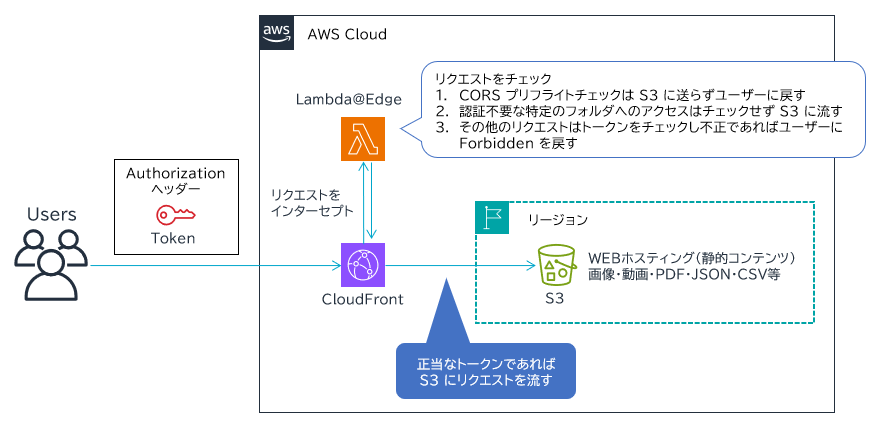
以下の Lambda@Edge 関数について説明します。
Lambda@Edge 関数の制約
Lambda@Edge 関数を作成するときには、通常の Lambda 関数にはない制約があるので、注意が必要です。


詳細は AWS 公式ドキュメントに掲載されていますが、私が気を遣ったところを挙げておきます。総じて、大量のリクエストやレスポンスに対して呼び出されるので、迅速かつ安全に実行できることを優先してつくられている、と感じました。
- 関数をバージニア北部リージョン (us-east-1) にデプロイしなければならない。これは CloudFront と同じなので妥当ですよね。
- ただデプロイしただけでは CloudFront と関連付けられない。関数の「バージョン」を作成し、そのバージョンを CloudFront と関連付ける必要がある。
- Lambda@Edge 関数に割り当てる IAM ロールは、通常の Lambda 関数で設定する lambda.amazonaws.com による引き受けだけでなく、edgelambda.amazonaws.com も含めた両方を設定する必要がある。権限は必要なものを付ければよいが、最低限 Amazon CloudWatch Logs にログを残す設定があれば OK。
- 環境変数は使用できない。そのため、環境変数はベタにコード内に埋め込む必要あり。AWS CloudFormation でデプロイする場合は !Sub でパラメータを埋め込めばよい。
- Lambda レイヤーは使用できない。レイヤーが必要な高度な処理はできないということになる。モジュールを使えば一発の処理でも、ベタに JavaScript で書かないといけない局面がある。
- AWS X-Ray は使用できない。
- Amazon CloudWatch Logs にログが残らないことがある。これはデバッグで困りました。マネジメントコンソールで関数をテスト実行するときはログが残ったので、そこでデバッグしました。
さらに、私が実施したケースでは以下の件がありました。Lambda@Edge に限った話ではありませんが。
- Lambda@Edge 関数のコードサンプルは Node.js が多く Python は少ない。そのため、ランタイムは最新の Node.js 24 を採用した。
- Node.js の Lambda 関数を AWS CloudFormation でデプロイすると、デプロイされるコードのファイル名は index.js 固定になる。しかし Node.js 24 Lambda 関数が期待している拡張子は .mjs であり、その場合、コードを ES Modules (ESM) に従って書かないといけない。拡張子の変更は CloudFormation ではできないため、コードを古い CommonJS に従って書くことになる。
- 前述した Lambda 関数バージョンを AWS CloudFormation で発行することは可能。Lambda 関数そのものを変更するときに、同時に Lambda 関数バージョンの Description を更新してバージョンを更新する運用にした。
- アーキテクチャ編にも掲載したが、CORS 対応のためレスポンスに Access-Control-Allow-Origin ヘッダーなどの CORS 関連ヘッダーを含める必要がある。環境変数が使用できないため、ベタにコードに書く必要あり。ただし、私の場合は CloudFront でオーバーライドする設計にしたため、Lambda@Edge 関数コード内に CORS 関連ヘッダーを書かなくて済んだ。
Lambda@Edge 関数コード
実際に動かしたコードはこちら。
上述の制約通り、Node.js 24 ですが CommonJS で書かれています。require(xxx)など。
正当なリクエストには、Authorization ヘッダーに “Bearer ” 付きの JWT が格納されている前提です。
'use strict';
const crypto = require('crypto');
const https = require('https');
// Cognito のアプリケーションクライアントID
const CLIENT_ID = "xxxxxxxxxxxxxxxxxxxxxxxxxx";
// Cognito のユーザープールID とリージョン名を埋め込む
const ISSUER = "https://cognito-idp.ap-northeast-1.amazonaws.com/ap-northeast-1_xxxxxxxxx";
const JWKS_URL = `${ISSUER}/.well-known/jwks.json`;
let cachedKeys = null;
let cachedAt = 0;
function fetchJson(url) {
    return new Promise((resolve, reject) => {
        https.get(url, res => {
            let data = "";
            res.on("data", c => data += c);
            res.on("end", () => resolve(JSON.parse(data)));
        }).on("error", reject);
    });
}
async function getJwks() {
    if (cachedKeys && Date.now() - cachedAt < 3600000) return cachedKeys; cachedKeys = await fetchJson(JWKS_URL); cachedAt = Date.now(); return cachedKeys; } function b64u(str) { str += "=".repeat((4 - str.length % 4) % 4); return Buffer.from(str.replace(/-/g, "+").replace(/_/g, "/"), "base64"); } exports.handler = async (event) => {
    const req = event.Records[0].cf.request;
    // 1. CORS プリフライトチェックであればすぐにレスポンスを戻す。
    // status コードを入れることでユーザーに戻る。
    /* ========== OPTIONS preflight ========== */
    if (req.method === "OPTIONS") {
        return {
            status: "204",
            statusDescription: "No Content"
        };
    }
    // 2. 認証不要なリクエストであればそのまま S3 に流す。
    // ここではパスが /public/ から始まるリクエストであれば認証なしで通すようにしている。
    // return req と書くことで S3 に流れる。
    /* ========== Public images bypass ========== */
    if (req.uri.startsWith("/public/")) {
        return req;
    }
    /* ========== Authorization required ========== */
    // 3. ここからはトークンのチェックをしている。正当なトークンでなければ fail のレスポンスを返す。
    const fail = { status: "403", statusDescription: "Forbidden" };
    const auth = req.headers.authorization?.[0]?.value;
    if (!auth) return fail;
    try {
        const token = auth.replace("Bearer ", "");
        const parts = token.split(".");
        if (parts.length !== 3) return fail;
        const [h, p, s] = parts;
        const header = JSON.parse(b64u(h).toString());
        const payload = JSON.parse(b64u(p).toString());
        if (payload.iss !== ISSUER || payload.aud !== CLIENT_ID || payload.exp < Date.now() / 1000) { return fail; } const jwks = await getJwks(); const key = jwks.keys.find(k => k.kid === header.kid);
        if (!key) return fail;
        const pub = crypto.createPublicKey({ key, format: "jwk" });
        const ok = crypto.verify("RSA-SHA256", Buffer.from(`${h}.${p}`), pub, b64u(s));
        return ok ? req : fail;
    } catch (e) {
        return fail;
    }
};
Amazon CloudFront 側の実装
セキュリティ設計上、以下の構成であることが前提です。説明は省略します。
- オリジンは Amazon S3 バケットで、OAC が設定されている。(関連付けられた CloudFront でなければ S3 バケットにアクセスできない)


ここまでで話した Lambda@Edge 関数ができていれば、Amazon CloudFront ディストリビューションと関連付けるのは簡単です。注意すべきは Lambda 関数のバージョンが発行できていないと関連付けできないことぐらいでしょうか。Amazon CloudFront なので IAM ロールを意識する必要はありません。
詳細な設定はこの後紹介する AWS CloudFormation テンプレートで紹介します。
AWS CloudFormation テンプレート
設定詳細は CloudFormation テンプレートで紹介します。適宜インラインで補足します。
Lambda@Edge 関数 (バージニア北部リージョン限定!!)
AWSTemplateFormatVersion: 2010-09-09
Description: The CloudFormation template that creates a Lambda@Edge function to authorize users access S3 contents. The resources must be deployed in us-east-1 region.

# ------------------------------------------------------------#
# Input Parameters
# ------------------------------------------------------------#
Parameters:
  SubName:
    Type: String
    Description: System sub name. (e.g. prod or test)
    Default: test
    MaxLength: 10
    MinLength: 1

  // 重要。このパラメータを Lambda@Edge 関数変更の都度、書き換える必要がある。これにより関数のバージョンが更新される。
  // さらに、新しいバージョンで Amazon CloudFront ディストリビューションも更新する必要あり。忘れないように。
  Updated:
    Type: String
    Description: The updated date and time of the lambda function. You must update this value when you update the lambda function, and update the relevant CloudFront stack.
    Default: 2026-01-10T0900
    MaxLength: 20
    MinLength: 10

  CognitoUserPoolId:
    Type: String
    Description: Cognito user pool ID.
    Default: ap-northeast-1_xxxxxxxxx
    MaxLength: 50
    MinLength: 1

  CognitoUserPoolRegion:
    Type: String
    Description: The region name where Cognito user pool is deployed.
    Default: ap-northeast-1
    MaxLength: 30
    MinLength: 1

  CognitoUserPoolAppClientId:
    Type: String
    Description: Cognito user pool app client ID.
    Default: xxxxxxxxxxxxxxxxxxxxxxxxxx
    MaxLength: 50
    MinLength: 1

Metadata:
  AWS::CloudFormation::Interface:
    ParameterGroups:
      - Label:
          default: "General Configuration"
        Parameters:
          - SubName
          - Updated
      - Label:
          default: "Cognito Configuration"
        Parameters:
          - CognitoUserPoolId
          - CognitoUserPoolAppClientId
          - CognitoUserPoolRegion

Resources:
# ------------------------------------------------------------#
# Lambda@Edge Role (IAM)
# ------------------------------------------------------------#
  LambdaAtEdgeRole:
    Type: AWS::IAM::Role
    Properties:
      RoleName: !Sub example-LambdaAtEdge-${SubName}
      Description: This role allows Lambda functions to push logs.
      AssumeRolePolicyDocument:
        Version: 2012-10-17
        Statement:
          - Effect: Allow
            Principal:
              Service:
                - lambda.amazonaws.com
                - edgelambda.amazonaws.com
            Action:
              - sts:AssumeRole
      Path: /
      ManagedPolicyArns:
        - arn:aws:iam::aws:policy/service-role/AWSLambdaBasicExecutionRole

# ------------------------------------------------------------#
# Lambda
# ------------------------------------------------------------#
  LambdaAtEdge:
    Type: AWS::Lambda::Function
    Properties:
      FunctionName: !Sub example-s3auth-${SubName}
      Description: Lambda@Edge function to check authorization to access S3 contents
      Runtime: nodejs24.x
      Timeout: 3
      MemorySize: 128
      Role: !GetAtt LambdaAtEdgeRole.Arn
      Handler: index.handler
      Tags:
        - Key: Cost
          Value: !Sub example-${SubName}
      Code:
        // !Sub で環境変数をパラメータから埋め込んでいます。
        ZipFile: !Sub |
          'use strict';
          const crypto = require('crypto');
          const https = require('https');
          const CLIENT_ID = "${CognitoUserPoolAppClientId}";
          const ISSUER = "https://cognito-idp.${CognitoUserPoolRegion}.amazonaws.com/${CognitoUserPoolId}";
          const JWKS_URL = `${!ISSUER}/.well-known/jwks.json`;
          let cachedKeys = null;
          let cachedAt = 0;
          function fetchJson(url) {
            return new Promise((resolve, reject) => {
              https.get(url, res => {
                let data = "";
                res.on("data", c => data += c);
                res.on("end", () => resolve(JSON.parse(data)));
              }).on("error", reject);
            });
          }
          async function getJwks() {
            if (cachedKeys && Date.now() - cachedAt < 3600000) return cachedKeys; cachedKeys = await fetchJson(JWKS_URL); cachedAt = Date.now(); return cachedKeys; } function b64u(str) { str += "=".repeat((4 - str.length % 4) % 4); return Buffer.from(str.replace(/-/g, "+").replace(/_/g, "/"), "base64"); } exports.handler = async (event) => {
            const req = event.Records[0].cf.request;
            /* ========== OPTIONS preflight ========== */
            if (req.method === "OPTIONS") {
              return {
                status: "204",
                statusDescription: "No Content"
              };
            }
            /* ========== Public images bypass ========== */
            if (req.uri.startsWith("/public/")) {
              return req;
            }
            /* ========== Authorization required ========== */
            const fail = { status: "403", statusDescription: "Forbidden" };
            const auth = req.headers.authorization?.[0]?.value;
            if (!auth) return fail;
            try {
              const token = auth.replace("Bearer ", "");
              const parts = token.split(".");
              if (parts.length !== 3) return fail;
              const [h, p, s] = parts;
              const header = JSON.parse(b64u(h).toString());
              const payload = JSON.parse(b64u(p).toString());
              if (payload.iss !== ISSUER || payload.aud !== CLIENT_ID || payload.exp < Date.now() / 1000) { return fail; } const jwks = await getJwks(); const key = jwks.keys.find(k => k.kid === header.kid);
              if (!key) return fail;
              const pub = crypto.createPublicKey({ key, format: "jwk" });
              const ok = crypto.verify("RSA-SHA256", Buffer.from(`${!h}.${!p}`), pub, b64u(s));
              return ok ? req : fail;
            } catch (e) {
              return fail;
            }
          };
    DependsOn:
      - LambdaAtEdgeRole

# You must update the version description when you update the lambda function.
  LambdaAtEdgeVersion:
    Type: AWS::Lambda::Version
    Properties:
      Description: !Sub "The updated date and time of the lambda function: ${Updated}"
      FunctionName: !Ref LambdaAtEdge
    DependsOn:
      - LambdaAtEdge

# ------------------------------------------------------------#
# Output Parameters
# ------------------------------------------------------------#
Outputs:
# Lambda
  LambdaAtEdgeVersionFunctionArn:
    Value: !GetAtt LambdaAtEdgeVersion.FunctionArn
  LambdaAtEdgeVersionVersion:
    Value: !GetAtt LambdaAtEdgeVersion.Version
Amazon CloudFront
Content Security Policy や レスポンスヘッダーはオリジンからのレスポンスにオーバーライド (上書き) する設定にしています。
AWSTemplateFormatVersion: 2010-09-09
Description: The CloudFormation template that creates a S3 bucket, a CloudFront distribution and DNS records in Route 53.

# ------------------------------------------------------------#
# Input Parameters
# ------------------------------------------------------------#
Parameters:
  SubName:
    Type: String
    Description: System sub name. (e.g. prod or test)
    Default: test8
    MaxLength: 10
    MinLength: 1
    AllowedPattern: "^[a-z0-9]+$"

  DomainName:
    Type: String
    Description: Domain name for URL. xxxxx.xxx
    Default: xxxxx.xxx
    AllowedPattern: "^(?!-)(?:[a-zA-Z0-9-]{0,62}[a-zA-Z0-9])(?:\\.(?!-)(?:[a-zA-Z0-9-]{0,62}[a-zA-Z0-9]))*$"

  SubDomainName:
    Type: String
    Description: Sub domain name for URL.
    Default: xxxxx
    MaxLength: 20
    MinLength: 1

  CertificateArn:
    Type: String
    Description: ACM certificate ARN. AWS Amplify supports the certificate only in us-east-1 region.
    Default: arn:aws:acm:us-east-1:999999999999:certificate/xxxxxxxxxxxxxxxxxxxxxxxxxxxxx
    MaxLength: 90
    MinLength: 80
    AllowedPattern: ^arn:aws:acm:us-east-1:\d{12}:certificate\/.+$

  LambdaAtEdgeVersionArn:
    Type: String
    Description: Lambda@Edge function version ARN in us-east-1 region.
    Default: arn:aws:lambda:us-east-1:999999999999:function:example-s3auth-xxxxx:1
    MaxLength: 200
    MinLength: 40
    AllowedPattern: ^arn:aws:lambda:us-east-1:\d{12}:function:.+:.+$

Metadata:
  AWS::CloudFormation::Interface:
    ParameterGroups:
      - Label:
          default: "General Configuration"
        Parameters:
          - SubName
      - Label:
          default: "Domain Configuration"
        Parameters:
          - DomainName
          - SubDomainName
      - Label:
          default: "Security Configuration"
        Parameters:
          - CertificateArn
          - LambdaAtEdgeVersionArn

Resources:
### 中略 - CloudFront 以外を省略します。 ###

# ------------------------------------------------------------#
# CloudFront
# ------------------------------------------------------------#
  CloudFrontDistribution:
    Type: AWS::CloudFront::Distribution
    Properties:
      DistributionConfig:
        Enabled: true
        Comment: !Sub CloudFront distribution for example-${SubName}-img
        Aliases:
          - !Sub ${SubDomainName}-img.${DomainName}
        HttpVersion: http2
        IPV6Enabled: true
        PriceClass: PriceClass_200
        DefaultCacheBehavior:
          TargetOriginId: !Sub S3Origin-${SubDomainName}-img
          ViewerProtocolPolicy: redirect-to-https
          AllowedMethods:
            - GET
            - HEAD
            - OPTIONS
          CachedMethods:
            - GET
            - HEAD
          CachePolicyId: !Ref CloudFrontCachePolicy
          OriginRequestPolicyId: !Ref CloudFrontOriginRequestPolicy
          ResponseHeadersPolicyId: !Ref CloudFrontResponseHeadersPolicy
          # ここに、Lambda@Edge 関数の関連付け設定がある
          LambdaFunctionAssociations:
            - EventType: viewer-request
              LambdaFunctionARN: !Ref LambdaAtEdgeVersionArn
              IncludeBody: false
          Compress: true
          SmoothStreaming: false
        Origins:
          - Id: !Sub S3Origin-${SubDomainName}-img
            DomainName: !Sub ${S3Bucket}.s3.${AWS::Region}.amazonaws.com
            S3OriginConfig:
              OriginAccessIdentity: ""
            OriginAccessControlId: !GetAtt CloudFrontOriginAccessControl.Id
            ConnectionAttempts: 3
            ConnectionTimeout: 10
        ViewerCertificate:
          AcmCertificateArn: !Ref CertificateArn
          MinimumProtocolVersion: TLSv1.2_2025
          SslSupportMethod: sni-only
      Tags:
        - Key: Cost
          Value: !Sub example-${SubName}
    DependsOn:
      - CloudFrontCachePolicy
      - CloudFrontOriginRequestPolicy
      - CloudFrontOriginAccessControl
      - CloudFrontResponseHeadersPolicy
  CloudFrontOriginAccessControl:
    Type: AWS::CloudFront::OriginAccessControl
    Properties:
      OriginAccessControlConfig:
        Description: !Sub CloudFront OAC for example-${SubName}
        Name: !Sub OriginAccessControl-${SubDomainName}-img
        OriginAccessControlOriginType: s3
        SigningBehavior: always
        SigningProtocol: sigv4
  CloudFrontCachePolicy:
    Type: AWS::CloudFront::CachePolicy
    Properties:
      CachePolicyConfig:
        Name: !Sub CachePolicy-${SubDomainName}-img
        Comment: !Sub CloudFront Cache Policy for example-${SubName}-img
        DefaultTTL: 3600
        MaxTTL: 86400
        MinTTL: 60
        ParametersInCacheKeyAndForwardedToOrigin:
          CookiesConfig:
            CookieBehavior: none
          EnableAcceptEncodingBrotli: true
          EnableAcceptEncodingGzip: true
          HeadersConfig:
            HeaderBehavior: whitelist
            Headers:
              - Authorization
              - Access-Control-Request-Headers
              - Access-Control-Request-Method
              - Origin
          QueryStringsConfig:
            QueryStringBehavior: none
  CloudFrontOriginRequestPolicy:
    Type: AWS::CloudFront::OriginRequestPolicy
    Properties:
      OriginRequestPolicyConfig:
        Name: !Sub OriginRequestPolicy-${SubDomainName}-img
        Comment: !Sub CloudFront Origin Request Policy for example-${SubName}-img
        CookiesConfig:
          CookieBehavior: none
        HeadersConfig:
          HeaderBehavior: whitelist
          Headers:
            - Access-Control-Request-Headers
            - Access-Control-Request-Method
            - Origin
            - referer
            - user-agent
        QueryStringsConfig:
          QueryStringBehavior: none
  CloudFrontResponseHeadersPolicy:
    Type: AWS::CloudFront::ResponseHeadersPolicy
    Properties:
      ResponseHeadersPolicyConfig:
        Name: !Sub ResponseHeadersPolicy-${SubDomainName}-img
        Comment: !Sub CloudFront Response Headers Policy for example-${SubName}-img
        CorsConfig:
          AccessControlAllowCredentials: false
          AccessControlAllowHeaders:
            Items:
              - "Authorization"
              - "Content-Type"
          AccessControlAllowMethods:
            Items:
              - GET
              - HEAD
              - OPTIONS
          AccessControlAllowOrigins:
            Items:
              - !Sub https://${SubDomainName}.${DomainName}
          AccessControlExposeHeaders:
            Items:
              - "*"
          AccessControlMaxAgeSec: 600
          OriginOverride: true
        SecurityHeadersConfig:
          ContentSecurityPolicy:
            # 注意。ここで CSP に blob: を入れておかないと後々エラーになります。UI編で説明します。
            ContentSecurityPolicy: !Sub "default-src 'self' *.${DomainName} blob:; object-src 'self' blob:;"
            Override: true
          ContentTypeOptions:
            Override: true
          FrameOptions:
            FrameOption: DENY
            Override: true
          ReferrerPolicy:
            Override: true
            ReferrerPolicy: strict-origin-when-cross-origin
          StrictTransportSecurity:
            AccessControlMaxAgeSec: 31536000
            IncludeSubdomains: true
            Override: true
            Preload: true
          XSSProtection:
            ModeBlock: true
            Override: true
            Protection: true
        CustomHeadersConfig:
          Items:
            - Header: Cache-Control
              Value: no-store
              Override: true
続編記事
UI 編では、React アプリからどのようにリクエストを書けばよいか解説します。
まとめ
いかがでしたでしょうか?
実運用を考えると、CI/CD 環境までつくれると良いですね。でも一度作ればあまり変更が入らない環境なので、そこまでやるか?とも思いますね。
本記事が皆様のお役に立てれば幸いです。