
こんにちは、広野です。
会社のネットワークから AWS の VPC 環境にリモートアクセスしたいニーズはよくあります。小規模であればクライアント VPC 環境を構築するのが最も容易です。AWS Client VPN というマネージドサービスを利用するのが最もお手軽なのですが、会社ネットワークの制約で使用できないときには、独自に VPN サーバーを構築する必要性があります。
今回は、オープンソースの VPN ソフトウェア WireGuard を使用した独自 VPN サーバーの小規模向け構成例を紹介します。本記事は実装編で、続編記事でアクセスログ編があります。AWS CloudFormation でデプロイするようにしていますので、手軽にお試しいただけます。
WireGuard についてはこちら。

やりたいこと
今回紹介する構成は、以下の要件を満たすために構築しています。このようなユースケースに最適だと思っていただいてかまいません。
- 小規模向け、数人程度のチームで利用
- 安価、軽量、高速を求める
- ネットワークの制約で、エンドポイントが固定グローバル IP アドレスであること
※この部分が、AWS Client VPN だと難しい要件になります。 - 特定のソースグローバル IP アドレスで VPN 接続を制限する
- 最低限、アクセスログは必要
アーキテクチャ
要件から、以下のアーキテクチャに落とし込みました。
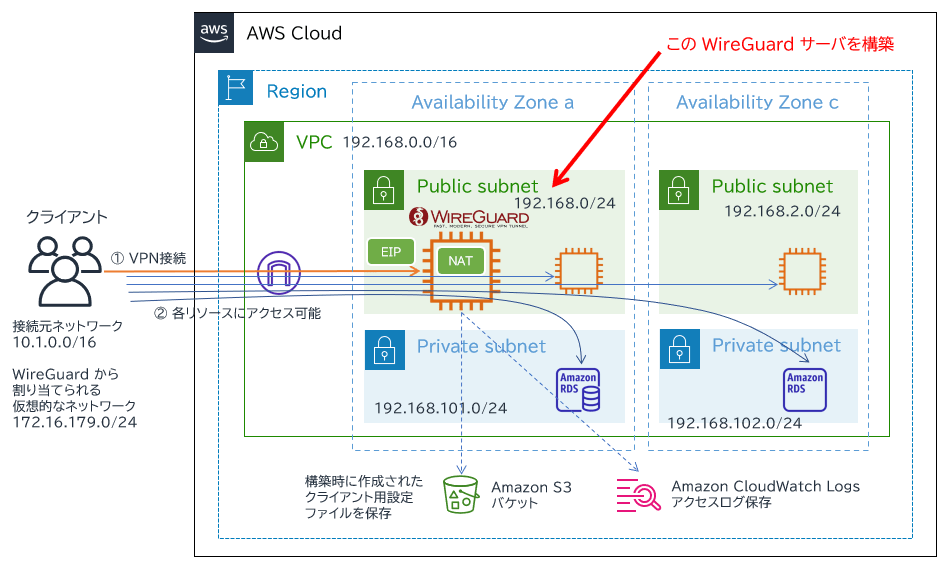
- Amazon EC2 インスタンスに WireGuard をインストール。パブリックサブネットに配置。
- OS は Amazon Linux 2023 ARM 64、インスタンスタイプは t4g.nano を採用。(高速、安価を求めるため)
- EC2 インスタンスには Elastic IP をアタッチ。クライアント PC からのアクセス先を固定グローバル IP アドレスにするため。
- EC2 インスタンスへのアクセス (つまり VPN 接続の許可) は、セキュリティグループでソース IP アドレス指定で許可する。
- OS 内で iptables を使用し、NAT (IP マスカレード) を構成。VPC 内では、通信のソース IP アドレスは EC2 インスタンス (WireGuard サーバー) に見える。そのため、アクセス先のリソースのセキュリティグループには EC2 インスタンスのセキュリティグループをソースにしたアクセス制御をかける。
- クライアントからは VPC 内の指定したサブネットへの通信のみ、VPN 接続にルーティングするスプリットトンネルを採用。設定によりすべての通信を VPN 接続にルーティングすることも可能。
- VPN 接続したクライアントと EC2 インスタンス間での通信は 172.16.179.0/24 のネットワークを使用するよう設定しているが、特にこの CIDR にこだわる必要はない。VPN 接続に一般的に言えることだが、アクセスする可能性のある他の CIDR と重複しないようにする必要がある。
- どのクライアントからどの VPC 内リソースにアクセスしたか、アクセスログに IP アドレスベースで残す。ログは Amazon CloudWatch Logs に保管。※詳細はアクセスログ編の記事で説明。
- クライアント用の WireGuard 設定ファイル (つまり VPN 接続設定) は今回は作業簡略化のため EC2 のユーザーデータスクリプトで作成、指定した Amazon S3 バケットに保存するようにしている。通常、ユーザー管理ではそのようなことはしない。
環境構築
環境は AWS CloudFormation でデプロイしました。テンプレートにより以下の構築を自動化しています。
- Amazon EC2 インスタンスの作成
- WireGuard サーバーのセットアップ
- サーバー内の NAT 構成
- クライアント設定ファイル生成、指定した Amazon S3 バケットへの保存 (Amazon S3 バケットは別途作成されている前提)
- Elastic IP アドレスと EC2 インスタンスの関連付け
- Amazon Route 53 DNS レコード作成 (Amazon Route 53 ホストゾーンが別途作成されている前提)
- IAM ロール / セキュリティグループ作成
- アクセスログ保存設定および Amazon CloudWatch Logs への転送設定 ※アクセスログ編で説明
以下はテンプレートに入っていません。パラメーターで既存リソースを指定します。あえて既存リソースを使用できるよう、分けています。
- VPC 作成
- Amazon S3 バケット作成
- Amazon Route 53 ホストゾーン作成
Amazon S3 バケットにクライアント用の設定ファイルが一旦保存されるため、暗号化、アクセス制御が必要になるとお考えください。
Amazon Route 53 レコードは必須ではありません。クライアント PC からの WireGuard VPN エンドポイントが Elastic IP アドレス直指定に変わるだけです。
EC2 インスタンスのネットワーク設定で、ソースとデストのチェックを行う設定は無効化します。そうしないと NAT サーバーとして機能しないためです。
可用性は考慮していません。ご注意ください。その他、必要に応じて運用やセキュリティ設定を追加する必要はあります。
WireGuard 設定ファイル
テンプレート紹介の前に、作成される WireGuard 設定ファイルを紹介します。Amazon EC2 のユーザーデータ内で作成しています。
サーバー用設定ファイル
/etc/wireguard/wg0.conf が出来上がります。wg0 は WireGuard によって作成される仮想的なネットワークインターフェースです。
[Interface]
Address = 172.16.179.254/24
MTU = 1350
SaveConfig = true
PostUp = iptables -t nat -A POSTROUTING -o ens5 -j MASQUERADE; iptables -A FORWARD -i wg0 -d 192.168.1.0/24 -j ACCEPT; iptables -A FORWARD -i wg0 -d 192.168.2.0/24 -j ACCEPT; iptables -A FORWARD -i wg0 -d 192.168.101.0/24 -j ACCEPT; iptables -A FORWARD -i wg0 -d 192.168.102.0/24 -j ACCEPT; iptables -A FORWARD -i wg0 -j LOG --log-prefix "WG_DENIED " --log-level 4; iptables -A FORWARD -i wg0 -j DROP
PostDown = iptables -t nat -D POSTROUTING -o ens5 -j MASQUERADE; iptables -D FORWARD -i wg0 -d 192.168.1.0/24 -j ACCEPT; iptables -D FORWARD -i wg0 -d 192.168.2.0/24 -j ACCEPT; iptables -D FORWARD -i wg0 -d 192.168.101.0/24 -j ACCEPT; iptables -D FORWARD -i wg0 -d 192.168.102.0/24 -j ACCEPT; iptables -D FORWARD -i wg0 -j LOG --log-prefix "WG_DENIED " --log-level 4; iptables -D FORWARD -i wg0 -j DROP
ListenPort = 51820
PrivateKey = ************************************

[Peer]
PublicKey = ********************************************
AllowedIPs = 172.16.179.1/32

[Peer]
PublicKey = ********************************************
AllowedIPs = 172.16.179.2/32

[Peer]
PublicKey = ********************************************
AllowedIPs = 172.16.179.3/32
Address は VPN でクライアントとの間で使用する仮想的なネットワークで、wg0 に割り当てる IP アドレスです。
MTU はデフォルトだとジャンボフレームになっていたので、安全のために下げています。一般的な MTU 値の 1500 ぎりぎりにすると、通信の過程でオーバーヘッドが加わって通信できなくなるとのことで、1350 にしました。ネットワーク環境によっては、速度が出ないときには速度を測定しながらの最適化が必要になるかもしれません。
EC2 インスタンスを NAT サーバーにするために、PostUp, PostDown のところで iptables のコマンドを書いています。ここで書くことで、WireGuard のサービス起動時に実行されます。
[Peer] には、それぞれクライアントの情報が書かれます。削除したいクライアントは、ここから削除すればアクセスできなくなります。
クライアント用設定ファイル
client1 から client3 という名前で、3名分の設定ファイルを作成しています。それぞれセキュリティは独立しており、退職等により個別の無効化が可能です。通常は、コマンドまたは別途 WireGuard 管理ツールを使用してユーザー管理します。
この設定ファイル (.conf) を WireGuard のクライアントアプリケーションでインポートすることで、WireGuard サーバーに VPN 接続できます。
[Interface]
PrivateKey = ******************************************
Address = 172.16.179.1/32
MTU = 1350
[Peer]
PublicKey = ****************************************
Endpoint = hirono-vpn-wg2.example.com:51820
AllowedIPs = 172.16.179.254/24,192.168.1.0/24,192.168.2.0/24,192.168.101.0/24,192.168.102.0/24
PersistentKeepalive = 25
Address は、VPN でサーバーとの間で使用する仮想的なネットワークで、クライアントに割り当てる IP アドレスです。DHCP のような動的割り当て機能はなく、固定で設定する必要があります。今回の構成では、IP アドレスの 4 オクテット目を 1 から順に自動採番するようにしています。
MTU はデフォルトでは 1420 なのですが、サーバー側の説明で書いた通り、1350 にしています。
Endpoint は、今回の構成では Amazon Route 53 に登録したレコードに合わせて FQDN を書いていますが、Elastic IP アドレスそのままでも大丈夫です。ポートはサーバー側の設定と合わせて 51820 を設定しています。説明し忘れましたが、WireGuard では VPN 接続に TCP は使用できません。UDP 一択です。軽量、高速重視にしているためと考えられます。
AllowedIPs で指定したサブネット向けの通信が、VPN 接続にルーティングされます。指定されていない宛先への通信は、クライアントの元々のネットワーク環境を使用してアクセスします。スプリットトンネルと言われる構成です。
PersistentKeepAlive は VPN セッションを維持するために必要なものです。アイドルによる突然の切断を防ぎます。
AWS CloudFormation テンプレート
AWSTemplateFormatVersion: "2010-09-09"
Description: The CloudFormation template to create a WireGuard VPN server on Graviton EC2.
# ------------------------------------------------------------#
# Input Parameters
# ------------------------------------------------------------#
Parameters:
  SystemName:
    Type: String
    Description: System name. use lower case only. (e.g. example)
    Default: example
    MaxLength: 10
    MinLength: 1
    AllowedPattern: "^[a-z0-9]+$"

  SubName:
    Type: String
    Description: System sub name. use lower case only. (e.g. prod or dev)
    Default: dev
    MaxLength: 10
    MinLength: 1
    AllowedPattern: "^[a-z0-9]+$"

  HostName:
    Type: String
    Description: The server host name.
    Default: example-dev-wg
    MaxLength: 30
    MinLength: 1

  S3BucketName:
    Type: String
    Description: The S3 bucket name where the server saves the output. use lower case only.
    Default: example-dev-wg-output
    MaxLength: 100
    MinLength: 3
    AllowedPattern: "^[a-z0-9-]+$"

  EipAddress:
    Type: String
    Description: Elastic IP address for the VPN server.
    MaxLength: 15
    MinLength: 10
    AllowedPattern: "^((25[0-5]|2[0-4][0-9]|1[0-9][0-9]|[1-9]?[0-9])\\.){3}(25[0-5]|2[0-4][0-9]|1[0-9][0-9]|[1-9]?[0-9])$"

  EipAllocationId:
    Type: String
    Description: The allocation ID for the Elastic IP address.

  VpcId:
    Type: AWS::EC2::VPC::Id
    Description: Choose the existing VPC ID you deploy the EC2 instance in.

  InstanceSubnet:
    Type: AWS::EC2::Subnet::Id
    Description: Choose the existing Public Subnet ID you deploy the EC2 instance in.

  ImageId:
    Type: String
    Description: Amazon Linux 2023 AMI (ARM64) for ap-northeast-1 region as of 2025-05-04.
    Default: ami-0d2428bc03d666c70

  InstanceType:
    Type: String
    Description: Choose the EC2 ARM64 instance type.
    Default: t4g.nano
    AllowedValues:
      - t4g.nano
      - t4g.micro
      - t4g.small

  InstanceVolumeSize:
    Type: Number
    Description: The EBS volume size in GB.
    Default: 20

  DomainName:
    Type: String
    Description: The domain name to create the DNS record for the VPN endpoint.
    Default: example.com
    AllowedPattern: "^(?!-)(?:[a-zA-Z0-9-]{0,62}[a-zA-Z0-9])(?:\\.(?!-)(?:[a-zA-Z0-9-]{0,62}[a-zA-Z0-9]))*$"

  AllowedSourceSubnet:
    Type: String
    Description: Allowed source IPv4 subnet and subnet mask. Global address only. (e.g. xxx.xxx.xxx.xxx/32)
    Default: 99.99.99.99/32
    AllowedPattern: "^((25[0-5]|2[0-4][0-9]|1?[0-9]{1,2})\\.){3}(25[0-5]|2[0-4][0-9]|1?[0-9]{1,2})\\/([0-9]|[1-2][0-9]|3[0-2])$"

  AllowedDestSubnets:
    Type: CommaDelimitedList
    Description: "Comma-separated list of VPC Subnet CIDRs to acess through VPN."
    Default: "192.168.1.0/24,192.168.2.0/24,192.168.101.0/24,192.168.102.0/24"

  VpnClientAddressPrefix:
    Type: String
    Default: 172.16.179.
    Description: The vpn-internal IP address prefix for each VPN clients. Private address only. (e.g. xxx.xxx.xxx.)
    AllowedPattern: "^((25[0-5]|2[0-4][0-9]|1?[0-9]{1,2})\\.){3}$"

  VpnServerAddress:
    Type: String
    Default: 172.16.179.254/24
    Description: The vpn-internal IP address with the subnet mask for the VPN server. Private address only. (e.g. xxx.xxx.xxx.xxx/24)
    AllowedPattern: "^((25[0-5]|2[0-4][0-9]|1?[0-9]{1,2})\\.){3}(25[0-5]|2[0-4][0-9]|1?[0-9]{1,2})\\/([0-9]|[1-2][0-9]|3[0-2])$"

  TimeZone:
    Type: String
    Description: The OS time zone.
    Default: Asia/Tokyo
    AllowedPattern: "^(Africa|America|Antarctica|Arctic|Asia|Atlantic|Australia|Europe|Indian|Pacific)/[A-Za-z0-9_/-]+$"

Metadata:
  AWS::CloudFormation::Interface:
    ParameterGroups:
      - Label:
          default: "General Configuration"
        Parameters:
          - SystemName
          - SubName
      - Label:
          default: "EC2 Configuration"
        Parameters:
          - HostName
          - ImageId
          - InstanceType
          - InstanceVolumeSize
          - TimeZone
          - S3BucketName
      - Label:
          default: "Network Configuration"
        Parameters:
          - VpcId
          - InstanceSubnet
          - EipAddress
          - EipAllocationId
          - AllowedSourceSubnet
          - AllowedDestSubnets
          - VpnClientAddressPrefix
          - VpnServerAddress
          - DomainName

Resources:
# ------------------------------------------------------------#
# CloudWatch Logs
# ------------------------------------------------------------#
  LogGroupWgAccess:
    Type: AWS::Logs::LogGroup
    Properties:
      LogGroupName: !Sub /wireguard/${HostName}/accesslog
      RetentionInDays: 365
      Tags:
        - Key: Cost
          Value: !Sub ${SystemName}-${SubName}

# ------------------------------------------------------------#
# EC2 Security Group
# ------------------------------------------------------------#
  Ec2SecurityGroup:
    Type: AWS::EC2::SecurityGroup
    Properties:
      VpcId: !Ref VpcId
      GroupDescription: Allow VPN access
      SecurityGroupIngress:
        - Description: Allow VPN from the specified subnet
          FromPort: 51820
          IpProtocol: udp
          ToPort: 51820
          CidrIp: !Ref AllowedSourceSubnet
      SecurityGroupEgress:
        - Description: Allow all outbound traffic
          IpProtocol: -1
          CidrIp: 0.0.0.0/0
      Tags:
        - Key: Cost
          Value: !Sub ${SystemName}-${SubName}
        - Key: Name
          Value: !Sub SG-${HostName}

# ------------------------------------------------------------#
# EC2 Launch template
# ------------------------------------------------------------#
  EC2LaunchTemplate:
    Type: AWS::EC2::LaunchTemplate
    Properties:
      LaunchTemplateName: !Ref HostName
      LaunchTemplateData:
        InstanceType: !Ref InstanceType
        ImageId: !Ref ImageId
        BlockDeviceMappings:
          - Ebs:
              VolumeSize: !Ref InstanceVolumeSize
              VolumeType: gp3
              DeleteOnTermination: true
              Encrypted: true
            DeviceName: /dev/xvda
        NetworkInterfaces:
          - SubnetId: !Ref InstanceSubnet
            Groups:
              - !Ref Ec2SecurityGroup
            DeviceIndex: 0
            AssociatePublicIpAddress: true
        MetadataOptions:
          HttpTokens: required
        Monitoring:
          Enabled: true
        TagSpecifications:
          - ResourceType: volume
            Tags:
              - Key: Cost
                Value: !Sub ${SystemName}-${SubName}
    DependsOn:
      - Ec2SecurityGroup

# ------------------------------------------------------------#
# EC2 Role / Instance Profile (IAM)
# ------------------------------------------------------------#
  Ec2Role:
    Type: AWS::IAM::Role
    Properties:
      RoleName: !Sub Ec2Role-${HostName}
      Description: This role allows the EC2 instance to access S3 and SSM.
      AssumeRolePolicyDocument:
        Version: 2012-10-17
        Statement:
          - Effect: Allow
            Principal:
              Service:
                - ec2.amazonaws.com
            Action:
              - sts:AssumeRole
      Path: /
      ManagedPolicyArns:
        - arn:aws:iam::aws:policy/AmazonSSMManagedInstanceCore
        - arn:aws:iam::aws:policy/CloudWatchAgentServerPolicy
      Policies:
        - PolicyName: !Sub Ec2Policy-${HostName}
          PolicyDocument:
            Version: 2012-10-17
            Statement:
              - Effect: Allow
                Action:
                  - "s3:PutObject"
                Resource:
                  - !Sub "arn:aws:s3:::${S3BucketName}/*"
              - Effect: Allow
                Action:
                  - "s3:ListBucket"
                Resource:
                  - !Sub "arn:aws:s3:::${S3BucketName}"
              - Effect: Allow
                Action:
                  - "logs:CreateLogStream"
                  - "logs:PutLogEvents"
                  - "logs:DescribeLogStreams"
                Resource:
                  - !GetAtt LogGroupWgAccess.Arn

  Ec2InstanceProfile:
    Type: AWS::IAM::InstanceProfile
    Properties:
      InstanceProfileName: !Ref Ec2Role
      Path: /
      Roles:
        - !Ref Ec2Role
    DependsOn:
      - Ec2Role

# ------------------------------------------------------------#
# EC2 Instance
# ------------------------------------------------------------#
  Ec2Instance:
    Type: AWS::EC2::Instance
    Properties:
      IamInstanceProfile: !Ref Ec2InstanceProfile
      LaunchTemplate:
        LaunchTemplateId: !Ref EC2LaunchTemplate
        Version: !GetAtt EC2LaunchTemplate.LatestVersionNumber
      ImageId: !Ref ImageId
      SourceDestCheck: false
      Tags:
        - Key: Cost
          Value: !Sub ${SystemName}-${SubName}
        - Key: Name
          Value: !Ref HostName
      UserData:
        Fn::Base64: !Sub
          - |
            #!/bin/bash -xe
            set -euxo pipefail
            # Locale & timezone
            timedatectl set-timezone ${TimeZone}
            # Install packages
            dnf install -y wireguard-tools iptables-services amazon-cloudwatch-agent rsyslog
            # Create directory
            mkdir -p /etc/wireguard
            cd /etc/wireguard
            umask 077
            # Find the primary interface
            PRIMARY_IF=$(ip route | grep default | awk '{print $5}' | head -n1)
            # Create server keys
            wg genkey | tee server_private.key | wg pubkey > server_public.key
            SERVER_PUB=$(cat server_public.key)
            # Build iptables rules
            ALLOWED_SUBNETS="${AllowedSubnets}"
            POSTUP="iptables -t nat -A POSTROUTING -o $PRIMARY_IF -j MASQUERADE"
            POSTDOWN="iptables -t nat -D POSTROUTING -o $PRIMARY_IF -j MASQUERADE"
            IFS=',' read -ra SUBNETS <<< "$ALLOWED_SUBNETS"
            for SUBNET in "${!SUBNETS[@]}"; do
              POSTUP="$POSTUP; iptables -A FORWARD -i wg0 -d $SUBNET -j ACCEPT"
              POSTDOWN="$POSTDOWN; iptables -D FORWARD -i wg0 -d $SUBNET -j ACCEPT"
            done
            POSTUP="$POSTUP; iptables -A FORWARD -i wg0 -j LOG --log-prefix \"WG_DENIED \" --log-level 4"
            POSTUP="$POSTUP; iptables -A FORWARD -i wg0 -j DROP"
            POSTDOWN="$POSTDOWN; iptables -D FORWARD -i wg0 -j LOG --log-prefix \"WG_DENIED \" --log-level 4"
            POSTDOWN="$POSTDOWN; iptables -D FORWARD -i wg0 -j DROP"
            # Create WireGuard server config
            cat <<EOF > /etc/wireguard/wg0.conf
            [Interface]
            Address = ${VpnServerAddress}
            SaveConfig = true
            ListenPort = 51820
            PrivateKey = $(cat server_private.key)
            MTU = 1350
            PostUp = $POSTUP
            PostDown = $POSTDOWN
            EOF
            # Create client configs and add peers to server
            mkdir -p clients
            for i in {1..3}; do
              CLIENT_NAME="client$i"
              CLIENT_IP="${VpnClientAddressPrefix}$i"
              CLIENT_PRIV=$(wg genkey)
              CLIENT_PUB=$(echo "$CLIENT_PRIV" | wg pubkey)
              cat <<EOF > "clients/$CLIENT_NAME.conf"
            [Interface]
            PrivateKey = $CLIENT_PRIV
            Address = $CLIENT_IP/32
            MTU = 1350
            [Peer]
            PublicKey = $SERVER_PUB
            Endpoint = ${HostName}.${DomainName}:51820
            AllowedIPs = ${AllowedSubnets}
            PersistentKeepalive = 25
            EOF
              cat <<EOF >> /etc/wireguard/wg0.conf
            [Peer]
            # $CLIENT_NAME
            PublicKey = $CLIENT_PUB
            AllowedIPs = $CLIENT_IP/32
            EOF
            done
            # Enable IP forwarding
            echo "net.ipv4.ip_forward = 1" >> /etc/sysctl.conf
            sysctl -p
            # Start service
            systemctl enable wg-quick@wg0
            systemctl start wg-quick@wg0
            # Save client's configs
            aws s3 cp clients/ "s3://${S3BucketName}/clients/" --recursive
            # Configure iptables logging - log new connections through wg0 (TCP and ICMP only)
            iptables -I FORWARD 1 -i wg0 -p tcp -m conntrack --ctstate NEW -j LOG --log-prefix "WG_ACCESS " --log-level 4
            iptables -I FORWARD 2 -i wg0 -p icmp -j LOG --log-prefix "WG_ACCESS " --log-level 4
            # Configure rsyslog
            mkdir -p /var/log/wireguard
            cat <<'RSYSLOG' > /etc/rsyslog.d/wireguard.conf
            :msg, contains, "WG_ACCESS" /var/log/wireguard/access.log
            :msg, contains, "WG_DENIED" /var/log/wireguard/access.log
            & stop
            RSYSLOG
            systemctl enable rsyslog
            systemctl start rsyslog
            # Configure logrotate
            cat <<'LOGROTATE' > /etc/logrotate.d/wireguard
            /var/log/wireguard/access.log {
              daily
              rotate 2
              compress
              missingok
              notifempty
              copytruncate
            }
            LOGROTATE
            # Configure CloudWatch Agent
            cat <<CWAGENT > /opt/aws/amazon-cloudwatch-agent/etc/amazon-cloudwatch-agent.json
            {
              "logs": {
                "logs_collected": {
                  "files": {
                    "collect_list": [
                      {
                        "file_path": "/var/log/wireguard/access.log",
                        "log_group_name": "/wireguard/${HostName}/accesslog",
                        "log_stream_name": "{instance_id}",
                        "timezone": "Local"
                      }
                    ]
                  }
                }
              }
            }
            CWAGENT
            /opt/aws/amazon-cloudwatch-agent/bin/amazon-cloudwatch-agent-ctl -a fetch-config -m ec2 -s -c file:/opt/aws/amazon-cloudwatch-agent/etc/amazon-cloudwatch-agent.json
          - AllowedSubnets: !Join [ ",", [ !Ref VpnServerAddress, !Join [ ",", !Ref AllowedDestSubnets ] ] ]
    DependsOn:
      - EC2LaunchTemplate
      - Ec2InstanceProfile

# ------------------------------------------------------------#
# EIP Association
# ------------------------------------------------------------#
  EipAssociation:
    Type: AWS::EC2::EIPAssociation
    Properties:
      AllocationId: !Ref EipAllocationId
      InstanceId: !Ref Ec2Instance
    DependsOn:
      - Ec2Instance

# ------------------------------------------------------------#
# Route 53
# ------------------------------------------------------------#
  Route53RecordA:
    Type: AWS::Route53::RecordSet
    Properties:
      HostedZoneName: !Sub ${DomainName}.
      Name: !Sub ${HostName}.${DomainName}.
      Type: A
      ResourceRecords:
        - !Ref EipAddress
      TTL: 1800
続編記事
アクセスログについては、以下の記事で紹介します。
まとめ
いかがでしたでしょうか。
このままでも動く構成ですが、要件や環境に合わせて加工が必要な場合は参考にしてもらえればと思います。
本記事が皆様のお役に立てれば幸いです。