
こんにちは、ひるたんぬです。
ニュースなどでよく「今日は全国的に…」と耳にする機会があり、それを聞くと「日本全体で…なんだなぁ」とぼんやり思う今日このごろですが、なぜ、「全国=日本全体」なのでしょうか?
思い返すと子どもの頃は「全国=地球に存在するすべての国」と勘違いしており、気がついたら日本全体と認識するようになっていました。
「全国」の定義を国語辞典で調べてみると…
ぜん‐こく【全国】
1 その国全体。
2 すべての国々。引用:コトバンク – 「全国(デジタル大辞泉 「全国」の意味・読み・例文・類語)」
さて、今回は6月17日に発表された「Amazon Bedrock Managed Knowledge Base」をCloudFormationでデプロイするまでの道のりをご紹介したいと思います。
(簡単にデプロイできればよかったのですが、思ったよりトラップが多かったです。。)
きっかけ
元々はS3 VectorsとBedrock Knowledge Baseを用いてナレッジベースを構築しようとしており、CloudFormationテンプレートの作成を進めていました。
その矢先に、先述した「Amazon Bedrock Managed Knowledge Base」のリソースを聞き、こちらで実装したらどうなるのだろう、と気になりました。


元々のテンプレート
以下が、S3 VectorsとBedrock Knowledge Baseを用いたテンプレートです。
各リソースの設定は必要最低限しか定義されておりませんので、適宜設定の追加や変更を行ってください。
今回はこちらのテンプレートをベースに、Amazon Bedrock Managed Knowledge Baseをデプロイするように変換していきます。
AWSTemplateFormatVersion: "2010-09-09"
Description: RAG Knowledge Base

Parameters:
  ResourceName:
    Type: String
    Default: my-knowledge-base
    Description: Use for resource name.

Resources:

  # -------------------------------------------------------
  # S3 Bucket: stores source documents for the data source
  # -------------------------------------------------------
  DataSourceBucket:
    Type: AWS::S3::Bucket
    Properties:
      BucketName: !Sub "${ResourceName}-datasource"

  # -------------------------------------------------------
  # S3 Vectors: vector bucket
  # -------------------------------------------------------
  VectorBucket:
    Type: AWS::S3Vectors::VectorBucket
    Properties:
      VectorBucketName: !Sub "${ResourceName}-vectors"

  # -------------------------------------------------------
  # S3 Vectors: index (Titan Embeddings V2 / 1024 dimensions)
  # -------------------------------------------------------
  VectorIndex:
    Type: AWS::S3Vectors::Index
    DependsOn: VectorBucket
    Properties:
      VectorBucketName: !Sub "${ResourceName}-vectors"
      IndexName: !Sub "${ResourceName}-index"
      DataType: float32
      Dimension: 1024
      DistanceMetric: cosine

  # -------------------------------------------------------
  # IAM Role: service role for Bedrock Knowledge Base
  # -------------------------------------------------------
  KbRole:
    Type: AWS::IAM::Role
    Properties:
      RoleName: !Sub "RoleForKB_${ResourceName}"
      AssumeRolePolicyDocument:
        Version: "2012-10-17"
        Statement:
          - Effect: Allow
            Principal:
              Service: bedrock.amazonaws.com
            Action: sts:AssumeRole
            Condition:
              StringEquals:
                aws:SourceAccount: !Ref AWS::AccountId

  KbRolePolicy:
    Type: AWS::IAM::Policy
    Properties:
      PolicyName: !Sub "S3PolicyForKB_${ResourceName}"
      Roles:
        - !Ref KbRole
      PolicyDocument:
        Version: "2012-10-17"
        Statement:
          # read access to the data source S3 bucket
          - Sid: S3ListBucketStatement
            Effect: Allow
            Action:
              - s3:ListBucket
            Resource:
              - !GetAtt DataSourceBucket.Arn
            Condition:
              StringEquals:
                aws:ResourceAccount: !Ref AWS::AccountId
          - Sid: S3GetObjectStatement
            Effect: Allow
            Action:
              - s3:GetObject
            Resource:
              - !Sub "${DataSourceBucket.Arn}/*"
            Condition:
              StringEquals:
                aws:ResourceAccount: !Ref AWS::AccountId
          # S3 Vectors: index-level actions
          - Effect: Allow
            Action:
              - s3vectors:GetIndex
              - s3vectors:PutVectors
              - s3vectors:GetVectors
              - s3vectors:DeleteVectors
              - s3vectors:QueryVectors
            Resource: !GetAtt VectorIndex.IndexArn
          # invoke the embedding model (Titan Embeddings V2)
          - Effect: Allow
            Action:
              - bedrock:InvokeModel
            Resource: !Sub "arn:aws:bedrock:${AWS::Region}::foundation-model/amazon.titan-embed-text-v2:0"

  # -------------------------------------------------------
  # Bedrock Knowledge Base
  # -------------------------------------------------------
  BedrockKnowledgeBase:
    Type: AWS::Bedrock::KnowledgeBase
    DependsOn: KbRolePolicy
    Properties:
      Name: !Sub "${ResourceName}-kb"
      Description: RAG Knowledge Base
      RoleArn: !GetAtt KbRole.Arn
      KnowledgeBaseConfiguration:
        Type: VECTOR
        VectorKnowledgeBaseConfiguration:
          EmbeddingModelArn: !Sub "arn:aws:bedrock:${AWS::Region}::foundation-model/amazon.titan-embed-text-v2:0"
      StorageConfiguration:
        Type: S3_VECTORS
        S3VectorsConfiguration:
          VectorBucketArn: !GetAtt VectorBucket.VectorBucketArn
          IndexArn: !GetAtt VectorIndex.IndexArn

  # -------------------------------------------------------
  # Bedrock Data Source (S3)
  # -------------------------------------------------------
  DataSource:
    Type: AWS::Bedrock::DataSource
    DeletionPolicy: Delete
    Properties:
      Name: !Sub "${ResourceName}-datasource"
      KnowledgeBaseId: !GetAtt BedrockKnowledgeBase.KnowledgeBaseId
      DataSourceConfiguration:
        Type: S3
        S3Configuration:
          BucketArn: !GetAtt DataSourceBucket.Arn
テンプレート作成
今回はKiroでテンプレートの変換を進めます。
最初の会話では、Kiro(が動作しているLLM)には「Amazon Bedrock Managed Knowledge Base」に関する知識はまだ入っていなかったため、Webサーチを使用して変換を進めてもらうようお願いしました。
そして、最初に出来上がったものがこちらです。
  # -------------------------------------------------------
  # Bedrock Managed Knowledge Base
  # -------------------------------------------------------
  BedrockKnowledgeBase:
    Type: AWS::Bedrock::KnowledgeBase
    DependsOn: KbRolePolicy
    Properties:
      Name: !Sub "${ProjectName}-kb"
      Description: RAG Knowledge Base (Bedrock Managed)
      RoleArn: !GetAtt KbRole.Arn
      KnowledgeBaseConfiguration:
        Type: MANAGED
        ManagedKnowledgeBaseConfiguration:
          EmbeddingModelType: MANAGED
元々S3 Vectorsをベクトルストアとして設定していたものが、「MANAGED」となっており、マネージドなKnowledge Baseを作る設定に変更されました。
こちらでデプロイを実行したところ、
Properties validation failed for resource BedrockKnowledgeBase with message: #/KnowledgeBaseConfiguration/ManagedKnowledgeBaseConfiguration: required key [EmbeddingModelArn] not found
というエラーに遭遇しました。これはテンプレート内の「ManagedKnowledgeBaseConfiguration」の設定として「EmbeddingModelArn」の項目が欠如していることを示すエラーです。
ここでCloudFormationのドキュメントを確認してみたところ、
EmbeddingModelArn- The ARN for the embeddings model.
Required: Yes
Type: String
Pattern:
^(arn:aws(-[^:]+)?:[a-z0-9-]+:[a-z0-9-]{1,20}:[0-9]{0,12}:[a-zA-Z0-9-:/._+]+)$Minimum:
20Maximum:
2048Update requires: Replacement
引用:AWS CloudFormation Template Reference – AWS::Bedrock::KnowledgeBase ManagedKnowledgeBaseConfiguration
とあり、確かに必須項目であることが分かります。
ここで、ManagedKnowledgeBaseConfigurationに設定しているもう一つの項目「EmbeddingModelType」について見てみると、
EmbeddingModelType- Choose CUSTOM to provide your own Bedrock embedding model ARN. Choose MANAGED to use a service-managed embedding model.
Required: No
Type: String
Allowed values:
CUSTOM | MANAGEDUpdate requires: Replacement
引用:AWS CloudFormation Template Reference – AWS::Bedrock::KnowledgeBase ManagedKnowledgeBaseConfiguration
とあります。こちらを「MANAGED」で設定しているので、埋め込みモデルの指定は不要では…?と思いながらKiroと相談すると…
状況が明確になりました。CFnのスキーマでは EmbeddingModelArn が Required: Yes になっており、APIリファレンスと矛盾しています。これはCFnのスキーマ定義側のバグ(もしくは未更新)の可能性が高いです。
引用:Kiroの回答
とやはりCloudFormation側の定義が正しくない可能性を指摘していました。Kiroが述べている「APIリファレンスと矛盾しています」についても気になったので、念のため確認してみます。
- embeddingModelArn
- The ARN for the embeddings model.
Type: String
Length Constraints: Minimum length of 20. Maximum length of 2048.
Pattern:
(arn:aws(-[^:]{1,12})?:(bedrock|sagemaker):[a-z0-9-]{1,20}:([0-9]{12})?:([a-z-]+/)?)?([a-zA-Z0-9.-]{1,63}){0,2}(([:][a-z0-9-]{1,63}){0,2})?(/[a-z0-9]{1,12})?Required: No
引用:Amazon Bedrock API Reference – ManagedKnowledgeBaseConfiguration
…確かにこちらでは必須項目とはなっていませんね。
CloudFormationの定義が正しくないことは分かりましたが、なんとかCloudForamtionのテンプレートを作ってみたくなったので、引き続き格闘を進めます。
Kiroと相談し、「EmbeddingModelArn」は記述しても、「EmbeddingModelType」がMANAGEDなら無視されるのでは…?という期待を込めて、適当な埋め込みモデルを設定してみました。
こちらがそのテンプレートです。
  # -------------------------------------------------------
  # Bedrock Managed Knowledge Base
  # -------------------------------------------------------
  BedrockKnowledgeBase:
    Type: AWS::Bedrock::KnowledgeBase
    DependsOn: KbRolePolicy
    Properties:
      Name: !Sub "${ProjectName}-kb"
      Description: RAG Knowledge Base (Bedrock Managed)
      RoleArn: !GetAtt KbRole.Arn
      KnowledgeBaseConfiguration:
        Type: MANAGED
        ManagedKnowledgeBaseConfiguration:
          EmbeddingModelType: MANAGED
          EmbeddingModelArn: !Sub "arn:aws:bedrock:${AWS::Region}::foundation-model/amazon.titan-embed-text-v2:0"
先述した通り、先程のテンプレートに「EmbeddingModelArn」を追加しました。これでデプロイを実行します。
Resource handler returned message: “embeddingModelArn must not be specified when embeddingModelType is MANAGED. (Service: BedrockAgent, Status Code: 400, Request ID: XXX) (SDK Attempt Count: 1)” (RequestToken: XXX)
…だめですね。「EmbeddingModelType」がMANAGEDの場合に「EmbeddingModelArn」は定義してはならないと怒られています。
ここで、CloudFormationのテンプレートをもう一度確認してみます。
ManagedKnowledgeBaseConfiguration- Contains configuration details for a knowledge base that uses a vector store fully managed by Amazon Bedrock. Specify this object when the knowledge base type is MANAGED.
Required: No
Type: ManagedKnowledgeBaseConfiguration
Update requires: Replacement
引用:AWS CloudFormation Template Reference – AWS::Bedrock::KnowledgeBase KnowledgeBaseConfiguration
今回は「KnowledgeBaseConfiguration」の「Type」でMANAGEDを指定しているため、上記の設定は必要ではないかとは思いますが、必須設定ではないので、この項目自体を削除してみます。
そうして出来上がったテンプレートが以下です。
  # -------------------------------------------------------
  # Bedrock Managed Knowledge Base
  # -------------------------------------------------------
  BedrockKnowledgeBase:
    Type: AWS::Bedrock::KnowledgeBase
    DependsOn: KbRolePolicy
    Properties:
      Name: !Sub "${ResourceName}-kb"
      Description: RAG Knowledge Base (Bedrock Managed)
      RoleArn: !GetAtt KbRole.Arn
      KnowledgeBaseConfiguration:
        Type: MANAGED
一番シンプルになりましたね。これでデプロイをすると…成功しました!
念のため、定義を削除した埋め込みモデルの設定を確認してみます。
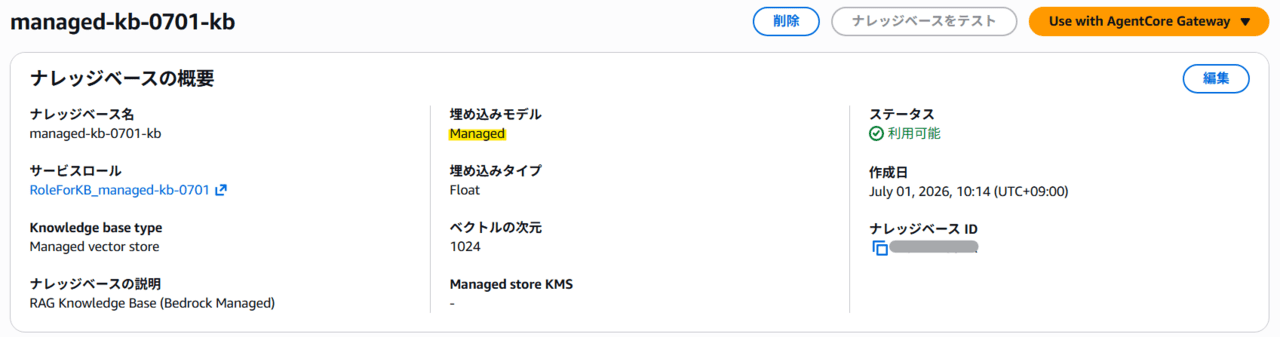
大丈夫そうですね。デフォルト(未定義状態)ではマネージドの埋め込みモデルが設定されることを確認できました。
また、きちんとRAGとして動作するかを確認してみます。
動作確認として、AWSパートナーネットワークの表彰に関する弊社ニュースリリースをRAGに格納して検証してみます。
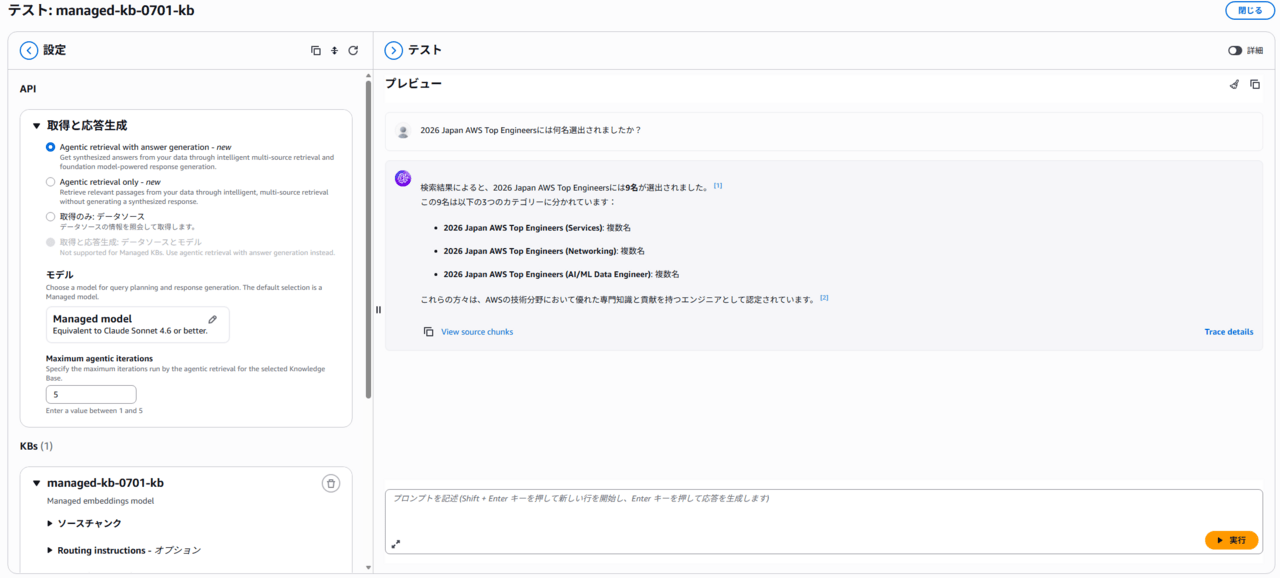
正しく動作していそうですね!
改めて、表彰された皆様、おめでとうございます!🎉
最終的なテンプレート
最終的に完成したテンプレートは以下です。
元のテンプレートから比較すると、S3 Vectorsに関するリソース定義や、埋め込みモデルの実行に関するIAMの許可がなくなるなど、シンプルなテンプレートとなりました。
AWSTemplateFormatVersion: "2010-09-09"
Description: RAG Knowledge Base (Bedrock Managed)

Parameters:
  ResourceName:
    Type: String
    Default: my-knowledge-base
    Description: Use for resource name.

Resources:

  # -------------------------------------------------------
  # S3 Bucket: stores source documents for the data source
  # -------------------------------------------------------
  DataSourceBucket:
    Type: AWS::S3::Bucket
    Properties:
      BucketName: !Sub "${ResourceName}-datasource"

  # -------------------------------------------------------
  # IAM Role: service role for Bedrock Managed Knowledge Base
  # -------------------------------------------------------
  KbRole:
    Type: AWS::IAM::Role
    Properties:
      RoleName: !Sub "RoleForKB_${ResourceName}"
      AssumeRolePolicyDocument:
        Version: "2012-10-17"
        Statement:
          - Effect: Allow
            Principal:
              Service: bedrock.amazonaws.com
            Action: sts:AssumeRole
            Condition:
              StringEquals:
                aws:SourceAccount: !Ref AWS::AccountId

  KbRolePolicy:
    Type: AWS::IAM::Policy
    Properties:
      PolicyName: !Sub "S3PolicyForKB_${ResourceName}"
      Roles:
        - !Ref KbRole
      PolicyDocument:
        Version: "2012-10-17"
        Statement:
          # read access to the data source S3 bucket
          - Sid: S3ListBucketStatement
            Effect: Allow
            Action:
              - s3:ListBucket
            Resource:
              - !GetAtt DataSourceBucket.Arn
            Condition:
              StringEquals:
                aws:ResourceAccount: !Ref AWS::AccountId
          - Sid: S3GetObjectStatement
            Effect: Allow
            Action:
              - s3:GetObject
            Resource:
              - !Sub "${DataSourceBucket.Arn}/*"
            Condition:
              StringEquals:
                aws:ResourceAccount: !Ref AWS::AccountId

  # -------------------------------------------------------
  # Bedrock Managed Knowledge Base
  # -------------------------------------------------------
  BedrockKnowledgeBase:
    Type: AWS::Bedrock::KnowledgeBase
    DependsOn: KbRolePolicy
    Properties:
      Name: !Sub "${ResourceName}-kb"
      Description: RAG Knowledge Base (Bedrock Managed)
      RoleArn: !GetAtt KbRole.Arn
      KnowledgeBaseConfiguration:
        Type: MANAGED

  # -------------------------------------------------------
  # Bedrock Data Source (S3 via Managed KB Connector)
  # -------------------------------------------------------
  DataSource:
    Type: AWS::Bedrock::DataSource
    Properties:
      Name: !Sub "${ResourceName}-datasource"
      KnowledgeBaseId: !GetAtt BedrockKnowledgeBase.KnowledgeBaseId
      DataSourceConfiguration:
        Type: MANAGED_KNOWLEDGE_BASE_CONNECTOR
        ManagedKnowledgeBaseConnectorConfiguration:
          ConnectorParameters:
            type: S3
            version: "1"
            connectionConfiguration:
              bucketName: !Ref DataSourceBucket
              bucketOwnerAccountId: !Ref AWS::AccountId
おわりに
今回は、先日リリースされた「Amazon Bedrock Managed Knowledge Base」をCloudFormationでデプロイするまでの壁と、実際のテンプレートをご紹介しました。
今後、CloudFormationの定義の修正でこの壁はなくなるとは思いますが、この記事がどなたかのお役に立てますと幸いです。