

はじめに
- 当記事は、前回の記事「Ansibleを使用してNW機器設定を自動化する(FortiGate-アドレス編①)」からの改善となります。
設定情報がベタ書きで使い勝手が悪い点 を 設定情報をまとめてINPUT(JSON)できる使い勝手の良い仕組みとしました!!
これにより、Anibleとの連携ができるようになりますので、ご参考になれば幸いです。
※前回記事:https://blog.usize-tech.com/ansible-automation-fortigate-address-1/ - 当記事は、日常の運用業務(NW機器設定)の自動化により、運用コストの削減 および 運用品質の向上 を目標に
「Ansible」を使用し、様々なNW機器設定を自動化してみようと 試みた記事です。 - Ansibleは、OSS版(AWX)+OSS版(Ansible)を使用しております。
Fortigateの「Objects-アドレス」の登録/変更/削除を実施してみた
事前設定
- Templateを作成し、インベントリーと認証情報を設定する。
- インベントリー:対象機器(ホスト)の接続先/接続方法/使用プラグインを設定する。
---
ansible_host: xxx.xxx.xxx.xxx ← 接続先IPを指定
ansible_connection: httpapi ← FortiGateは、デフォルト接続方式(ssh)ではなく、HTTP/HTTPS(API)を使用
ansible_httpapi_use_ssl: yes ← HTTP/HTTPS(API)を使用する際、HTTPSを使用
ansible_httpapi_validate_certs: no ← HTTP/HTTPS(API)を使用する際、証明書のチェックを無視(証明書が信頼できないエラーを回避)
ansible_network_os: fortinet.fortios.fortios ← 接続方式(httpapi)を使用する場合、使用するプラグインを指定
- 認証情報:対象機器へのログイン情報(ユーザ名/パスワード)を設定。
ユーザ名は  変数:ansible_user   に保持される
パスワードは 変数:ansible_password に保持される
事前設定2:設定情報をまとめてINPUT(JSON)できるように、「Survey」を活用
- テンプレートが読み込むことができる変数(Survey)を設定する。※今回は、各設定のデフォルト値に値を設定する。
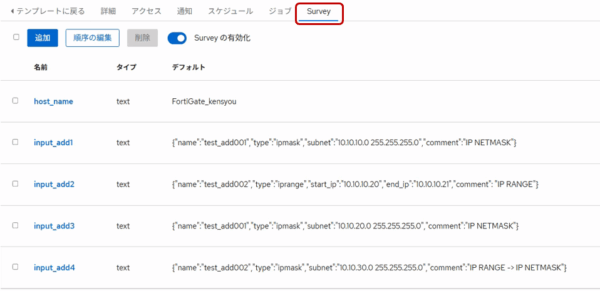
- 実際の値(JSON)
・input_add1: {"name":"test_add001","type":"ipmask","subnet":"10.10.10.0 255.255.255.0","comment":"IP NETMASK"}
・input_add2: {"name":"test_add002","type":"iprange","start_ip":"10.10.10.20","end_ip":"10.10.10.21","comment": "IP RANGE"}
・input_add3: {"name":"test_add001","type":"ipmask","subnet":"10.10.20.0 255.255.255.0","comment":"IP NETMASK"}
・input_add4: {"name":"test_add002","type":"ipmask","subnet":"10.10.30.0 255.255.255.0","comment":"IP RANGE -> IP NETMASK"}
Playbook作成(YAML)
使用モジュール
- fortinet.fortios.fortios_firewall_address を使用。
※参考ページ:https://docs.ansible.com/projects/ansible/latest/collections/fortinet/fortios/fortios_firewall_address_module.html
変数(Survey)の値取得
- vars で 各変数(Survey)の値取得。
※各変数(Survey)の値は、構造化データのように見えて「文字列」なので、ディクショナリ(構造化データ)として正しく扱えるように、from_json フィルターを使用すること!!vars: wk_input1: '{{ input_add1 | from_json}}' wk_input2: '{{ input_add2 | from_json}}' wk_input3: '{{ input_add3 | from_json}}' wk_input4: '{{ input_add4 | from_json}}'
Objects-アドレスの登録(Type:Subnet) ★変数(Survey)の値をそのまま使用した場合…エラーとなる
- アドレス情報(Type:Subnet)を指定して登録(state: ‘present’)を行う。 ※Survey:input_add1を使用
- name: Add Address(Subnet) fortios_firewall_address: vdom: "root" state: "present" firewall_address: name: '{{ input_add1.name }}' type: '{{ input_add1.type }}' subnet: '{{ input_add1.subnet }}' comment: '{{ input_add1.comment }}' register: wk_result - 実行結果:構造化データではないので、オブジェクトに項目が無いというエラーとなる。 ※Ansibleの実行結果を抜粋
"failed": true,
"msg"   : "The task includes an option with an undefined variable.. 'ansible.utils.unsafe_proxy.AnsibleUnsafeText object' has no attribute 'name'
           ...
Objects-アドレスの登録(Type:Subnet)
- アドレス情報(Type:Subnet)を指定して登録(state: ‘present’)を行う。 ※ディクショナリ(構造化データ)のwk_input1を使用
- name: Add Address(Subnet) fortios_firewall_address: vdom: "root" state: "present" firewall_address: name: '{{ wk_input1.name }}' type: '{{ wk_input1.type }}' subnet: '{{ wk_input1.subnet }}' comment: '{{ wk_input1.comment }}' register: wk_result - 実行結果:対象のアドレスが登録された。 ※登録後のアドレス情報を抜粋
"msg": {
  "meta": {
    "results": [
      {
        "name": "test_add001",
        "type": "ipmask",
        "subnet": "10.10.10.0 255.255.255.0",
        "comment": "IP NETMASK"
      }
    ],
    "status": "success",
    "vdom": "root"
  }
}
Objects-アドレスの登録(Type:IP Range)
- アドレス情報(Type:IP Range)を指定して登録(state: ‘present’)を行う。 ※ディクショナリ(構造化データ)のwk_input2を使用
- name: Add Address(IP RANGE) fortios_firewall_address: vdom: "root" state: "present" firewall_address: name: '{{ wk_input2.name }}' type: '{{ wk_input2.type }}' start_ip: '{{ wk_input2.start_ip }}' end_ip: '{{ wk_input2.end_ip }}' comment: '{{ wk_input2.comment }}' register: wk_result - 実行結果:対象のアドレスが登録された。 ※登録後のアドレス情報を抜粋
"msg": {
  "meta": {
    "results": [
      {
        "name": "test_add002",
        "type": "iprange",
        "start-ip": "10.10.10.20",
        "end-ip": "10.10.10.21",
        "comment": "IP RANGE"
      }
    ],
    "status": "success",
    "vdom": "root"
  }
}
Objects-アドレスの変更 ※同一Typeでの変更パターン
- アドレス情報(Type:Subnet)を指定して変更(state: ‘present’)を行う。 ※ディクショナリ(構造化データ)のwk_input3を使用
- name: Change Address(Subnet) fortios_firewall_address: vdom: "root" state: "present" firewall_address: name: '{{ wk_input3.name }}' type: '{{ wk_input3.type }}' subnet: '{{ wk_input3.subnet }}' comment: '{{ wk_input3.comment }}' register: wk_result - 実行結果:対象のアドレスが変更された。※変更後のアドレス情報を抜粋
"msg": {
  "meta": {
    "results": [
      {
        "name": "test_add001",
        "type": "ipmask",
        "subnet": "10.10.20.0 255.255.255.0",
        "comment": "IP NETMASK"
      }
    ],
    "status": "success",
    "vdom": "root"
  }
}
Objects-アドレスの変更 ※異なるTypeへの変更パターン
- アドレス情報(Type:IP Range)を指定して変更(state: ‘present’)を行う。 ※ディクショナリ(構造化データ)のwk_input4を使用
- name: Change Address(IP RANGE -> IP NETMASK) fortios_firewall_address: vdom: "root" state: "present" firewall_address: name: '{{ wk_input4.name }}' type: '{{ wk_input4.type }}' subnet: '{{ wk_input4.subnet }}' comment: '{{ wk_input4.comment }}' register: wk_result - 実行結果:対象のアドレスが正しく変更されない!! ※変更後のアドレス情報を抜粋
"msg": {
  "meta": {
    "results": [
      {
        "name": "test_add002",
        "type": "ipmask",         ← Typeは、変更された
        "subnet": "0.0.0.0 0.0.0.0",   ← subnetは、正しく設定されない。。。
        "comment": "IP RANGE -> IP NETMASK",
      }
    ],
    "status": "success",
    "vdom": "root"
  }
}
- 異なるTypeへの変更対応方法について
- 現状のAnsibleモジュールでは、異なるTypeへの変更は正しく実施されないことが分かりました。。。
- その為、異なるTypeへの変更時は、変更元アドレスを削除した後に 新しいTypeのアドレスを登録するようにしましょう!
Objects-アドレスの削除
- 接続情報とアドレスを指定して削除(state: ‘absent’)を行う。 ※ディクショナリ(構造化データ)のwk_input1を使用
- name: Delete Address fortios_firewall_address: vdom: "root" state: "absent" firewall_address: name: '{{ wk_input1.name }}' register: wk_result - 実行結果:対象のアドレスが削除された。 ※削除後のアドレス情報なし
最後に
- 今回、変数(Survey)を活用したことで、AnsibleにINPUT(JSON)を設定できるようになりました。
設定情報がYAMLにベタ書きではなくなったので、使い勝手は増しましたが、
都度 変数(Survey)のデフォルト値に値を設定しての実行の為、まだまだ 使い勝手が悪い。。。今後 外部からAnsibleのINPUT(JSON)に値を連携し実行させる仕組みを試みたいと思います。