

どうも。サービス監視といえばURL監視です。
Amazon CloudWatch Synthetics は高機能であるがゆえ、わりと構築に手間がかかりますね。ちょっとURLを突っつけばいいだけなんだけど、ということはよくあります。
AWS CloudFormationテンプレートにしておけば、必要なときに短時間でできるのでそれを共有しておこうと思います。
概略
CloudWatch Syntheticsは、Lambdaを作りそこでヘッドレスブラウザを使いさまざまなHTTPリクエストを組み合わせてWeb操作を行うことが出来ます。その定型的なリクエストパターンに応じてCloudWatchメトリクスに情報を出力し、CloudWach Alarmで監視ができます。
さて、監視される側のWebサービスが対外的に公開されているサービスであれば、監視元を考慮する必要はありません。IPアドレス制御により一部のネットワークにしか提供していない場合に、Syntheticsで監視するとセキュリティグループをどうするかが問題になります。
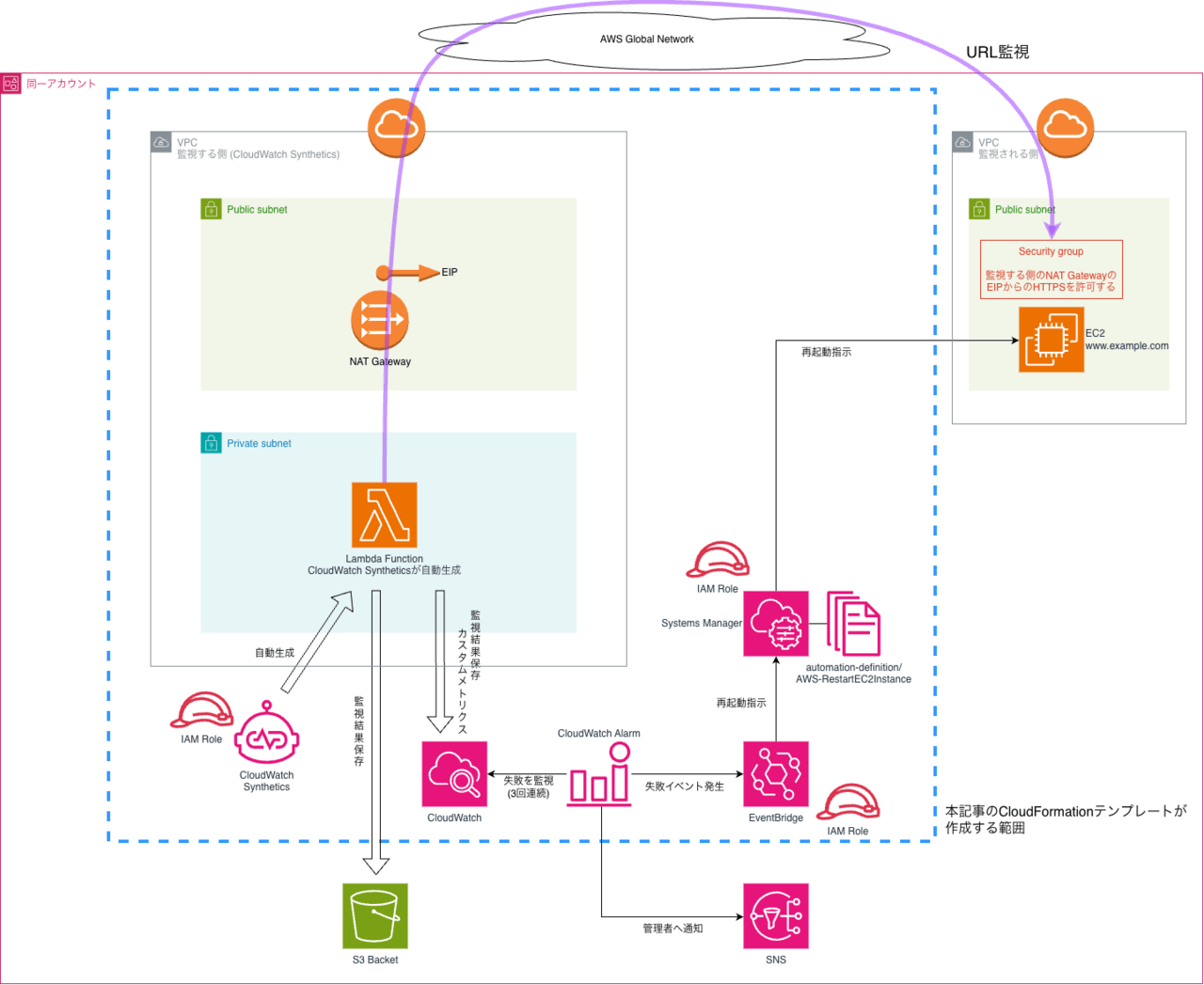
今回は、以下のアーキテクチャにより、Syntheticsが作り出すリクエスト発行LambdaをVPC内に閉じ込め、EIPによる接続元IPアドレスの固定化を行います。
これにより、監視される側のセキュリティグループに監視元IPアドレス(SyntheticsのLambda)を許可する設定が可能となります。
監視の結果、URLからのレスポンスが返らなくなった場合、Systems Manager でEC2の再起動を行います。
この一連の仕組みを、CloudFormationテンプレートで一気に作成します。
アーキテクチャ図
CFnテンプレートの使用方法
事前に作成する必要のあるリソース
CloudFormationテンプレートが生成するのは、水色の点線の範囲です。以下のリソースについては事前に作成しておき、必要な情報をパラメータで与えてください。(もしくはテンプレート内のdefault値を書き換えてください)
- 監視が失敗した場合の通知先SNSトピック
- Synthetics が監視結果を保存するS3バケット
監視条件
現在のテンプレートでは、以下の監視条件が設定してあります。要件に応じて変更してください。
- 監視対象URL: http://www.example.com/index.html
- 監視間隔: 5分ごと
- 監視リクエストのタイムアウト: 60秒
- 監視対象を再起動する失敗回数: 3回
- 監視結果のデータ保持期間: 90日間
注意点
- CFnスタックを作成する際は、IAMロールの作成を行います。
--capabilities CAPABILITY_NAMED_IAMオプションを付けてください。 - CFnスタックを削除する歳は、VPC Lambdaを使っている関係で、Lambdaが使用するENIがVPC内に保持されています。そのため、いきなりスタック削除を実行すると、Canaryを削除しても数分間はLambdaの仕様によりENIが残ります。その結果、セキュリティグループやサブネットの削除が失敗し、スタック削除自体が失敗します。 以下のような手順でスタック削除を実施してください。
- CloudWatch Synthetics の Canary を削除する。
- 10分ほど待機する。
- スタックの削除を実行する。
閉域ネットワークへの応用
今回、Global Network側から監視を行っていますが、VPC間のIP到達性があれば、このCloudFormationテンプレートで社内のプライベートネットワークに閉じても利用可能です。監視する側のVPCにSyntheticsのVPCエンドポイントを追加してください。
CFnテンプレート
AWSTemplateFormatVersion: '2010-09-09'
Description: 'CloudWatch Synthetics Canary for URL monitoring with VPC configuration'

Parameters:
  MonitoringUrl:
    Type: String
    Default: 'http://www.exmple.com/index.html'
    Description: 'URL to monitor'

  ArtifactS3Location:
    Type: String
    Default: 's3://synurl-work/synthetics/'
    Description: 'S3 bucket URI for storing artifacts (format: s3://bucket-name/path/)'
    AllowedPattern: '^s3://[a-z0-9][a-z0-9-]*[a-z0-9]/.*$'
    ConstraintDescription: 'Must be a valid S3 URI format (s3://bucket-name/path/) and bucket name cannot contain periods'

  MonitoringFrequency:
    Type: String
    Default: 'rate(5 minutes)'
    Description: 'Monitoring frequency'
    AllowedValues:
      - 'rate(1 minute)'
      - 'rate(5 minutes)'
      - 'rate(10 minutes)'
      - 'rate(15 minutes)'
      - 'rate(30 minutes)'
      - 'rate(1 hour)'

  TimeoutSeconds:
    Type: Number
    Default: 60
    Description: 'Timeout in seconds'
    MinValue: 3
    MaxValue: 840

  DataRetentionDays:
    Type: Number
    Default: 90
    Description: 'Data retention period in days'
    MinValue: 1
    MaxValue: 455

  TargetEC2InstanceId:
    Type: String
    Default: 'i-xxxxxxxxxxxxxx'
    Description: 'EC2 Instance ID to restart on monitoring failure'
    AllowedPattern: '^i-[a-z0-9]{8,17}$'
    ConstraintDescription: 'Must be a valid EC2 instance ID (e.g., i-1234567890abcdef0)'

  NotificationTopicArn:
    Type: String
    Default: 'arn:aws:sns:ap-northeast-1:123456789012:synurl-TPC'
    Description: 'SNS Topic ARN for SMS notifications'
    AllowedPattern: '^arn:aws:sns:[a-z0-9-]+:[0-9]{12}:.+$'
    ConstraintDescription: 'Must be a valid SNS Topic ARN'

Resources:
  # VPC
  SYNURLVPC:
    Type: AWS::EC2::VPC
    Properties:
      CidrBlock: '10.0.0.0/16'
      EnableDnsHostnames: true
      EnableDnsSupport: true
      Tags:
        - Key: Name
          Value: 'synurl-vpc'
        - Key: Cost
          Value: 'synurl'

  # Internet Gateway
  SYNURLIGW:
    Type: AWS::EC2::InternetGateway
    Properties:
      Tags:
        - Key: Name
          Value: 'synurl-igw'
        - Key: Cost
          Value: 'synurl'

  # Attach Internet Gateway to VPC
  AttachGateway:
    Type: AWS::EC2::VPCGatewayAttachment
    Properties:
      VpcId: !Ref SYNURLVPC
      InternetGatewayId: !Ref SYNURLIGW

  # Public Subnet (for NAT Gateway)
  SYNURLPublicSubnet:
    Type: AWS::EC2::Subnet
    Properties:
      VpcId: !Ref SYNURLVPC
      CidrBlock: '10.0.1.0/24'
      AvailabilityZone: !Select [0, !GetAZs '']
      MapPublicIpOnLaunch: true
      Tags:
        - Key: Name
          Value: 'synurl-pub-subnet'
        - Key: Cost
          Value: 'synurl'

  # Private Subnet (for Lambda)
  SYNURLSubnet:
    Type: AWS::EC2::Subnet
    Properties:
      VpcId: !Ref SYNURLVPC
      CidrBlock: '10.0.3.0/24'
      AvailabilityZone: !Select [0, !GetAZs '']
      MapPublicIpOnLaunch: false
      Tags:
        - Key: Name
          Value: 'synurl-pri-subnet'
        - Key: Cost
          Value: 'synurl'

  # Elastic IP for NAT Gateway
  YteraNATGatewayEIP:
    Type: AWS::EC2::EIP
    DependsOn: AttachGateway
    Properties:
      Domain: vpc
      Tags:
        - Key: Name
          Value: 'synurl-synthrics-natgw-eip'
        - Key: Cost
          Value: 'synurl'

  # NAT Gateway
  YteraNATGateway:
    Type: AWS::EC2::NatGateway
    Properties:
      AllocationId: !GetAtt YteraNATGatewayEIP.AllocationId
      SubnetId: !Ref SYNURLPublicSubnet
      Tags:
        - Key: Name
          Value: 'synurl-synthrics-natgw'
        - Key: Cost
          Value: 'synurl'

  # Public Route Table
  SYNURLPublicRouteTable:
    Type: AWS::EC2::RouteTable
    Properties:
      VpcId: !Ref SYNURLVPC
      Tags:
        - Key: Name
          Value: 'synurl-public-route-table'
        - Key: Cost
          Value: 'synurl'

  # Private Route Table
  SYNURLPrivateRouteTable:
    Type: AWS::EC2::RouteTable
    Properties:
      VpcId: !Ref SYNURLVPC
      Tags:
        - Key: Name
          Value: 'synurl-private-route-table'
        - Key: Cost
          Value: 'synurl'

  # Route to Internet Gateway (Public)
  PublicRoute:
    Type: AWS::EC2::Route
    DependsOn: AttachGateway
    Properties:
      RouteTableId: !Ref SYNURLPublicRouteTable
      DestinationCidrBlock: '0.0.0.0/0'
      GatewayId: !Ref SYNURLIGW

  # Route to NAT Gateway (Private)
  PrivateRoute:
    Type: AWS::EC2::Route
    Properties:
      RouteTableId: !Ref SYNURLPrivateRouteTable
      DestinationCidrBlock: '0.0.0.0/0'
      NatGatewayId: !Ref YteraNATGateway

  # Associate Public Route Table with Public Subnet
  PublicSubnetRouteTableAssociation:
    Type: AWS::EC2::SubnetRouteTableAssociation
    Properties:
      SubnetId: !Ref SYNURLPublicSubnet
      RouteTableId: !Ref SYNURLPublicRouteTable

  # Associate Private Route Table with Private Subnet
  PrivateSubnetRouteTableAssociation:
    Type: AWS::EC2::SubnetRouteTableAssociation
    Properties:
      SubnetId: !Ref SYNURLSubnet
      RouteTableId: !Ref SYNURLPrivateRouteTable

  # Security Group for Lambda
  SYNURLLambdaSG:
    Type: AWS::EC2::SecurityGroup
    Properties:
      GroupName: 'synurl-lambda-none-sg'
      GroupDescription: 'Security group for Synthetics Lambda - no inbound, all outbound'
      VpcId: !Ref SYNURLVPC
      SecurityGroupEgress:
        - IpProtocol: -1
          CidrIp: '0.0.0.0/0'
          Description: 'Allow all outbound traffic'
      Tags:
        - Key: Name
          Value: 'synurl-lambda-none-sg'
        - Key: Cost
          Value: 'synurl'

  # IAM Role for CloudWatch Synthetics
  YteraCloudWatchSyntheticsRole:
    Type: AWS::IAM::Role
    Properties:
      RoleName: 'synurl-CloudWatchSyntheticsRole'
      AssumeRolePolicyDocument:
        Version: '2012-10-17'
        Statement:
          - Effect: Allow
            Principal:
              Service: lambda.amazonaws.com
            Action: sts:AssumeRole
      Policies:
        - PolicyName: SyntheticsCanaryExecutionPolicy
          PolicyDocument:
            Version: '2012-10-17'
            Statement:
              # CloudWatch Synthetics基本権限
              - Effect: Allow
                Action:
                  - synthetics:*
                Resource: '*'
              # CloudWatch Logs権限
              - Effect: Allow
                Action:
                  - logs:CreateLogGroup
                  - logs:CreateLogStream
                  - logs:PutLogEvents
                Resource:
                  - !Sub 'arn:aws:logs:${AWS::Region}:${AWS::AccountId}:log-group:/aws/lambda/cwsyn-*'
              # CloudWatch Metrics権限
              - Effect: Allow
                Action:
                  - cloudwatch:PutMetricData
                Resource: '*'
                Condition:
                  StringEquals:
                    'cloudwatch:namespace': 'CloudWatchSynthetics'
              # S3権限(アーティファクト保存用)
              - Effect: Allow
                Action:
                  - s3:PutObject
                  - s3:GetObject
                  - s3:GetObjectVersion
                  - s3:PutObjectAcl
                  - s3:GetBucketLocation
                  - s3:ListBucket
                Resource:
                  - !Sub
                    - '${BucketArn}/*'
                    - BucketArn: !Sub
                      - 'arn:aws:s3:::${BucketName}'
                      - BucketName: !Select [2, !Split ['/', !Ref ArtifactS3Location]]
                  - !Sub
                    - '${BucketArn}'
                    - BucketArn: !Sub
                      - 'arn:aws:s3:::${BucketName}'
                      - BucketName: !Select [2, !Split ['/', !Ref ArtifactS3Location]]
              # VPC権限(VPC内実行用)
              - Effect: Allow
                Action:
                  - ec2:CreateNetworkInterface
                  - ec2:DescribeNetworkInterfaces
                  - ec2:DeleteNetworkInterface
                  - ec2:AttachNetworkInterface
                  - ec2:DetachNetworkInterface
                Resource: '*'
              # X-Ray権限(トレーシング用)
              - Effect: Allow
                Action:
                  - xray:PutTraceSegments
                Resource: '*'
              # Lambda基本実行権限
              - Effect: Allow
                Action:
                  - lambda:InvokeFunction
                Resource: '*'
              # Lambda関数とレイヤーのタグ管理権限
              - Effect: Allow
                Action:
                  - lambda:ListTags
                  - lambda:TagResource
                  - lambda:UntagResource
                Resource:
                  - !Sub 'arn:aws:lambda:${AWS::Region}:${AWS::AccountId}:function:cwsyn-synurl-canary01-*'
                  - !Sub 'arn:aws:lambda:${AWS::Region}:${AWS::AccountId}:layer:cwsyn-synurl-canary01-*'
      Tags:
        - Key: Name
          Value: 'synurl-CloudWatchSyntheticsRole'
        - Key: Cost
          Value: 'synurl'

  # CloudWatch Synthetics Canary
  YteraCanary:
    Type: AWS::Synthetics::Canary
    DeletionPolicy: Delete
    Properties:
      Name: 'synurl-canary01'
      ExecutionRoleArn: !GetAtt YteraCloudWatchSyntheticsRole.Arn
      Code:
        Handler: 'heartbeat.handler'
        Script: !Sub |
          from aws_synthetics.selenium import synthetics_webdriver as webdriver
          from aws_synthetics.common import synthetics_logger as logger
          from selenium.webdriver.support.ui import WebDriverWait
          from selenium.webdriver.support import expected_conditions as EC
          from selenium.webdriver.common.by import By
          import time

          def heartbeat_monitoring():
              # ブラウザインスタンスを作成
              browser = webdriver.Chrome()

              try:
                  # 監視対象URLにアクセス
                  logger.info(f'Navigating to ${MonitoringUrl}')
                  browser.get('${MonitoringUrl}')

                  # ページの読み込み完了を待機
                  WebDriverWait(browser, 10).until(
                      EC.presence_of_element_located((By.TAG_NAME, "body"))
                  )

                  # スクリーンショットを保存
                  browser.save_screenshot('heartbeat_screenshot.png')

                  # ページタイトルをログに記録
                  page_title = browser.title
                  logger.info(f'Page title: {page_title}')

                  # HTTPステータスコードの確認(JavaScript経由)
                  status_code = browser.execute_script(
                      "return window.performance.getEntriesByType('navigation')[0].responseStatus || 200"
                  )

                  if status_code >= 400:
                      raise Exception(f'HTTP error: {status_code}')

                  logger.info(f'Successfully accessed ${MonitoringUrl} with status: {status_code}')

              except Exception as e:
                  logger.error(f'Heartbeat monitoring failed: {str(e)}')
                  raise e

              finally:
                  # ブラウザを閉じる(自動的に閉じられるが明示的に記述)
                  browser.quit()

          # Canaryのエントリーポイント
          def handler(event, context):
              return heartbeat_monitoring()
      ArtifactS3Location: !Ref ArtifactS3Location
      RuntimeVersion: 'syn-python-selenium-9.0'
      Schedule:
        Expression: !Ref MonitoringFrequency
        DurationInSeconds: 0
      RunConfig:
        TimeoutInSeconds: !Ref TimeoutSeconds
        MemoryInMB: 960
        ActiveTracing: false
      FailureRetentionPeriod: !Ref DataRetentionDays
      SuccessRetentionPeriod: !Ref DataRetentionDays
      StartCanaryAfterCreation: true
      VpcConfig:
        VpcId: !Ref SYNURLVPC
        SubnetIds:
          - !Ref SYNURLSubnet
        SecurityGroupIds:
          - !Ref SYNURLLambdaSG
      # Canary自体のタグ
      Tags:
        - Key: Name
          Value: 'synurl-canary01'
        - Key: Cost
          Value: 'synurl'
      # Canaryが作成するLambda関数とレイヤーにタグを複製
      ResourcesToReplicateTags:
        - lambda-function

  # CloudWatch Alarm for Canary failure detection
  YteraCanaryFailureAlarm:
    Type: AWS::CloudWatch::Alarm
    Properties:
      AlarmName: 'synurl-canary01-failure-alarm'
      AlarmDescription: 'Trigger EC2 restart and SNS notification when Canary fails for 15 minutes'
      MetricName: SuccessPercent
      Namespace: CloudWatchSynthetics
      Statistic: Minimum
      Period: 300
      EvaluationPeriods: 3
      Threshold: 100
      ComparisonOperator: LessThanThreshold
      Dimensions:
        - Name: CanaryName
          Value: !Ref YteraCanary
      TreatMissingData: breaching
      ActionsEnabled: true
      AlarmActions:
        - !Ref NotificationTopicArn
      OKActions:
        - !Ref NotificationTopicArn

  # EventBridge Rule to trigger SSM Automation on Alarm
  YteraAlarmToSSMRule:
    Type: AWS::Events::Rule
    Properties:
      Name: 'synurl-canary-alarm-to-ssm'
      Description: 'Trigger SSM Automation to restart EC2 when Canary alarm fires'
      State: ENABLED
      EventPattern:
        source:
          - aws.cloudwatch
        detail-type:
          - CloudWatch Alarm State Change
        detail:
          alarmName:
            - !Ref YteraCanaryFailureAlarm
          state:
            value:
              - ALARM
      Targets:
        - Arn: !Sub 'arn:aws:ssm:${AWS::Region}::automation-definition/AWS-RestartEC2Instance:$DEFAULT'
          RoleArn: !GetAtt YteraEventBridgeRole.Arn
          Id: 'RestartEC2Target'
          Input: !Sub |
            {
              "InstanceId": ["${TargetEC2InstanceId}"],
              "AutomationAssumeRole": ["${YteraSSMAutomationRole.Arn}"]
            }

  # IAM Role for EventBridge to invoke SSM Automation
  YteraEventBridgeRole:
    Type: AWS::IAM::Role
    Properties:
      RoleName: 'synurl-EventBridgeSSMAutomationRole'
      AssumeRolePolicyDocument:
        Version: '2012-10-17'
        Statement:
          - Effect: Allow
            Principal:
              Service: events.amazonaws.com
            Action: sts:AssumeRole
      Policies:
        - PolicyName: StartSSMAutomationPolicy
          PolicyDocument:
            Version: '2012-10-17'
            Statement:
              - Effect: Allow
                Action:
                  - ssm:StartAutomationExecution
                Resource:
                  - !Sub 'arn:aws:ssm:${AWS::Region}:${AWS::AccountId}:automation-definition/*'
                  - !Sub 'arn:aws:ssm:${AWS::Region}:${AWS::AccountId}:automation-execution/*'
                  - !Sub 'arn:aws:ssm:${AWS::Region}::document/AWS-*'
              - Effect: Allow
                Action:
                  - iam:PassRole
                Resource: !GetAtt YteraSSMAutomationRole.Arn
      Tags:
        - Key: Name
          Value: 'synurl-EventBridgeSSMAutomationRole'
        - Key: Cost
          Value: 'synurl'

  # IAM Role for SSM Automation to restart EC2
  YteraSSMAutomationRole:
    Type: AWS::IAM::Role
    Properties:
      RoleName: 'synurl-SSMAutomationExecutionRole'
      AssumeRolePolicyDocument:
        Version: '2012-10-17'
        Statement:
          - Effect: Allow
            Principal:
              Service:
                - ssm.amazonaws.com
            Action: sts:AssumeRole
      ManagedPolicyArns:
        - arn:aws:iam::aws:policy/service-role/AmazonSSMAutomationRole
      Policies:
        - PolicyName: EC2RestartPolicy
          PolicyDocument:
            Version: '2012-10-17'
            Statement:
              - Effect: Allow
                Action:
                  - ec2:RebootInstances
                  - ec2:DescribeInstances
                  - ec2:DescribeInstanceStatus
                Resource: '*'
      Tags:
        - Key: Name
          Value: 'synurl-SSMAutomationExecutionRole'
        - Key: Cost
          Value: 'synurl'

Outputs:
  CanaryName:
    Description: 'Name of the created Canary'
    Value: !Ref YteraCanary
    Export:
      Name: !Sub '${AWS::StackName}-CanaryName'

  VPCId:
    Description: 'VPC ID'
    Value: !Ref SYNURLVPC
    Export:
      Name: !Sub '${AWS::StackName}-VPCId'

  SubnetId:
    Description: 'Subnet ID'
    Value: !Ref SYNURLSubnet
    Export:
      Name: !Sub '${AWS::StackName}-SubnetId'

  SecurityGroupId:
    Description: 'Security Group ID'
    Value: !Ref SYNURLLambdaSG
    Export:
      Name: !Sub '${AWS::StackName}-SecurityGroupId'

  IAMRoleArn:
    Description: 'IAM Role ARN'
    Value: !GetAtt YteraCloudWatchSyntheticsRole.Arn
    Export:
      Name: !Sub '${AWS::StackName}-IAMRoleArn'

  CanaryId:
    Description: 'Canary ID'
    Value: !GetAtt YteraCanary.Id
    Export:
      Name: !Sub '${AWS::StackName}-CanaryId'

  MonitoringUrl:
    Description: 'Monitoring target URL'
    Value: !Ref MonitoringUrl
    Export:
      Name: !Sub '${AWS::StackName}-MonitoringUrl'

  NATGatewayEIP:
    Description: 'NAT Gateway Elastic IP'
    Value: !Ref YteraNATGatewayEIP
    Export:
      Name: !Sub '${AWS::StackName}-NATGatewayEIP'

  AlarmName:
    Description: 'CloudWatch Alarm Name'
    Value: !Ref YteraCanaryFailureAlarm
    Export:
      Name: !Sub '${AWS::StackName}-AlarmName'

  EventBridgeRuleName:
    Description: 'EventBridge Rule Name'
    Value: !Ref YteraAlarmToSSMRule
    Export:
      Name: !Sub '${AWS::StackName}-EventBridgeRuleName'

  EventBridgeRoleArn:
    Description: 'EventBridge IAM Role ARN'
    Value: !GetAtt YteraEventBridgeRole.Arn
    Export:
      Name: !Sub '${AWS::StackName}-EventBridgeRoleArn'

  SSMAutomationRoleArn:
    Description: 'SSM Automation IAM Role ARN'
    Value: !GetAtt YteraSSMAutomationRole.Arn
    Export:
      Name: !Sub '${AWS::StackName}-SSMAutomationRoleArn'